Checking part names and functions
This chapter gives information about the
names of the parts and the main features
using the buttons.
12
4
3
6
78
a9
5
b
c
d
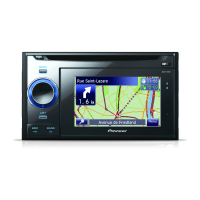
1 Disc loading slot
Insert a disc to play.
= For details concerning operations, refer
to Inserting and ejecting a disc on the
next page.
2 EJECT button
Press to eject the disc from the disc loading
slot.
3 Head unit
4 MODE button
! Press to switch between the map screen
and the audio operation screen.
! Press to display the map screen while
the navigation function screen is dis-
played.
5 MULTI-CONTROL
MULTI-CONTROL is used only for the audio
function.
= For more details, refer to the descriptions
from Chapter 14 to Chapter 24.
! Rotating;
Adjusts the audio source volume.
! Moving MULTI-CONTROL to the lef t or
right;
Allows you to change the frequency one
step at a time; operates track search con-
trols.
! Keep moving MULTI-CONTROL to the
left or right ;
Allows you to perform manual seek tun-
ing, fast forward or reverse.
6 LIST button
This button is used only for audio functions.
= For more details, refer to the descriptions
from Chapter 14 to Chapter 24.
7 SRC/OFF button
This button is used only for audio functions.
Before you start
Engb
10
Chapter
02


 To Next Page
 Loading...









