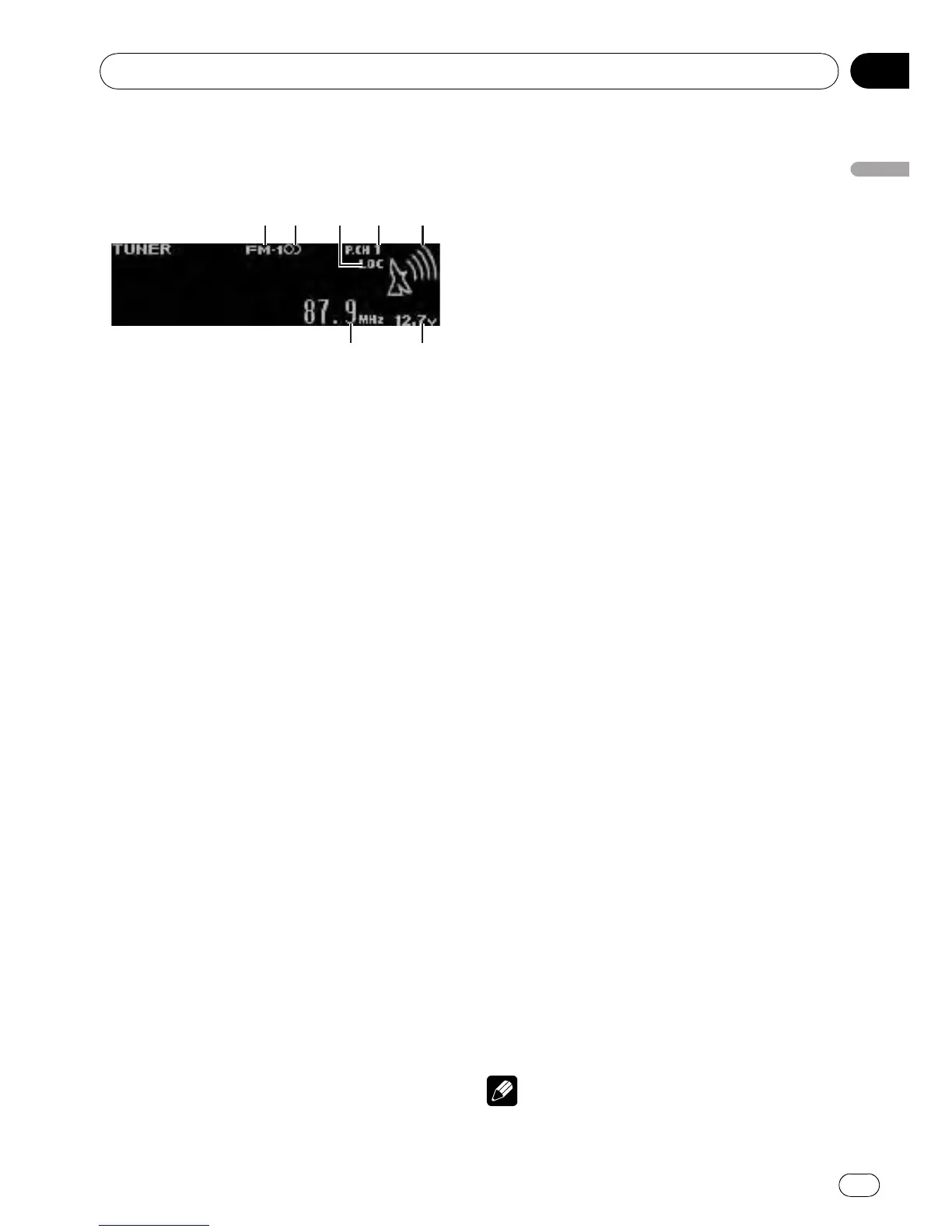
1 Band indicator
2 5 (stereo) indicator
Appears when the selected frequency is being
broadcast in stereo.
3 LOC indicator
Appears when local seek tuning is on.
4 Preset number indicator
5 Signal level indicator
Shows the radio wave strength.
6 Voltage indicator
Shows the battery voltage.
! The level displayed on the voltage indi-
cator may differ from the actual voltage
level.
7 Frequency indicator
% Select a band
Press B.
# Band can be selected from among FM1, FM2,
FM3 or AM.
% Manual tuning (step by step)
Push MULTI-CONTROL left or right.
% Seek tuning
Push and hold MULTI-CONTROL left or right,
and then release.
# You can cancel seek tuning by pushing
MULTI-CONTROL left or right.
# While pushing and holding MULTI-CONTROL
left or right, you can skip stations. Seek tuning
starts as soon as you release MULTI-CONTROL.
Storing and recalling broadcast
frequencies
You can easily store up to six broadcast fre-
quencies for later recall.
! Six stations for each band can be stored in
memory.
1 Use MULTI-CONTROL to store the se-
lected frequency in memory.
Turn to change the preset number. Press and
hold to store.
2 Use MULTI-CONTROL to select the de-
sired station.
Turn to change the station. Press to select.
# All stations stored for FM bands can be re-
called from each independent FM band.
# You can also change the station by pushing
MULTI-CONTROL up or down.
# To return to the ordinary display, press B.
# If you do not operate the list within about 30
seconds, the display automatically returns to the
ordinary display.
# You can also recall radio station frequencies
assigned to preset tuning numbers by pushing
MULTI-CONTROL up or down during the fre-
quency display.
Introduction to advanced
operations
1 Press MULTI-CONTROL to display the
main menu.
2 Use MULTI-CONTROL to select
FUNCTION.
Turn to change the menu option. Press to se-
lect.
3 Turn MULTI-CONTROL to select the
function.
BSM (best stations memory)—Local (local
seek tuning)
Notes
! To return to the ordinary display, press B.
Operating this unit
En
13
Section
02
Operating this unit



 To Next Page
 Loading...