# You can also change the disc title by pushing
MULTI-CONTROL up or down.
# When playing CD TEXT disc, push
MULTI-CONTROL right to see a list of the tracks
in the selected disc. Push MULTI-CONTROL left
to return to the disc list.
# If no title is entered for a disc, NO TITLE is dis-
played.
# NO DISC is displayed next to the disc number
when there is no disc in the magazine.
# You can scroll through text data by pressing
and holding D/Scrl.
# If you do not operate the list within about 30
seconds, the display automatically returns to the
ordinary display.
DVD Player
Basic Operations
You can use this unit to control a DVD player or
multi-DVD player, which is sold separately.
For details concerning operation, refer to the
DVD player’s or multi-DVD player’s operation
manual. This section provides information on
DVD operations with this unit which differs
from that described in the DVD player’sor
multi-DVD player’s operation manual.
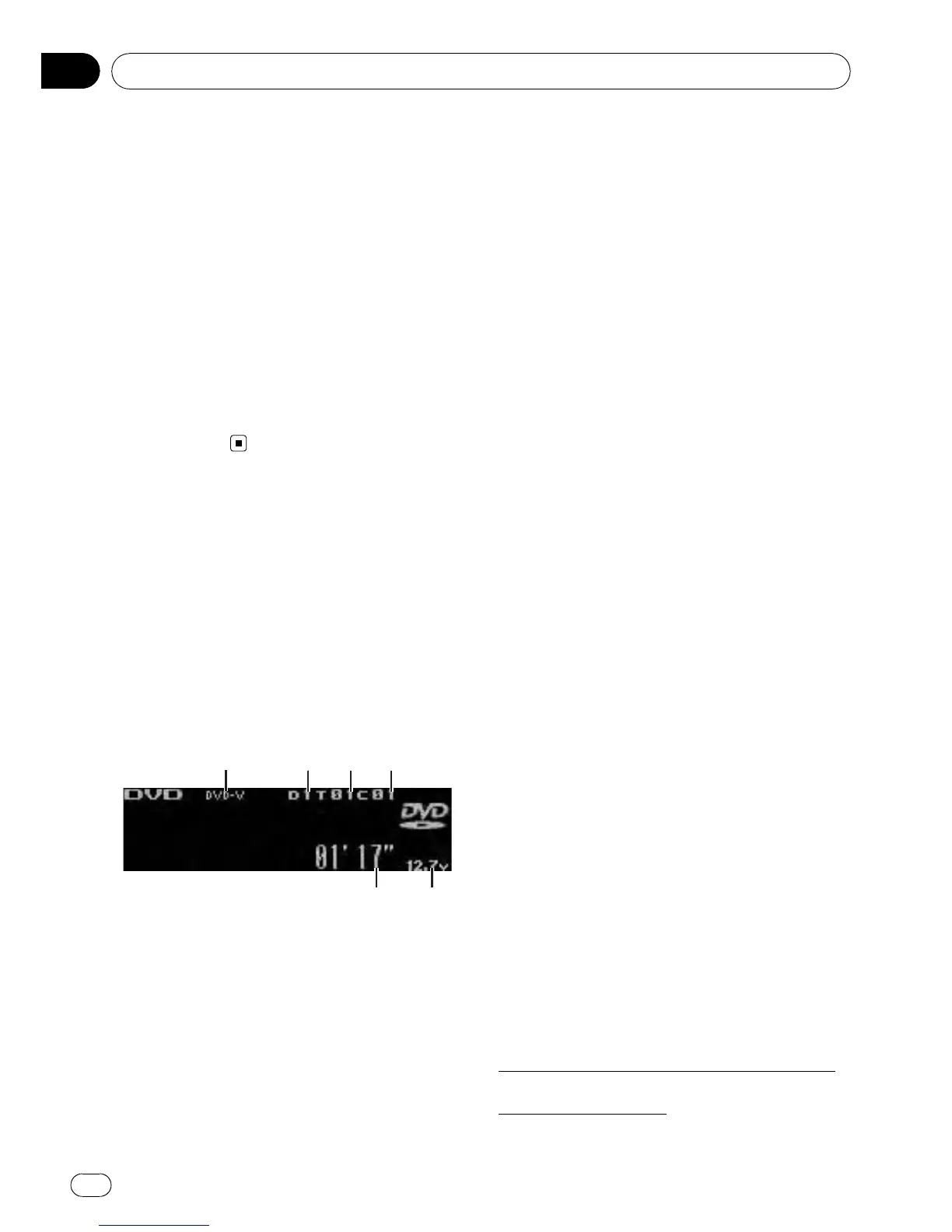
1 DVD-V/VCD/CD/MP3/WMA indicator
Shows the type of disc currently playing.
2 Disc number indicator
Shows the number of the disc currently play-
ing when using a multi-DVD player.
3 Title/Folder number indicator
Shows the title (when playing DVD video) or
folder (when playing compressed audio) of
the selection currently playing.
4 Chapter/track number indicator
Shows the chapter (when playing DVD video)
or track (when playing Video CD, CD or com-
pressed audio) currently playing.
5 Voltage indicator
Shows the battery voltage.
! The level displayed on the voltage indi-
cator may differ from the actual voltage
level.
6 Play time indicator
% Select a chapter/track
Push MULTI-CONTROL left or right.
% Fast forward or reverse
Push and hold MULTI-CONTROL left or right.
# When playing compressed audio, there is no
sound on fast forward or reverse.
% Select a disc/title
VCD/CD: Push MULTI-CONTROL up or down.
DVD-V/MP3/WMA: Push and hold
MULTI-CONTROL up or down.
% Select a folder
Push MULTI-CONTROL up or down.
# You can operate this function only when a
DVD player compatible with compressed audio
playback is connected to this unit.
# You cannot select a folder that does not have
a compressed audio file recorded in it.
Introduction to advanced
operations
1 Press MULTI-CONTROL to display the
main menu.
2 Use MULTI-CONTROL to select
FUNCTION.
Turn to change the menu option. Press to se-
lect.
3 Turn MULTI-CONTROL to select the
function.
During DVD video or Video CD playback
Play mode (repeat play)—Pause (pause)
During CD playback
Available accessories
En
66
Section
06



 To Next Page
 Loading...