19
> Before Start > Part Names > Install > Initial Setup >Playback
Advanced Setup | Firmware Update | Others
USB Storage Device/HDD
Basic operations
You can play music files by connecting a USB storage
device or HDD (hard disk drive) to the USB port on the front
or rear of the unit.
0 The USB port on the front supports a maximum 5 V/0.5 A
power supply. If the HDD requires more than this,
connect to the USB port (maximum 5 V/1 A) on the rear
of the unit.
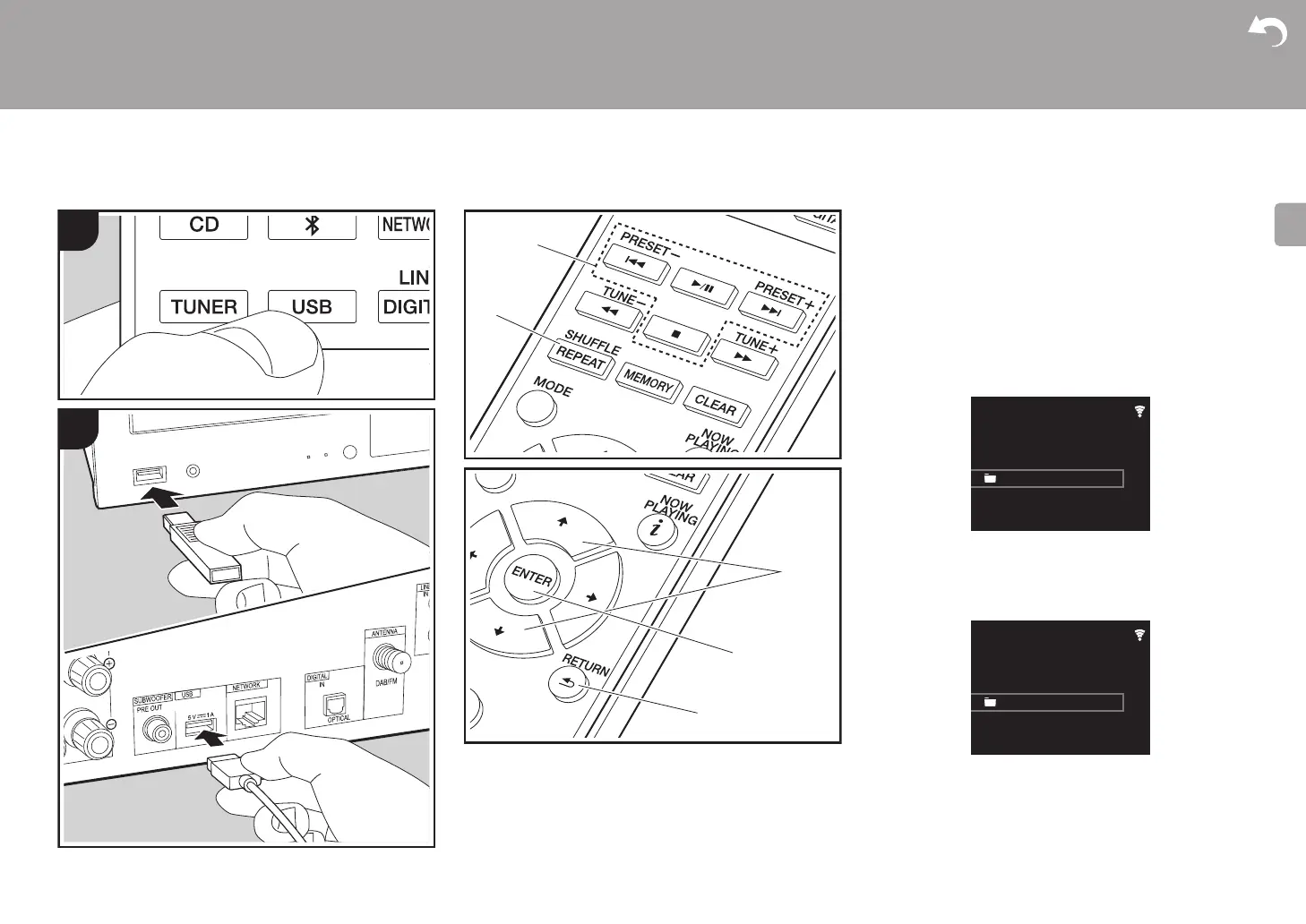
1. Turn the unit on.
2. Press USB to select either "USB Front" or "USB Rear".
3. Plug your USB storage device or HDD into the USB port
on the front or rear.
4. Folders and music files are displayed on the display
when loading is complete.
5. Select the folder or music file with the cursors (c) of the
remote controller and press ENTER (d) to confirm. To
return to the previous display, press RETURN (e).
6. Use play buttons (a) to stop play or choose tracks to play.
0 The display of album name, artist name, and album art is
supported with MP3/WMA/Apple Lossless/FLAC/AAC/
USB Front
No Storage
USB
USB Front
USB Storage
USB


 To Next Page
 Loading...