This document describes the Pirelli PZEROTEMPO Chrono Automatic watch, providing instructions for its operation, setting, and maintenance.
Function Description
The watch features both timekeeping and chronograph functions.
Time Function:
- Displays hours, minutes, and seconds.
- Includes a small seconds counter (typically in position 5 on the dial).
- Features a date display (typically in position 6 on the dial).
Chronograph Function:
- Measures elapsed time in hours, minutes, and seconds.
- Includes a 12-hour counter (typically in position 4 on the dial).
- Includes a minute counter (typically in position 1 on the dial).
- Features a seconds hand in the center of the dial for chronograph measurement.
- Some models also include a 10th of a second counter.
Usage Features
1. Setting the Time:
- Unscrew the crown (if it is a screwed crown).
- Pull out the crown by 2 notches. This action also stops the movement (second stop function), allowing for precise time setting.
- Turn the crown in either direction to move the hour and minute hands forward or backward until the desired time is set.
- Return the crown to its normal position.
- Retighten the crown (if it is a screwed crown) to ensure water resistance.
2. Correcting the Date:
- Unscrew the crown (if screwed).
- Pull out the crown by 1 notch.
- Turn the crown clockwise. The date display will change with each click, corresponding to one day (1-31).
- Return the crown to its normal position.
- Retighten the crown (if screwed).
- Important Note: Do not leave the crown pulled out by 1 notch for more than 20 minutes, as this can affect the hour setting.
- Attention: Avoid correcting the date during the time period between 7 p.m. and 3 a.m. to prevent potential damage to the movement.
3. Using the Chronograph:
- Starting the Chronograph: Press push-button A (often labeled "start/stop"). The central seconds hand will immediately begin moving.
- Stopping the Chronograph: Press push-button A again.
- Reading the Final Time: Read the elapsed time from the chronograph counters (seconds, minutes, and hours).
- Resetting the Chronograph: Press push-button B (often labeled "intermediate time/catch-up/reset"). All chronograph hands will return to their zero positions.
- Added Times (Sequential Measurement): The sequence of starting and stopping the chronograph (push-button A) can be repeated to measure successive time intervals without resetting.
4. Intermediate Time (Split Time) Measurement:
- Start Chronograph: Press push-button A.
- Measure Intermediate Time: Press push-button B. The chronograph hands will stop, allowing you to read the intermediate time, while the internal timing continues.
- Read Intermediate Time: Note the time displayed.
- Catch-up (Resume Timing): Press push-button B again. The chronograph hands will instantly advance to catch up with the ongoing elapsed time.
- Stop Chronograph: Press push-button A.
- Read Final Time: Note the total elapsed time.
- Reset: Press push-button B.
- Multiple Intermediate Times: The sequence of measuring intermediate time and catching up (steps 2 to 4) can be repeated to record multiple split times.
Maintenance Features
1. Precautions:
- Water Resistance: Do not operate the crown or push-buttons when the watch is in water.
- Screwed Crown: If your model has a screwed crown, it must be unscrewed to access setting functions and then screwed back tightly after use to ensure the watch remains sealed and water-resistant. Always check that the crown is correctly tightened.
2. Zeroing the Chronograph Counters:
- This procedure is necessary after changing the battery or if the chronograph hands are not correctly positioned (i.e., not returning to zero).
- Minutes Counter Zeroing:
- Unscrew the crown (if screwed).
- Pull out the crown by 2 notches.
- Press push-button A to reset the minute counter. For a quick correction, press and hold push-button A for more than one second.
- Return the crown to the normal position.
- Retighten the crown.
- Seconds and 10th of a Second Counter Zeroing:
- Unscrew the crown (if screwed).
- Pull out the crown by 1 notch.
- Press push-button A to reset the 10th of a second counter.
- Press push-button B to reset the second counter. For a quick correction, press and hold the respective push-button for more than one second.
- Return the crown to the normal position.
- Retighten the crown.
3. Battery Life Indicator (Quartz Models):
- If the second hand moves in 2-second increments, it indicates that the battery is almost depleted. In such cases, have the watch checked and the battery replaced by a Sector dealer.

 Need help?
 General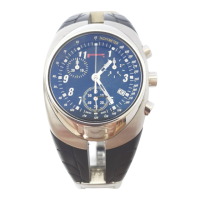

 To Next Page