Page 3For technical questions, please call 1-888-866-5797.Item 62569
Instructions
1. Press OFF ON Button, or move the
Jaws to automatically turn caliper on.
2. To toggle measurement between
millimeter, inches and fractions,
press mm inch/F Button.
Note: When the unit is turned on, the most
recent measurement will be displayed.
3. Turn Thumb Knob to close the Jaws, then
press ZERO Button to set display to 0.
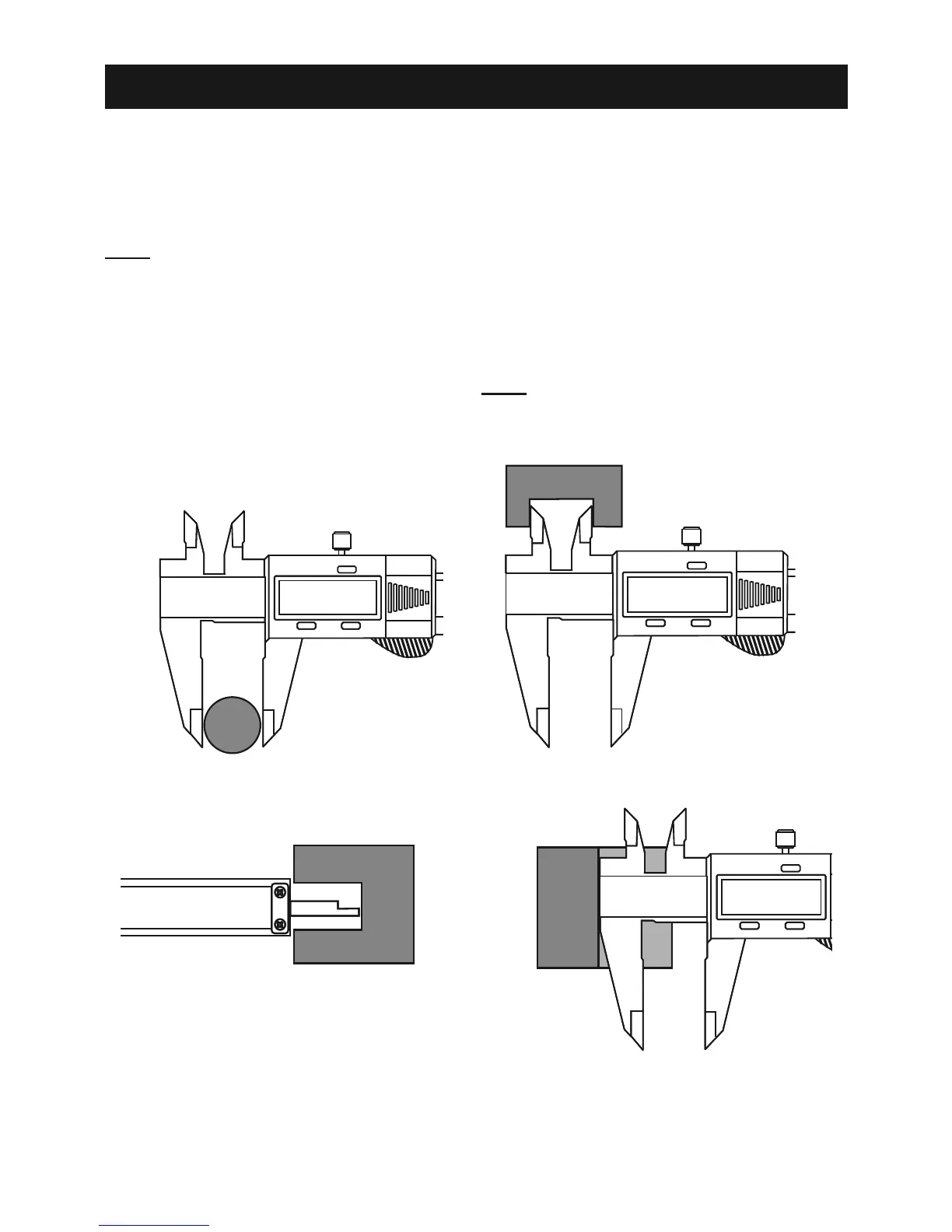
4. To measure outside of object,
set the Bottom Jaws outside
object being measured. Slide the Jaws
together until they gently contact the object.
5. To measure inside of object, set the
top Jaws inside object being measured.
Spread Jaws apart until they
gently contact the object.
6. When finished, press OFF ON Button
to turn off caliper. The unit will also
automatically shut off if left idle.
7. To replace battery, slide open battery
compartment, remove old battery, install
new battery positive (flat) side up, then
slide Battery Cover back into place.
Note: Replacement parts are not available.
inch/F
OFF
ON
ZERO
mm
OFF
ON
ZERO
inch/F
OFF
ON
ZERO
mm
OFF
ON
ZERO
Outside Measurement Inside Measurement


 To Next Page