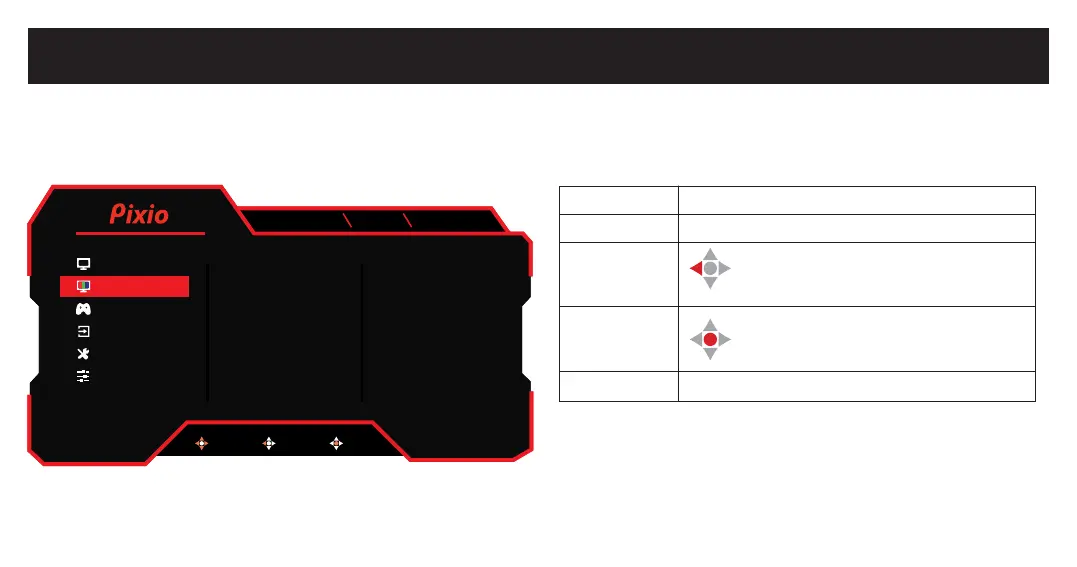
Main OSD Navigation
How to Reconfigure
To turn ON/OFF the OSD Menu, Press Jog Button.
To turn ON/OFF the Monitor, Press Jog Button for more than
2 seconds.
Up
Down
Left
Center
Press
Move up the OSD Menu / Increase Value
Move down the OSD Menu / Decrease Value
Move left on the OSD Menu / Back
Press center button to select
Turn ON / OFF the OSD Menu
BACK
DP1
1920x1080 165Hz FreeSync
Brightness 90
50
50
User
Full
50
Off
Contrast
Black Equalizer
Preset
Aspect Ratio
Sharpness
Ultra vivid
MOVE BACK ENTER
Color
Gaming Setup
Input
System Setup
User Data
V2.0
Display
DP1 (1.4)
1920x1080 165Hz FreeSync
Color Temperature
Gamma
Hue
Saturation
Low Bluelight
Normal
2.2
50
50
0
MOVE BACK ENTER
Color
Gaming Setup
Input
System Setup
User Data
V1.0
Display



 To Next Page