Remote Control
15
17
19
13
14
7
2
6
24
11
18
10
4
8
22
3
16
5
20
1
21
27
9
12
26
23
25
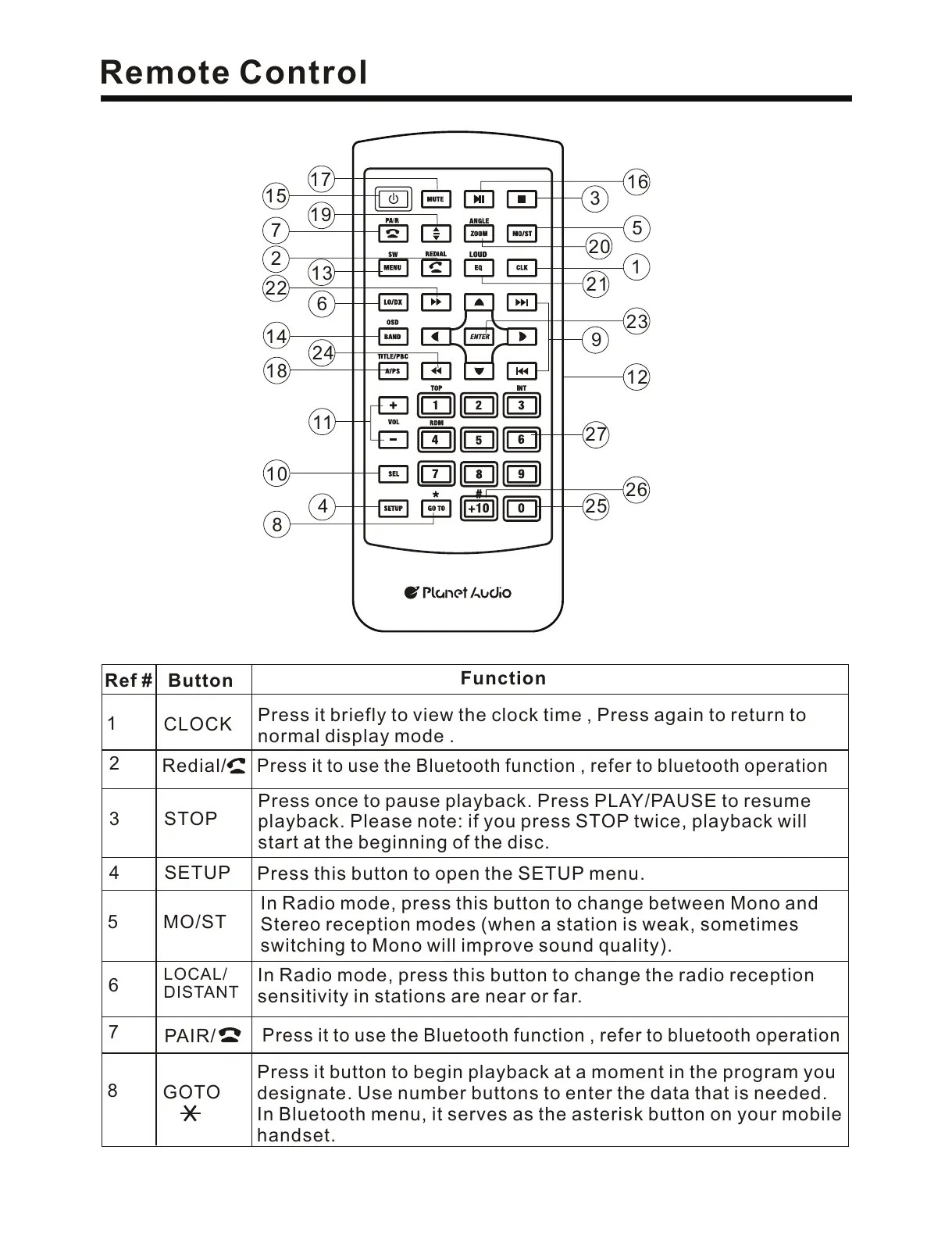
6
5
Button
Ref #
Function
1
2
CLOCK
Press it briefly to view the clock time , Press again to return to
normal display mode .
3
STOP
Press once to pause playback. Press PLAY/PAUSE to resume
playback. Please note: if you press STOP twice, playback will
start at the beginning of the disc.
SETUP
4
Press this button to open the SETUP menu.
MO/ST
In Radio mode, press this button to change between Mono and
Stereo reception modes (when a station is weak, sometimes
switching to Mono will improve sound quality).
LOCAL/
DISTANT
In Radio mode, press this button to change the radio reception
sensitivity in stations are near or far.
7
8
GOTO
Press it button to begin playback at a moment in the program you
designate. Use number buttons to enter the data that is needed.
In Bluetooth menu, it serves as the asterisk button on your mobile
handset.
Redial/
Press it to use the Bluetooth function , refer to bluetooth operation
PAIR/
Press it to use the Bluetooth function , refer to bluetooth operation


 To Next Page
 Loading...