
 Need help?
Do you have a question about the Plantron SAVI 440 and is the answer not in the manual?
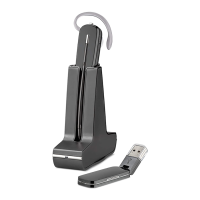
Welcome message and minimum system requirements for the Savi W440A headset.
Guidance on accessing the complete user guide and installing Plantronics software.
Instructions to change headset volume control direction for left ear wear.
Information on contacting Plantronics Technical Assistance Center for support.
Connect the USB adapter to your PC's USB port for headset communication.
Connect the base power supply to the charger base and then to an outlet.
Position and slide the battery into the headset until it snaps into place.
Select a wearing style and assemble the headset using the fit kit.
Gently push the headset into the charging cradle to charge the battery.
Download Plantronics software from plantronics.com/software.
Make a test call using your softphone or UC application.
Warnings regarding high volume use and potential hearing damage.
Information on DECT Forum security certification compliance.
Addresses and website for Plantronics Inc. and Plantronics BV.
Information on TCO, EAC, CE certifications, Singapore IDA standards, and trademarks.
 General
| Type | Wireless Headset |
|---|---|
| Connectivity | DECT |
| Microphone Type | Noise-canceling |
| Wearing style | Over-the-ear |
| Wireless technology | DECT |
| Standby time | 30 hours |
| DECT Security Certification | Yes |
| Charging Time | 3 hours |
| Noise Cancellation | Yes |
| Earpiece | Single |
| Compatibility | Desk phone |

 To Next Page