Headset Jack
MESSAGE WAITING Indicator*
Caller ID* and Display
TALK/FLASH Key
(phonebook)/
(
left
c
ursor)/ SPEED (Speed Dial) Key
2
1
CT11/12
C
ORDLESS
T
ELEPHONE
H
EADSET
S
YSTEM
For more technical features, see the Product Information Booklet at our website www.plantroncs/documentation/
1
2
3
3
3.4
3.3
3.2
CT11 and CT12
E
XAMINE THE
C
OMPONENTS OF THE
CT11/12 S
YSTEM
B
ASE
Back View
Front View
Top View
TELEPHONE REMOTE
C
T12 CONVERTIBLE HEADSET
with Firefly
TM
Over-the-Ear
Configuration
F
ront View
7
8
9
10
11
12
13
14
21
20
19
18
17
16
15
2
2
6
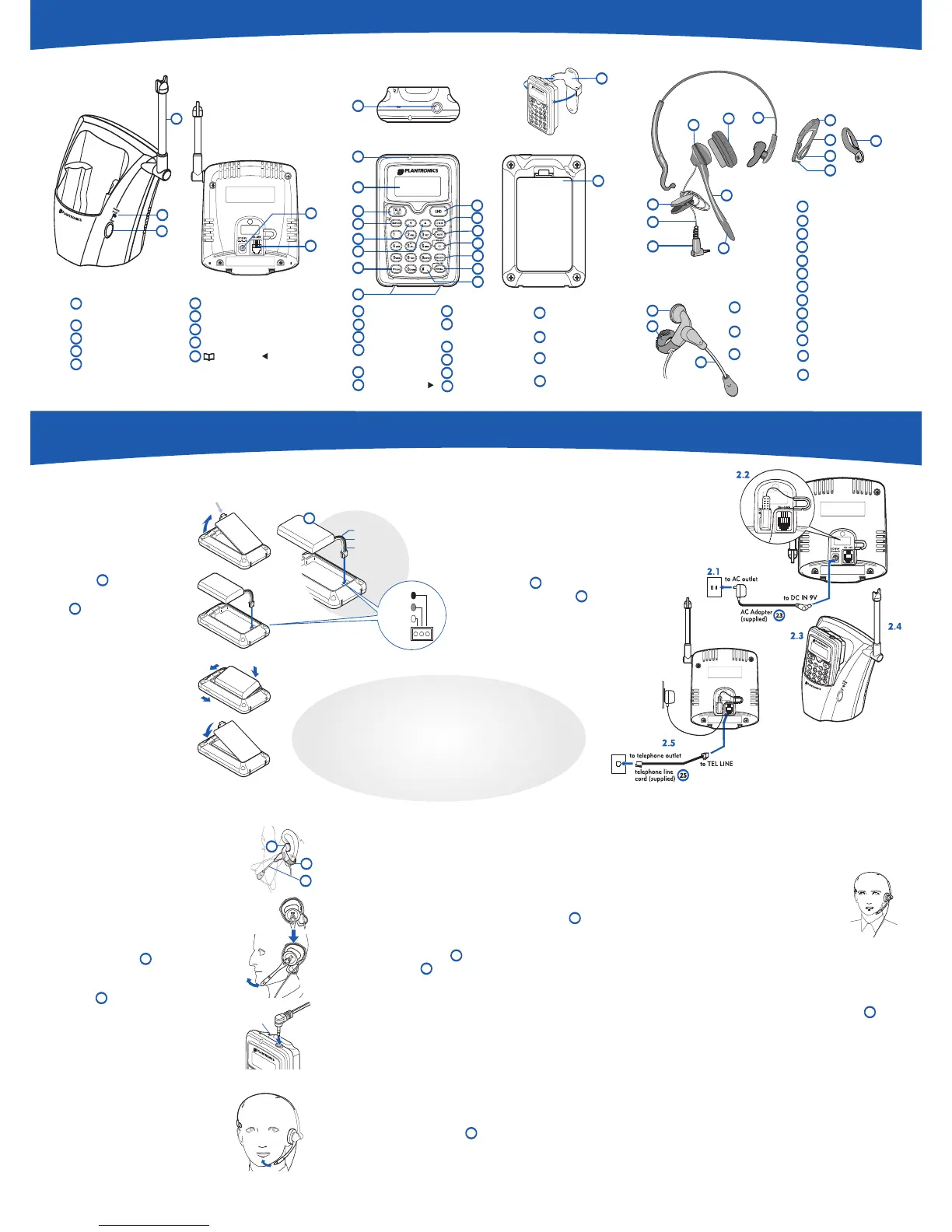
Install Battery
Pack
1.1 Squeeze open
the latch on the
Remote Battery
Compartment
Cover and lift the cover.
1.2 Connect the Battery Pack
connector using the
correct polarity. Do not force.
Plastic connectors will fit in
only one way.
1.3Insert battery pack into
the battery compartment.
Do not let wires hang out,
tuck them in.
1.4 Insert tabs of cover into
slots and push down to
securely close the cover.
Back View
S
et Up the Base
2.1 Connect the AC adapter power cord
to the base and an active AC outlet.
2.2 Route the power cord as shown in
the detail drawing allowing clearance
for the telephone plug to be inserted.
2.3Insert the remote into the charging cradle on
the base. Charge for 15 hours. The CHARGE/ IN
USE indicator light will go on.
2.4Raise Base Antenna to a vertical
position.
2.5Once the remote is fully charged, plug
one end of the telephone cord into the base
and plug the other end into an active
telephone outlet.
Black
Red
W
hite
BLACK
noir
RED
rouge
WHITE
blanc
Install CT11 Headset
Mount headset and point
boom toward mouth.
Install CT12 Headset
Your Convertible Headset can be
configured for over-the-ear or over-the-
head use.
For over-the-ear use
3.1 Press the headset to your ear, then
loop the Earloop behind the ear as
shown.
3.2 Adjust the tip of the Microphone
Boom toward the corner of your
mouth.
3.3 Plug the headset cord into the
2.5mm jack on the top of the remote.
3.4 Route the cord through the
handset’s cord retainer slot.
Or over-the-head use
3.5 Place the headset on your head so
the speaker covers your ear.
3.6 Adjust the tip of the microphone
boom toward the corner of your
mouth.
3.7 Repeat 3.3 and 3.4
3.5
1
2
3
4
5
6
7
8
13
▼ DOWN Key
▲ UP Key
*
TONE Key
Remote Charging
C
ontacts
E
ND Key
C
ID (Caller ID)*/
(right cursor) Key
14
15
16
17
18
19
20
21
Over-the-Head
C
onfiguration
In-the-Ear Headset
30
31
32
33
34
35
36
37
MENU/MUTE Key
SELECT/CH
(
channel) Key
D
ELETE Key
P
AUSE/REDIAL Key
#
Key
R
emote Battery
Compartment Cover
25
AC Adapter
(
not shown)
B
attery Pack
(
not shown)
Telephone Cord
(not shown)
Belt Clip
Headset Assembly
Ear Cushion Assembly
Adjustable Headband
M
icrophone Boom
C
lothing Clip
Cord
2.5 mm Plug
Firefly In-use Indicator
Cord Retainers
Earloop, Flexible
Thumb Loop
Pin for Pivot Ball
Ring Hole
Pivot Ball Ring
26
3
0
31
32
33
3
4
35
36
37
3
8
39
40
41
42
26
38
39
4
0
41
42
LOCATION CONSIDERATIONS
1. Locate the system in a central part of your
working area near a phone and a power outlet.
2. Do not locate it near a computer, microwave, or other
electronic devices such as TV’s and other cordless devices.
3. Do not locate it near heat sources, noise sources,
excessive moist environments, dusty environments,
and mechanical vibration environments.
BASE
T
ELEPHONE REMOTE
5
4
1
2
3
9
10
11
22
23
12
24
CONVERTIBLE HEADSET
Also supplied:
5
5.1
Make and Receive Test Calls
With your headset mounted from Step 3
and any required setting changes made
from Step 4, prepare to make your first call.
5.1 To make your first call
1.Remove remote from its base.
2.In the standby mode, dial the number as you
would on an ordinary phone.
3. Push the Talk/Flash key. After about two
seconds you will hear the number being dialed.
4. Talk once you connect.
5.Adjust the listen volume to Low, Medium, High, or
Maximum for your hearing comfort using the
▲
or
▼
keys.
6.Press the End key to disconnect and hang up the call.
5.2 To redial
1.In the standby mode, press the PAUSE/REDIAL key
once. The last number dialed will be displayed on the screen.
2.Press the Talk/Flash key to dial it.
Tips: 1) If the Talk/Flash key was pushed first and then you
pushed the Pause/Redial key, the last number dialed will be
immediately redialed. 2) The Pause/Redial key will store your
last three numbers dialed.
5.3 To answer a call
1.Press the Talk/Flash key and begin talking.
2.Press the End key to disconnect and hang up the call.
5.4 To mute a call
1.Press and hold the Menu/Mute key for 3 full seconds.
You will hear an activating beep and see Mute on the display.
2.Press the mute button to toggle off mute.
3.Press the End key or put the remote back into the base
charging cradle to disconnect and end the call.
20
2
B
ase Antenna/ Headset
Holder
CHARGE/IN USE Indicator
PAGE key
DC Power Input
Telephone Line Jack
*Must be activated through your local phone company.
22
24
1.1
1.2
1.3
1.4
2
4
39
33
4
Make Basic Setting Changes,
if necessary
4.1 Language option
The default language is English.
To change to French or Spanish:
1.When in Standby mode**, press the MENU/MUTE key.
2.Press the
▲
or
▼
key to move the pointer to language of
choice.
3.Press the SELECT/CH key to select language.
4.Press the END key to exit.
4.2 Dialing mode option
Most phone systems use tone dialing, which sends DTMF
tones through the phone lines. However some phone
systems in rural areas still use pulse dialing. The default
setting is tone dialing.
To change the dialing mode:
1.When in Standby mode**, press the Menu/Mute key.
2.Press the
▲
or
▼
key to move the pointer from Tone
Dialing to Pulse Dialing.
3.Press the Select/Ch key to select the dialing mode.
4.Press the End key to exit.
**Standby mode–The remote is not in use, it is off the
base, and the TALK/FLASH key has not been pressed.
A dial tone is not heard and the display is blank.
This standby mode is starting point for most activity.
9
15
17
18
1
CT11 HEADSET
H
eadset
Speaker
FlexGrip
®
Earloop
Adjustable
M
icrophone
Boom
27
28
29
27
28
2
9
3.1
29
27
28
3.6



 To Previous Page
 Loading...
