Plantronics, Inc.
345 Encinal Street
Santa Cruz, CA 95060
United States
Plantronics B.V.
Scorpius 171
2132 LR Hoofddorp
Netherlands
© 2021 Plantronics, Inc. All rights reserved. Poly, the propeller
design, and the Poly logo are trademarks of Plantronics, Inc.
The Bluetooth trademark is owned by Bluetooth SIG, Inc. and
any use of the mark by Plantronics, Inc. is under license. All
other trademarks are the property of their respective owners.
Manufactured by Plantronics, Inc.
203936-10 Rev B 04.21 Model ID: BT700, BT700C
PAIR
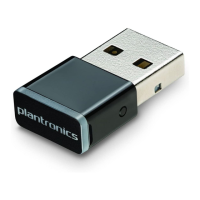
To pair your Bluetooth USB adapter to your
compatible Poly device, do the following:
1 Go to poly.com/lens and download Poly Lens
Desktop App to your computer.
2 Insert the USB adapter into your laptop or
computer and wait for your computer to
recognize it.
NOTE: USB-C shown. USB connection may vary
but function is the same.
3 Launch Poly Lens Desktop App and select
Poly BT700 in the left navigation bar.
4 Put your USB adapter in pair mode by
selecting “Pair New Device.” The USB
adapter ashes red and blue.
Put your Poly audio device in pair mode
(refer to your device’s user guide).
Pairing is successful when you hear
“Pairing successful, PC connected” and
the USB adapter LED is solid.
NOTE: Pairing is also available using Plantronics
Hub Desktop App. See your user guide for more
details.
CONFIGURE
Windows
Your USB adapter comes ready to take calls.
If you want to listen to music, you need to
configure your USB adapter.
1 To configure your USB adapter to play
music, go to Start menu > Control Panel >
Sound > Playback tab. Select Poly BT700,
set it as the Default Device and click OK.
2 To pause music when you place or receive
calls, go to Start menu > Control Panel >
Sound > Communications tab and select the
desired parameter.
Mac
To congure the USB adapter, go to Apple
menu > System Preferences > Sound.
On both the Input and Output tabs, select
Poly BT700.
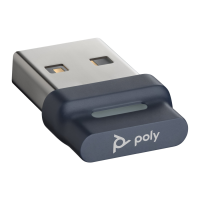
BT700
USB-A adapter
BT700
USB-C adapter
QUICK START
BT700 USB ADAPTER

 Need help?
 General





 To Next Page