®
®
plugfones.com
THE PLUGFONES EXPERIENCE
In order to enjoy the truly unique world our products oer, there are a few important things to
remember. First and foremost, Plugfones are earplugs – premium, custom-made foam and
silicone earplugs – and it's critical that the plugs are inserted correctly.
Careful insertion
Pinch down the foam tip. Reach over the head and pull the top of
the ear up and back. Push the earplug into the ear canal. Fit to
create SoundSeal™. Remove carefully.
Replacing Earplugs
Squeeze the base of the tip while
securing the speaker housing.
Separate with a quick pull motion.
Discard old earplug tip.
Holding the base of the new tip,
press the speaker securely.
Click into place.
CONNECTING
On & O: Press and hold the multifunction button for two seconds to turn the unit on.
The light will quickly flash red and blue, then flash blue intermittently to indicate the unit is
powered on. To power the unit o, press and hold the multifunction button for three seconds.
The light will flash red once while the unit is powering o.
Pairing: With the unit powered o, press the multifunction button for five seconds. The light will
alternate flashing red and blue while pairing. The light will quickly flash blue three times when
successfully paired.
Charging: Fully charge your Plugfones before their first use. To charge the unit, plug the
included Micro USB charging cable into the charging port on the controller module. Plug the
other end of the cable into a USB-compatible wall charger or computer USB port. A solid red
light indicates the unit is charging. A solid blue light indicates the unit is fully charged. When
the battery is low, the light will flash red once every minute.
®
®
Liberate
page: 1
WITH AUDIO
EARPLUGS
PF


 To Next Page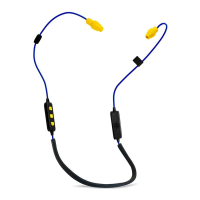


 General