4
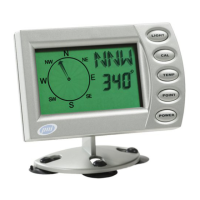
[1] LCD Display:
The compass has various LCD display
modes:
a. Compass Heading Mode – displays
heading information in cardinal points (N,
NNE, NE, etc.) and numeric digits (325°,
326°, etc.).
b. Clock Mode – used to set and display the
clock in a 12-hour or 24-hour format. Clock
mode is also equivalent to shut-off mode.
c. Bearing Mode – used to store and display
bearing point information.
d. Timer Mode – used to set and start trip
timer feature.
e. Alarm Mode – used to set and view alarm
clock settings.
[2] ADVANCE Button:
Used to turn the unit on, to step through the
various compass modes, to toggle between
various options in programming mode, and
to begin and end calibration.
[3] LIGHT Button:
Used to turn the backlight on or off, to
enter backlight programming, and to select
an option or value in programming mode.
[4] “DISTORTION” Message:
The compass detects when outside magnetic
DISPLAY AND BUTTONS



 To Next Page