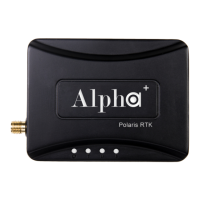
The Alpha+ RTK Receiver is a Real-Time Kinematic (RTK) Global Navigation Satellite System (GNSS) receiver designed for high-precision positioning applications. This quick start guide focuses on setting up an Alpha+ RTK Base/Rover pair for short baseline experimental scenarios, providing a foundational understanding of its operation and configuration. For more detailed usage scenarios and in-depth information, users are directed to the comprehensive Alpha+ RTK Receiver User Guide.
Function Description:
The Alpha+ RTK Receiver functions as a core component in a high-precision positioning system, capable of operating as both a base station and a rover. In an RTK setup, the base station remains stationary and transmits correction data to the rover, which then uses this data to achieve centimeter-level positioning accuracy. The system leverages signals from multiple GNSS constellations, including GPS, GLONASS, and BeiDou, to ensure robust and reliable performance.
For short baseline experiments, the Alpha+ RTK Receiver is configured to establish a direct communication link between the base and rover units. This setup is ideal for applications where the distance between the base and rover is relatively small, allowing for efficient and accurate real-time kinematic corrections. The receiver is designed to output NMEA (National Marine Electronics Association) data, which is a standard format for GPS receivers to communicate position, velocity, and time information. It also provides RTK status, indicating the quality and type of positioning solution (e.g., "Fix RTK" for a high-precision solution).
Important Technical Specifications (Inferred from the document):
- GNSS Support: The receiver supports multiple GNSS constellations, including GPS, GLONASS, and BeiDou, as indicated by the "Information RTK Info." section in the RTK Viewer, which displays data for each constellation.
- RTK Capability: The primary function is RTK positioning, enabling high-precision, real-time corrections. The RTK Viewer shows "Fix RTK" status, indicating that the receiver is capable of achieving a fixed, high-accuracy solution.
- Communication Interfaces:
- USB: The receiver connects to a PC via a Micro-USB cable for configuration, data logging, and monitoring. A specific USB driver (Silicon Labs USB to UART Bridge VCP Drivers) is required for PC communication.
- UART (TTL mode): The receivers communicate with each other (Base-to-Rover) using a 6-pin 3-wire cable, implying a UART (Universal Asynchronous Receiver/Transmitter) interface operating in TTL (Transistor-Transistor Logic) mode. This is confirmed by the "TTL mode / switch on A" and "TTL mode / switch on B" labels in the setup diagram and the instruction to push the "Interface Selection button to make UART selected."
- Antenna Connectivity: The receiver requires external RTK antennas. The document illustrates the use of both a standard high-precision antenna (for the rover) and a survey antenna (for the base), with the latter offering "better RTK performance."
- Power Supply: While not explicitly stated, the USB connection typically provides power for the receiver when connected to a PC. For standalone operation, an external power source would likely be required, though not detailed in this quick start.
- Firmware: The RTK Viewer displays firmware information, including Kernel Version, S.W. Version, Revision, and CRC, indicating that the device runs on embedded software that can be updated.
- Data Output: The receiver outputs NMEA data messages (e.g., SGLGSA, SGPRMC, SGPVTG, SGPZDA, SGPGST, SPSTI, SGPGGA, SGPGLL, SGPGSA) and RTK information, which can be viewed and analyzed using the RTK Viewer application.
- Positioning Accuracy: The "Scatter View" in the RTK Viewer, showing a scale of 0.01m, suggests that the system is designed for centimeter-level accuracy in RTK fixed solutions.
- Baud Rate: The default baud rate for communication is 115200, as shown in the RTK Viewer.
Usage Features:
- Base/Rover Configuration: The system is designed to operate as a base station and a rover, allowing for flexible deployment in various RTK applications. The quick start guide specifically details the setup for a base/rover pair.
- User-Friendly Software (RTK Viewer): The RTK Viewer application provides a graphical interface for monitoring the receiver's status, including:
- Connection Management: Connect/Disconnect buttons for managing the serial port connection.
- RTK Status: Displays "Fix RTK" or "No Fix," along with TTFF (Time To First Fix).
- Location Information: Shows Latitude, Longitude, MSL Altitude, and Ellipsoidal Height.
- Firmware Details: Provides information about the device's firmware.
- GNSS Satellite Tracking: Visual representation of tracked satellites for GPS, GLONASS, and BeiDou.
- RTK Info: Displays Direction, Speed, HDOP (Horizontal Dilution of Precision), VDOP (Vertical Dilution of Precision), WGS84 X, Y, Z coordinates, and PDOP (Position Dilution of Precision).
- NMEA Message Log: A real-time display of incoming NMEA messages.
- Scatter View: A graphical representation of positioning accuracy over time, showing the spread of position fixes.
- Earth View: A map display showing the current position.
- Interface Selection Button: A physical button on the receiver allows users to select the desired communication interface (e.g., UART), indicated by LED flashes.
- Slide Switch for Mode Selection: A slide switch on each receiver allows for easy configuration as either a base (switch to Left) or a rover (switch to Right) when using the 6-pin wire for Base-to-Rover communication. This simplifies the setup process for different operational roles.
- Hot Start/Cold Start Commands: The RTK Viewer provides "Hot Start" and "Cold Start" commands, which are useful for resetting the receiver's internal state and aiding in satellite acquisition under different conditions. A cold start clears all ephemeris and almanac data, forcing the receiver to acquire everything from scratch, while a hot start uses existing data to speed up acquisition.
- Scalability: The system can be used with one or two Alpha+ RTK Receivers, depending on whether a standalone receiver or a base/rover pair is needed.
Maintenance Features (Inferred from the document):
- Firmware Updates: The presence of "Updates" in the RTK Viewer menu and detailed firmware version information suggests that the device's firmware can be updated, allowing for performance improvements, bug fixes, and new features over time.
- Driver Installation: The requirement to install a specific USB driver (Silicon Labs VCP Drivers) indicates that driver management is part of the maintenance process, ensuring proper communication between the receiver and the PC.
- Cable Management: The system relies on specific cables (Micro-USB, 6-pin wire) for connectivity. Proper handling and care of these cables are essential for reliable operation.
- Antenna Selection: The document highlights that a "Survey Antenna offers better RTK performance" for the base station, implying that users can choose different antennas based on their specific accuracy requirements and application needs. This allows for optimization of the system's performance through hardware selection.
- Troubleshooting via RTK Viewer: The RTK Viewer serves as a primary diagnostic tool, allowing users to monitor various parameters (RTK status, satellite tracking, signal quality, NMEA messages) to identify and troubleshoot potential issues. For example, checking the "No Fix" status or low satellite count can help diagnose signal reception problems.

 Need help?

 To Next Page
 General