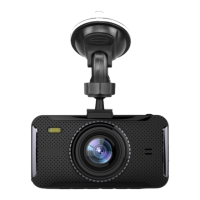
Switch between recording, camera and
playback.
In recording mode hold for 0.5s to lock video
file
In menu option, downward function
In recording mode, can capture a photo
In menu option, upward function
In recording mode, picture in picture function
Use this button to select your desired setting
This button will also stop/start recording
Enter or exit devices menu/settings
Hold for 0.5s to activate torch
Lock/unlock the video file
Press once to put screen in sleep mode
Hold down to power on/off
Connects to cigarette lighter adaptor
For bracket to connect to
16G micro SD card supplied
Indicator light to show if the device is on/off
Will help illuminate if image is too dark
Windscreen mount suction bracket


 To Next Page
 Loading...