EasyManua.ls Logo

Polymer Laboratories PL-ELS 2100 - User Manual

Polymer Laboratories PL-ELS 2100
57 pages
Print Icon
To Next Page IconTo Next Page
Loading...
OPERATOR’S MANUAL
FOR
PL-ELS 2100/2100
EVAPORATIVE
LIGHT SCATTERING
DETECTOR
Version 1.5
Polymer Laboratories Ltd, Essex Road, Church Stretton, Shropshire SY6 6AX, UK
Tel +44 01694 723581, Fax +44 01694 722171, Service Tel +44 01694 724333
Polymer Laboratories Varian Inc, 160 Old Farm Road, Amherst, MA 01002, USA
Tel: +1 413 253 9554, Fax +1 413 253 2476
Polymer Laboratories BV, Herclesweg 8, 4338 PL Middleburg, The Netherlands
Tel +31 118 671 500, Fax +31 118 623 193
Polymer Laboratories GmbH, PEKA Park T5 001 Otto-Hesse Straße 19 D 64293 Darmstadt,
Germany Tel +49 06151 860690, Fax +49 06151 860670
Polymer Laboratories SARL, GVIO Parc de Marseille Sud, Impasse du Paradou, Bâtiment D5, 13276
Marseille, France. Tel + 33 0491 176400, Fax + 33 0491 176401

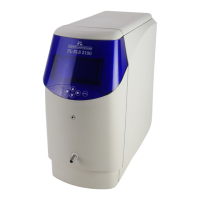
Table of Contents

Other manuals for Polymer Laboratories PL-ELS 2100

Questions and Answers

  • A
    Alison ClineSep 10, 2025
    Why is the air temperature too low inside Polymer Laboratories PL-ELS 2100 Security Sensors?
    • A
      Adam CookSep 10, 2025
      If the air temperature inside the enclosure of your Polymer Laboratories Security Sensors is 10°C or less, the environmental temperature is too cold.
  • J
    Jeffrey NelsonAug 22, 2025
    Why is there baseline noise in Polymer Laboratories PL-ELS 2100?
    • S
      Sabrina AndradeAug 23, 2025
      There are several reasons for baseline noise in Polymer Laboratories Security Sensors. It may be that the particle plume is not sufficiently dried in the evaporator tube. To resolve this, increase the temperature of the evaporator by 10° intervals until the noise is acceptable. It could also be due to poor nebulisation of solvent, in which case you should increase the gas flow rate and decrease the nebulisation temperature. Finally, pump pulsations, especially in microbore applications where low flow rates are used, can cause baseline noise. To fix this, use a pulse-free pump, increase the back pressure on the pump by fitting a back pressure regulator between the pump and the injection valve, and use a pulse dampener directly after the pump in the system.
  • K
    Kelli MedinaAug 25, 2025
    What to do if Polymer Laboratories Security Sensors shows no response?
    • J
      Jackson LewisAug 25, 2025
      If your Polymer Laboratories Security Sensors unit shows no response with a completely flat baseline, check that the data acquisition leads are properly connected. Also, verify that the light source is active and that the instrument is in RUN mode.
  • A
    Andrea DeanAug 27, 2025
    What causes baseline spikes in Polymer Laboratories PL-ELS 2100?
    • M
      Michael MartinezAug 27, 2025
      Baseline spikes in Polymer Laboratories Security Sensors can be caused by particulate matter in the gas supply, column shedding, or poor nebulisation. To address this, filter the incoming gas or change the supply. If the issue is column shedding, replace the column or fit an inline filter with a 0.2…m membrane filter directly after the column. If poor nebulisation is the cause, the nebuliser temperature may be too high, causing the solvent to boil; reduce the nebuliser temperature.
  • P
    Peter SmithAug 28, 2025
    Why is there a large baseline offset in Polymer Laboratories PL-ELS 2100 Security Sensors?
    • C
      Cynthia RiosAug 28, 2025
      A large baseline offset in Polymer Laboratories Security Sensors can be caused by inefficient evaporation, a high concentration of non-volatile buffer or stabiliser, or a contaminated diffuser. To resolve this, increase the evaporator temperature and/or gas flow. You may also need to use a lower concentration of stabiliser, unstabilised solvent, or a more volatile buffer.
  • J
    johnsonmichaelAug 29, 2025
    What to do if Polymer Laboratories PL-ELS 2100 Security Sensors detects liquid in drip tray?
    • B
      Bridget BrownAug 29, 2025
      If the liquid leak sensor has detected liquid in the drip tray of your Polymer Laboratories Security Sensors, it indicates liquid in the base of the unit. Stop the pump and investigate the source of the leak.
  • C
    Corey BlackSep 18, 2025
    Why has the fan stopped in Polymer Laboratories PL-ELS 2100 Security Sensors?
    • C
      courtney08Sep 18, 2025
      A stopped fan in Polymer Laboratories Security Sensors indicates a fault with the circuitry, wires, or the fan itself.
  • S
    Steven RobinsonSep 12, 2025
    Why am I getting a temperature error on Polymer Laboratories Security Sensors?
    • M
      Mackenzie BellSep 12, 2025
      If you get a temperature error as soon as the Polymer Laboratories Security Sensors instrument is powered on, it indicates a temperature probe fault or disconnection. Check the RTD connections.
  • J
    Jose NobleSep 8, 2025
    Why does Polymer Laboratories PL-ELS 2100 fail to zero?
    • A
      Adam LunaSep 8, 2025
      If the Polymer Laboratories Security Sensors instrument fails to zero, it indicates the offset is too high or the output is unstable. Ensure the instrument is in RUN mode.
  • G
    Gary CookSep 5, 2025
    Why is the display off on Polymer Laboratories PL-ELS 2100 Security Sensors but power is on?
    • A
      Aaron LeeSep 5, 2025
      If the display is not on, but power is connected and a blue glow is visible on your Polymer Laboratories Security Sensors, the instrument is likely in service mode. Set the rear panel switch to RUN.

Summary

Chapter 1 General Information

Introduction

Overview of the PL-ELS 2100/2100 Ice detector's function and use.

Specifications

Technical details, operating ranges, and physical characteristics of the detector.

Unpacking and Installation

Procedures for safely removing the instrument from its packaging.

Packing List

List of standard items included with the detector.

Site Preparation Checklist

Environmental, power, and gas supply requirements for instrument installation.

Front Panel Connections

Diagram and labels for front panel connections.

Power Connections

Instructions for connecting the power cable and fuse details.

Extraction Requirements

Guidelines for safely venting exhaust gases and vapors.

Control and Serial Connections

Details on connecting auxiliary equipment and PC via I/O and RS232 ports.

Gas and Fluid Connections

Procedures for connecting the gas supply and eluent stream.

General Precautions

Important safety and operational considerations before use.

Flammable Solvents Precautions

Specific safety measures when using flammable solvents with the instrument.

Chapter 2 System Description and General Operation

Basic Principles of Operation

Explanation of nebulisation, evaporation, and detection processes.

Theory of Operation

Scientific principles of light scattering, Rayleigh, and Mie scattering.

Operational Parameters

Key parameters affecting performance and how to optimize them.

Instrument Controls Overview

Description of front panel controls: Power, Display, and Keypad.

Keypad and Menu Navigation

How to use the keypad and navigate the instrument's menu system.

Parameter Setting Menu

Adjusting gain, smoothing, and LED intensity settings via the menu.

Smoothing and LED Intensity Details

Adjusting data smoothing and LED brightness for optimal signal.

Real-Time Monitoring and Modes of Operation

Displaying real-time data and understanding STANDBY/RUN modes.

RUN Mode and Method Management

Operating in RUN mode and loading/managing instrument methods.

Error Conditions and Clearing

Identifying and resolving instrument error conditions.

Chapter 2.4 PC Software

Details on software utilities for instrument control and method editing.

PC Configuration and Detector Connection

Setting up the PC, serial ports, and connecting the detector.

Control Software Features

Using software features like gain, smoothing, and LED intensity adjustments.

Automation Setup

Configuring automated sequences of events for the instrument.

System Test and Method Editor Overview

Performing instrument tests and overview of the method editor tool.

Method Editor Operations

Creating, storing, and downloading method sets using the editor.

Chapter 3 Set-Up

General Considerations

Key factors for setting up the detector, solvent compatibility, and connections.

Connecting the Detector

Step-by-step instructions for connecting power, gas, and waste.

Optimisation Protocol

Procedures for optimizing gas flow, evaporator, and nebuliser temperatures.

Chapter 4 Routine Maintenance

Drying the Diffuser

Procedure to dry a potentially blocked diffuser.

Cleaning the Evaporator Tube

Instructions for cleaning the evaporator tube using solvent or steam.

Information for Service Personnel

Details on fuses and light source for service technicians.

Putting Instrument into Storage

Recommended steps for storing the instrument.

Upgrading Firmware using Terminal

Step-by-step guide for updating instrument firmware via terminal software.

Chapter 5 Troubleshooting

Instrument Errors

Table of error conditions, descriptions, and suggested remedies.

General Problems and Remedies

Common issues like baseline noise, spikes, low sensitivity, and their solutions.

APPENDIX 1 Quick User Guide

APPENDIX 2 Method Record Sheet

APPENDIX 3 PL-ELS 2100 Test Procedure

APPENDIX 4 PL-ELS 2100 Ice Test Procedure

APPENDIX 5 Spare Part Listing

APPENDIX 7 Cleaning & Decontamination Procedures

Polymer Laboratories PL-ELS 2100 Specifications

General IconGeneral
BrandPolymer Laboratories
ModelPL-ELS 2100
CategorySecurity Sensors
LanguageEnglish