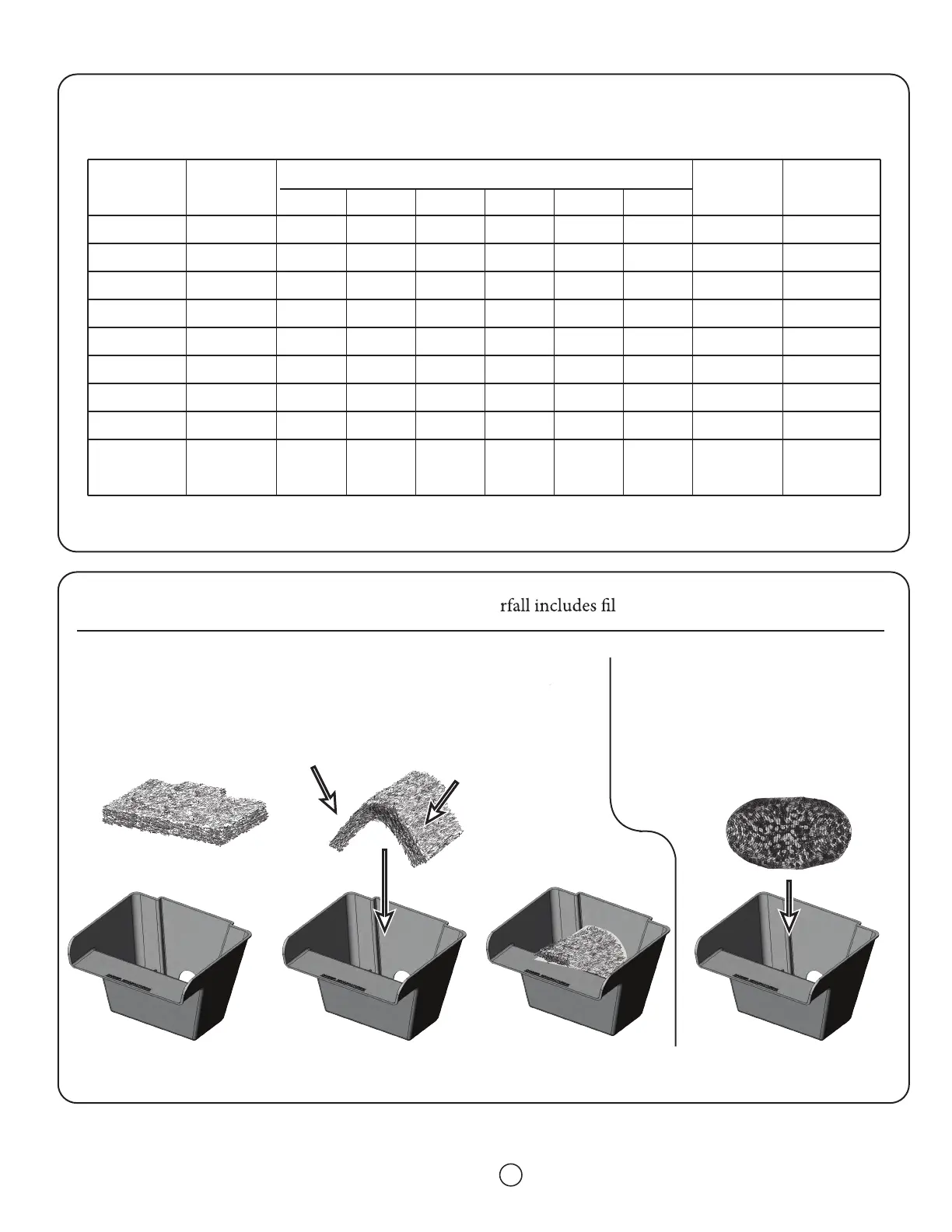
PRO1000 and PR
O 2000 PUMP REFERENCE CHAR
T
4
* Watts decrease as pump loads increase during normal usage. Examples show range from 0’ to shut-o; watts continue to decrease as ow decreases.
PRO SERIES
FILTER and FALLS MEDIA SET-UP
If your wate
ter media see the following steps.
For those models with Debris Filters:
Flex the Debris Filter pad as shown and press into lter box. If aer
time the Debris lter is lied by the water ow, either rinse and
replace Debris Filter or replace with a new one.*
For those models with
BioMatrix Media:
Simply place the media bag into
the lter b
ox. *
DO NO
T OPEN THE MEDIA BAG.
* Note that a at stone can be placed on top of either style lter media to keep it down.
21
37
49
60
93
110
150
140
95
@ 15'
-
-
-
-
-
-
470
-
-
Watts
Range*
- 11
- 16
- 22
- 32
- 42
- 38
- 40
- 75
- 90
Gallons Per Hour
Pump
Model 2
Model 3
Model 5
Model 7
Model 9.5
Model 12
Model 18
WFP 2000
HY-Drive
1900
Item #
02522
02523
02525
02517
02720
02722
02728
02650
20210
@ 1'
280
420
525
655
1010
1190
1300
1836
1710
@ 3'
170
325
400
565
900
1065
1170
1374
1325
@ 5'
65
235
300
450
770
900
1040
1086
870
@ 7'
-
140
200
325
650
795
925
942
555
@ 10'
-
-
-
110
475
570
775
654
-
Shutoff-
Head
6'5”
10'4"
10'6"
11'8"
13'7"
13'7"
16'6"
13'2"
10'0”


 To Next Page