11
6. TIMER SETTING
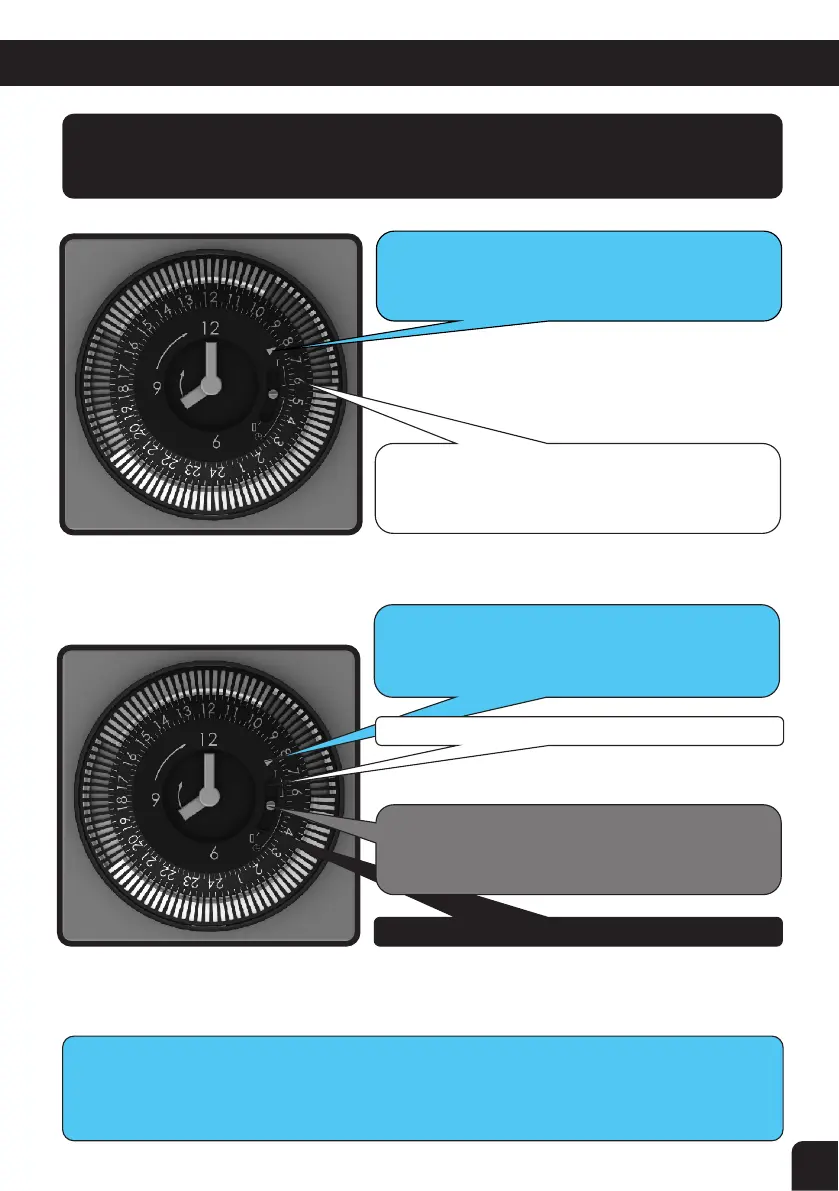
To adjust the time of the clock, simply hold the outside of the white segments
and turn the dial until the clock reads the right time and the number near the
timer on/off arrow is close to the same number.
Your Timer is simple to use, easy to understand and a reliable well known design.
It has a battery back up function if you operate your pool equipment from a low
tariff supply that turns off at times. It does require at least 12 hours charging at
first but simply leave it alone and it will charge itself as required.
This me is set at 8:00am and the dial pointer shows
the 8:00 posion as does the clock face hands
The Timer comes on where the pins that are pressed
out r
each the White dial pointer (in this case it will
be from 6 – 10am and 4 – 8pm)
When White adjustable segment pins reach this
dial pointer (in AUTOMATIC posion)
the Power Pack turns: ON if pins pressed out
OFF
if pins pulled in
With White Lever in this posion power pack is ON
With White Lever in this posion Power Pack is in
AUTOMATIC and the mer seng turns it ON/OFF
With White Lever in this posion Power Pack is OFF



 To Next Page