2 / 20
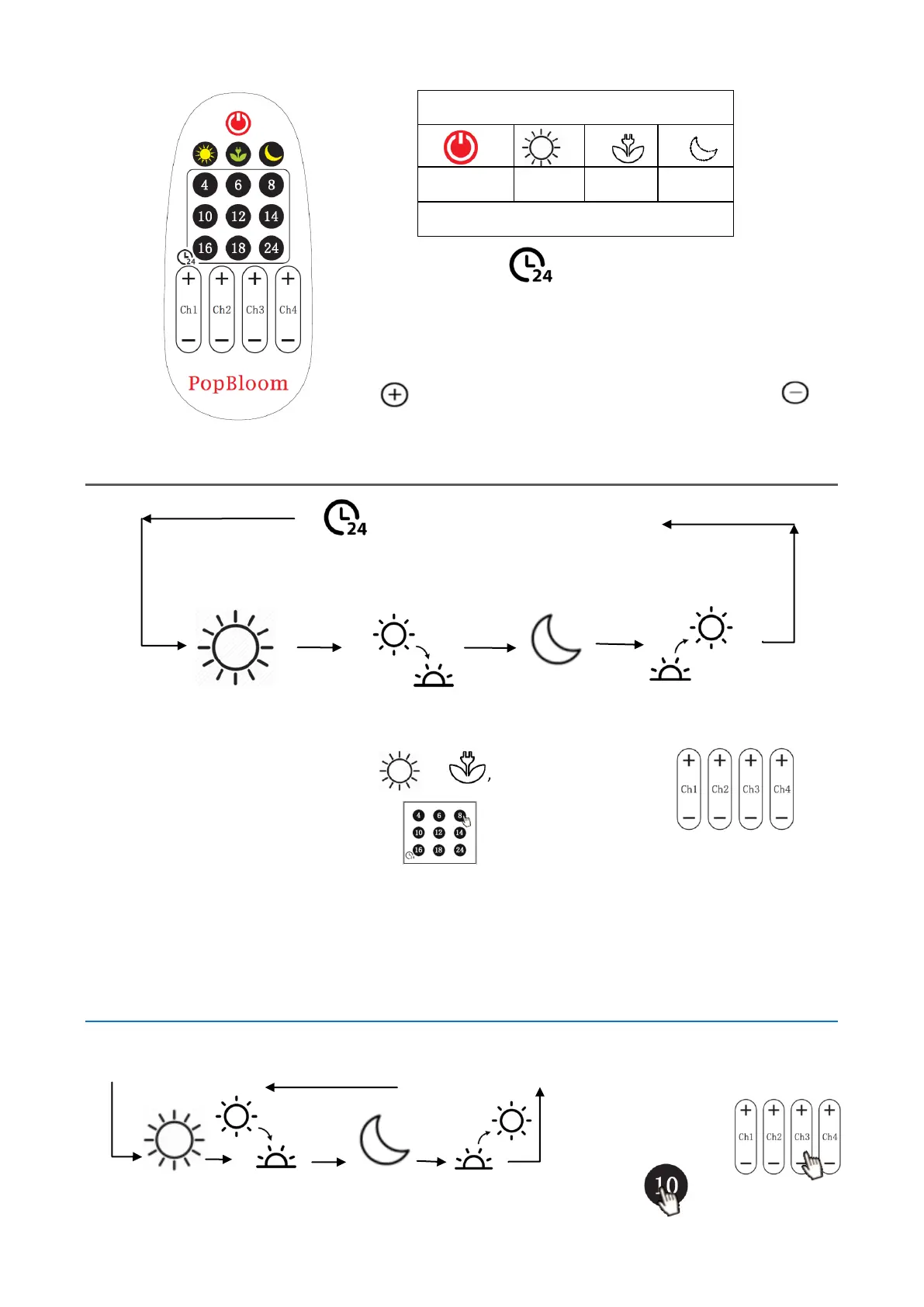
Manually set the brightness of 4 channels
100%-90%-80%-70%-60%-50%-40%-30%-20%-10%-5%-2%-0%
Type 1: Set the brightness and timer of “sunlight”
Start
To be set Auto 30 min Default ”Moon” Auto 30 min
STEPS:
1. Set “Sunlight” by choosing or , or set each channel via
2. Set timer for “Sunlight” via
TIPS:
System runs the “Sunrise”, “Moon” and “Sunset” automatically.
No way to change the default “Moon”. The Moonlight hours = 24H-1H-Sunlight hours
The actual time of “Sunrise” and“Sunset” is based on the difference in brightness between
the “Sunlight” and “Moonlight”.
Example
At 9:00 clock, set your own brightness, runs 10hours. “Moon” in the night, cycles every day.
STEPS:
① Start setting at 9:00
② adjust brightness
9:00-19:00 19:00-19:30 19:30-8:30 8:30-9:00 ③ Press to start timer
ECON : optimal growth while energy saving
Timer
Set the duration of the current lighting
24 hours cycle automatically
Pressing preset or manual key will clear the timer


 To Next Page
 Loading...