s
WWW.PORTACOOL.COM
Models: PACA05001A1 and PACA07001A1
Note: Follow QR code for detailed video instructions for Pump
servicing and maintenance.
Before Beginning:
• Move unit to safe and well-
illuminated work environment.
• Position Portacool with plenty of
working room on all sides.
• Disconnect Portacool from
electrical and water supplies.
Tools Needed:
• Screwdriver or Ratchet wrench
with a 10 mm socket.
• Drill Driver with a ¼ inch socket.
• Gloves and Safety Glasses
Steps:
1. Remove the Media Shroud and Media from the unit. First, remove the
2 screws at the bottom with a ¼” socket. Pull the media shroud out
and down to detach and remove. Lastly, slide the media directly out to
remove.
Figure 1: Portacool Unit Front View
2. Unscrew the two nylon Pump Bolts and remove the Bracket. Carefully
pull the Pump outside of the unit without detaching the Tube and Pump
power cable.
WARNING!
Disconnect Portacool from
electrical source before servicing.
APEX PUMP SERVICE & MAINTENANCE MANUAL
REFR0134 Rev. A

 Need help?
 General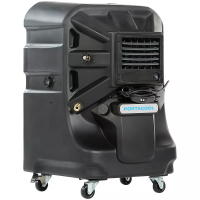

 To Next Page