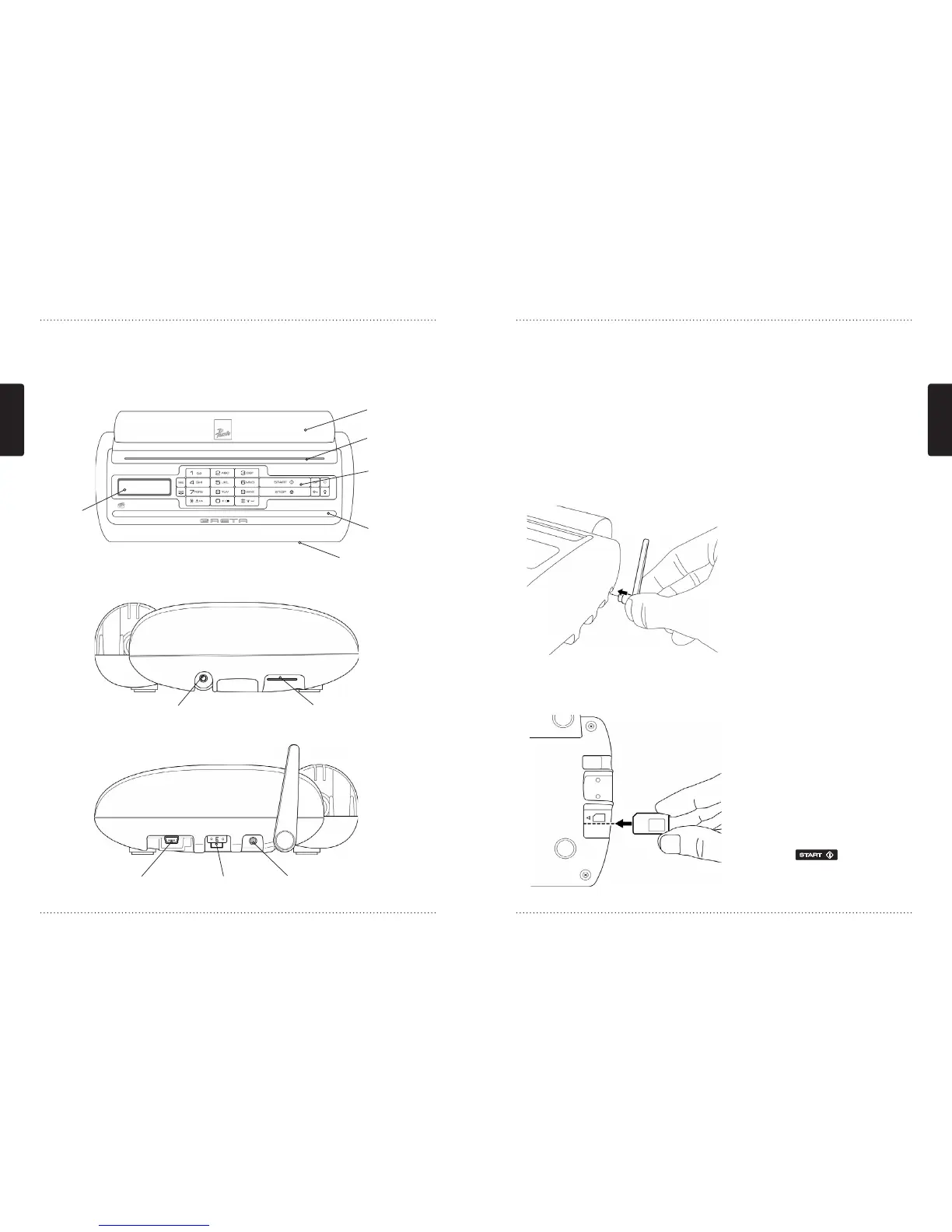
5. Overview & Quick Guide
5.1 Know your GRETA
Display
Paper roll
compartment
Paper output
Keypad
Scanner intake
Earpiece connector SIM Card holder
USB connector Power inletFuse
Scanner output
5.2 Greta contents list
• GRETA GSM Fax & Printer
• Antenna
• USB cable
• 110-240V AC power adapter
• Earpiece
• CD
• User manual
• Licence & Warranty booklet
• Registration card
5.3 Antenna connection
Connect the supplied antenna to
GRETA as shown. If you are using an
antenna adapter please make sure
you also connect an external antenna
to this.
NOTE: GRETA does not have a built-
in antenna and therefore requires
you to connect the supplied antenna
or an external antenna using the
external antenna adapter (accessory).
5.4 Inserting the SIM card
• Make sure that GRETA is switched
off before you insert the SIM card. It
is necessary to have subscribed to a
fax and data service from your mobile
operator in order to receive faxes.
With the fax/data service you receive
a separate fax number that needs to
be used to receive faxes. Contact your
mobile operator for more information.
• If your SIM card is PIN code enabled
the display will show “Enter PIN?”.
Please type your PIN code and confirm
by pressing
.
• GRETA will now connect to the
network and you will be ready to use
GRETA.



 To Next Page