EasyManua.ls Logo

Posturite DeskRite 100 - Single Arm Column Attachment; Dual Arm Connector Assembly; VESA Bracket Mounting; Frame Securing and Tightening

Posturite DeskRite 100
2 pages
Print Icon
To Previous Page IconTo Previous Page
Loading...
Installation instructions
...continued
A
B
C
B
------
------
Posturite Ltd
The Mill, Berwick,
East Sussex, BN26 6SZ, UK
t. 0345 345 0010
e. support@posturite.co.uk
posturite.co.uk
POSTURITE
Posture Depot
179 Gasoline Alley
Mooresville, NC 2811, USA
t. 704-999-0809
e. info@posturedepot.com
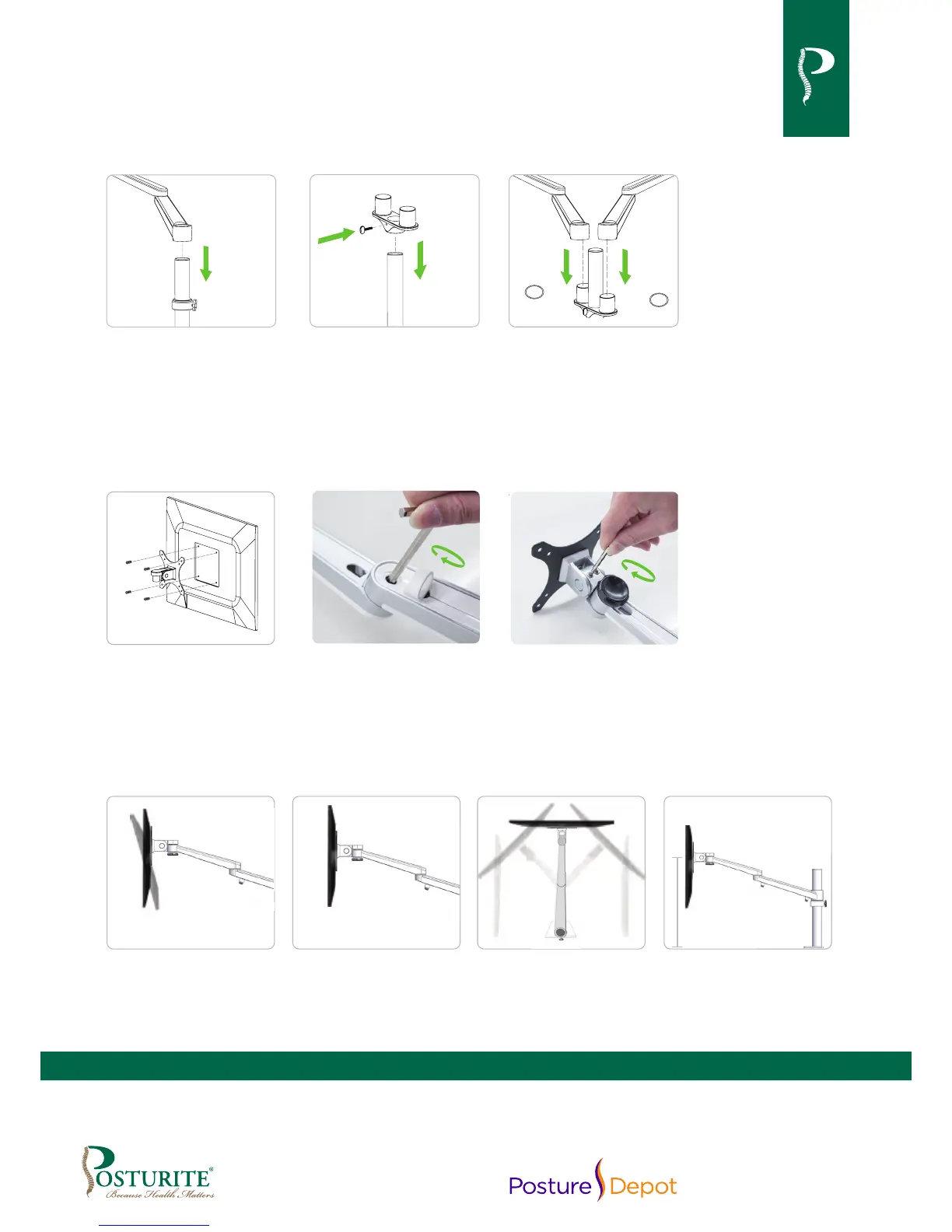
For Installation of Single Arm For Installation of Dual Arm
4
Slide the retaining ring
(A) onto the column,
then insert the double
section arm (B) onto
upright column.
5
Insert the dual arm
connector (B) into
the post. Adjust the
appropriate position
then tighten the
screw (C).
6
Slide the nylon
washers onto the dual
arm connector then
position both arms onto
connector.
7
Place VESA bracket in
position on back of the
monitor with lip facing
up, attach using 4
screws provided.
8
After positioning at
desired angle tighten
frame with the 6mm
hex key to prevent it
from dropping.
9
Tighten frame with a
4mm hex key to prevent
it from dropping.
Tilt adjustment
+90˚ / -80˚
Level adjustment
180˚
Cantilever adjustment
360˚
Height adjustment
max 460mm
max 18 inches

Other manuals for Posturite DeskRite 100