Step 2
In-Wall Installation
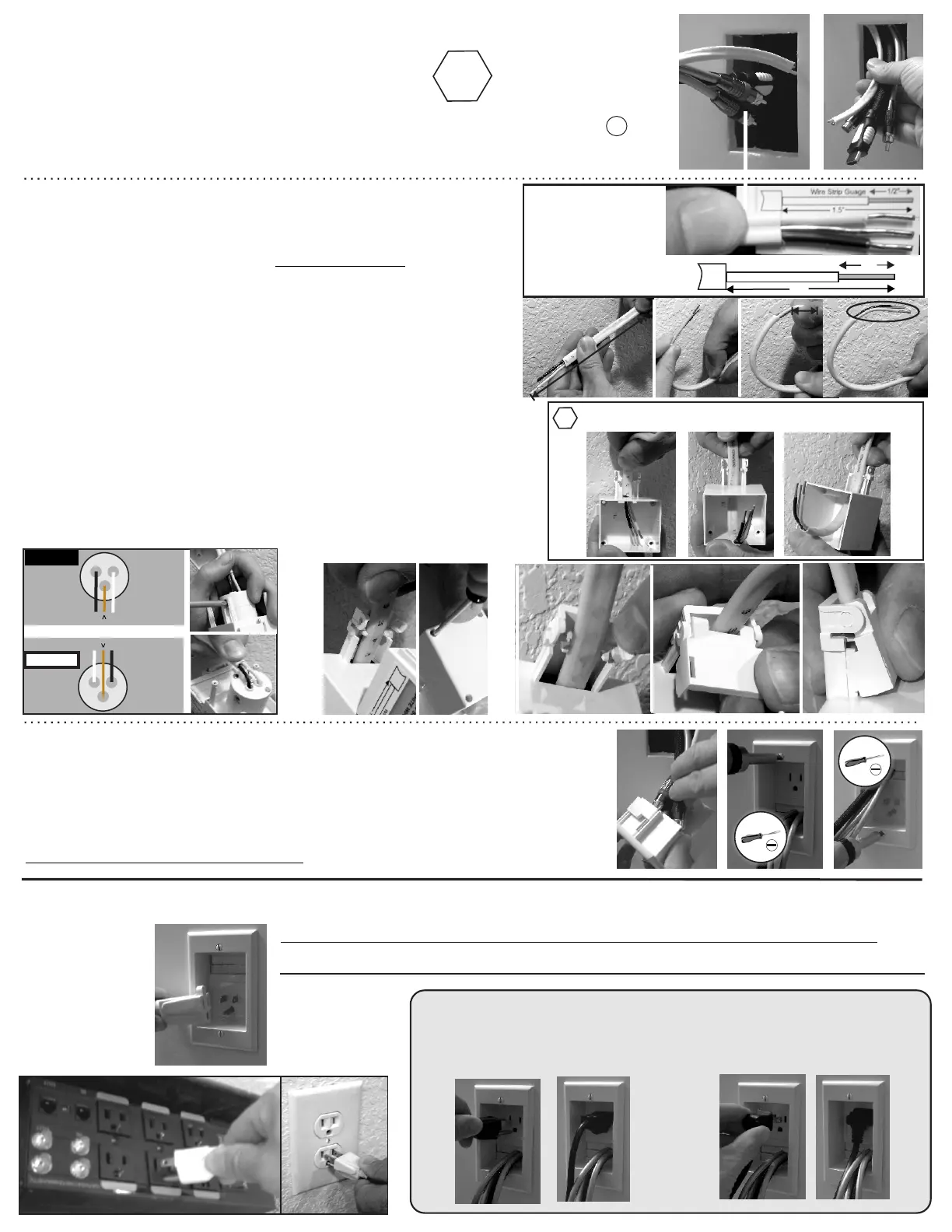
A) Begin at the upper PowerOUT location.
Drop or wall-fish audio video cables and NM-type
PowerWire to the PowerIN location below.
Pull all cables out lower cutout.
Step 3
Plug it in
Plug TV power supply cord in to PowerOUT and connect AV cables to TV.
Follow wall mount manufacture instructions, install TV on wall bracket.
Plug supplied 6’ PowerConnect cord into PowerIN.
Plug other end into existing grounded outlet or surge protector.
CAUTION-Risk of Fire-Only Use Cord Set Provided With This Kit or equivalent.
Plug in TV
Plug in Flat Angle Plug
I) Slide audio video cables through backside through CableBrush.
Allow for enough cable length out to connect to TV and Equipment.
J) Slide both wall plates into wall opening.
Use Flat-Blade screw driver to secure panel to wall.
Careful to not over-tighten!
The PowerBridge In-Wall Extension is now energized.
Existing
Outlet
Surge Protector
B) SKIP THIS STEP with supplied pre-stripped PowerWire
If you use your own wire, follow Wire Strip Gauge on label.
C) Wire PREP - Follow steps as shown for BOTH ends
D) Insert PREPPED PowerWire as shown through funnel into
back-boxes for OUTLET/INLET.
E) Tighten all three screws securing wires.
F) Bend all three wires toward the cable-brush.
G) Slide back-box onto back, pull PowerWire back up through
as shown, secure with the 4 supplied black screws with
supplied hex-tool.
H) Align wire in-between guides. Insert-snap supplied clamp
part into slots, snap both sides in place.
E
F
Wire Connection - Assembly
< Silver
WHITE Wire
Screw
TOP
Brass Screw >
BLACK Wire
Green Screw BARE Wire
W
Silver
WHITE Wire
Screw >
TOP
< Brass Screw
BLACK Wire
Green Screw BARE Wire
W
G
OUTLET
INLET
Use NM-type building wire.
14/2 size wire only.
Copper wire only
CU
!
B
1.5”
1/2”
Wire Strip Gauge
NOTE:
Kits supplied with
PowerWire are
already pre-stripped,
SKIP this step
J
I
6”
Half way-
slightly
bend wires
as shown
Bend in
hook shape
Wire PREP
DO THIS FIRST BEFORE WIRE CONNECTIONS
!
C
D
H
G


 To Previous Page
 Loading...