Functions and Features
The device is design to meet the IEEE802.3af standard. The
Power over Ethernet (PoE) Midspan adds 48VDC to unused
(non-data) wires in standard Category 5 Ethernet cable. As a
result, the PoE Midspan delivers both data and power to the
terminal.
EMC Compliance: Category 5 foiled twisted-pair cables must
be used to ensure compliance with requirements of FCC
Part 15, subpart B, Class B. The use of unshielded cables
(Category 5 for 10BASE-T ports or for 100BASE-Tx ports)
complies with Class A requirements.
Preliminary Steps
• Ensure AC power is applied to the PoE Midspan, using an
operational AC cable with an appropriate ground connection.
• Ensure that output Ethernet cable is connected to the
Data & Power Out port.
• Verify that power ready Ethernet compatible device is
connected.
Do not use cross over cable between the PoE Midspan
output port and the load device!
Installation
The PoE Midspan may be or wall/bench mounted using the
rear side holes.
NOTES: Before mounting the PoE Midspan to a fixed location:
• Do not to cover the PoE Midspan or block the airflow to the
PoE with any foreign objects. Keep the PoE Midspan away
from excessive heat and humidity, and free from vibration
and dust.
• Ensure that the cable length from the Ethernet network
source to the terminal does not exceed 100 meters (333
Feet). The PoE is not a repeater and does not amplify the
Ethernet data signal.
• Use a splitter if desired; ensure that the splitter is connected
close to the terminal and not on the Midspan!
• No “on-off” switch exists; Simply plug the PoE Midspan into
an AC power source.
Installing the Unit
• Connect the PoE Midspan to an AC outlet (100-240 VAC),
using a standard power cord.
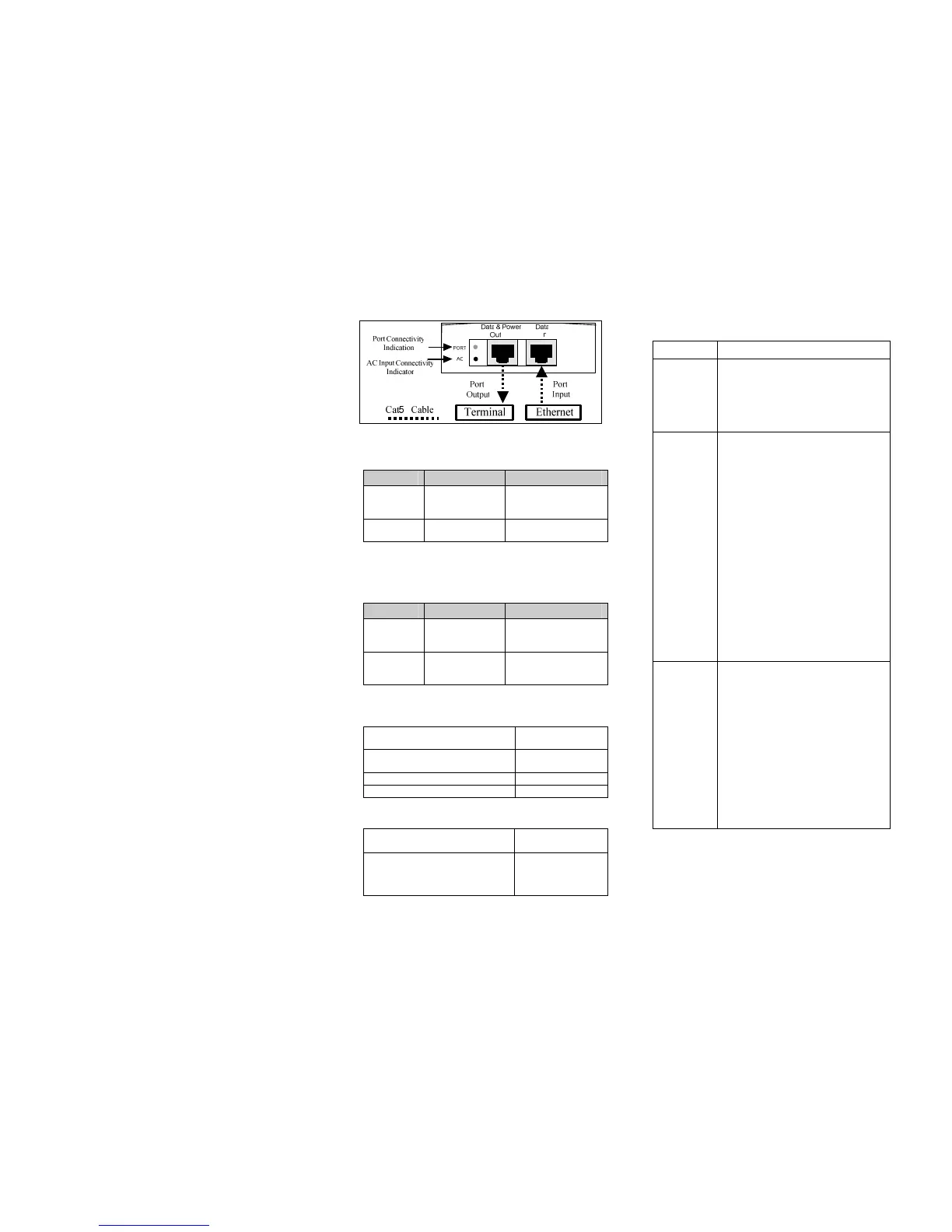
• Connect the unit Data In jack (input) to the remote Ethernet
network switch Patch panel and the Data & Power Out jack
(output) to the terminal.
Figure 1: connecting the PoE Midspan
Indicators
LED AC (Main) Port
Green
Indicates that the
power is on
(Power is active)
indicates that a
remote terminal is
connected
Green
Blinking
Output voltage is
out of range
Overload or short
circuit
Specifications
Environmental Specifications
Mode Temperature Humidity
Operating 0 to 40 °C
32 to 104°F
10 to 90%
(no condensation
allowed)
Storage -20 to 70 °C
-4 to 158°F
10 to 90%
(no condensation
allowed)
Electrical Specifications
Input Voltage 90 to 264 VAC
(47-63 Hz)
Input Current (110 - 220VAC)
0.5 ampere (max)
Minimum Available Output Power 15.4 Watts
Nominal Output Voltage 45 to 56 VDC
Ethernet Interface
Input (Data In):
Ethernet 10/100Base-T
RJ 45 female
socket
Output (Data & Power Out):
Ethernet 10/100Base-T, plus
48 VDC
RJ 45 female
socket, with DC
voltage on wire
pairs 7-8 and 4-5.
Troubleshooting
Symptom Corrective Steps
Midspan
does not
power up
1. Verify that a known-good power
cord is used.
2. Verify that the voltage at the power
inlet is between 100 and 240 Vac.
3. Remove and re-apply power to the
device and check the indicators
during power up sequence.
A port
indicator is
not lit and
the PD does
not operate
1. The Midspan did not detect a PD
and therefore the port is not
enabled.
2. Verify that the PD is designed for
PoE operation.
3. Verify that you are using a standard
Category 5/5e/6, straight-wired
cable, with four pairs.
4. If an external power splitter is in
use, replace it with a known-good
splitter.
5. Ensure input Ethernet cable is
connected to the Data In port.
6. Verify that the PD is connected to
the Data & Power port.
7. Try to reconnect the same PD into a
different Midspan. If it works, there
is probably a faulty port or RJ-45
connection.
8. Verify that there is no short over any
of the twisted pair cables or over the
RJ45 connectors.
The end
device
operates,
but there is
no data link
1. Verify that the port indicator on the
front panel is continuously lit.
2. If an external power splitter is in use,
replace it with a known-good splitter.
3. Verify that for this link, you are using
standard UTP/FTP Category 5
straight (non-crossover) cabling,
with all four pairs.
4. Verify that the Ethernet cable length
is less than 100 meters from the
Ethernet source to the load/remote
terminal.
5. Try to reconnect the same PD into a
different Midspan. If it works, there
is probably a faulty port or RJ-45
connection.


 To Previous Page
 Loading...