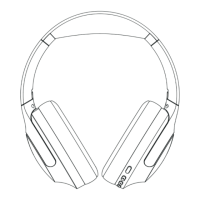
2- Multi-function button (power on / off, pairing, play / pause, auto
search radio)
3- Volume down (Short Press) / Last song (Long Press)
4- Volume up (Short Press)/Next song (Long Press)
5- MP3/FM
6- answer/end calls, reject call, last number redial
7- Micro SD/TF card slot
8- Micro USB charging port
9- Headset jack
10-
Microphone
11-
3.5 stereo sound supply extension line (3ft, male to male)
12- Micro-B USB charging cable
(2) Powering the headset
•
Power On: Press the mult-ifunction button for 2-3 seconds until the blue
indicator light flashes (the headset says: “The blue-tooth is ready to pair”).
•
Power Off: Press the multi-function button for 2-3 seconds until the blue
indicator light goes off (the headset says: “The blue-tooth is powered off”).
(3) Pair to your mobile phone or other products
•
Press the multi-function button for 2-3 seconds until the indicator light starts
flashing red and blue alternatively (the headset says: “The blue-tooth is ready to
pair”).
•
Turn on the blue-tooth function of your connecting smart phone (or other
device).
•
Search for the blue-tooth devices and select ’PowerLocus’. (Enter the code
‘0000’ if prompted)
•
If paring is successful, the blue light indicator flashes (the headset says: “The
blue-tooth is connected successfully”).
•
IMPORTANT: Please make sure the headphone is on before starting pairing
process.


 To Next Page