EasyManua.ls Logo

Powermat PM-KS-600T - User Manual

Powermat PM-KS-600T
28 pages
Print Icon
To Next Page IconTo Next Page
Loading...
ORIGINAL MANUAL
USER MANUAL
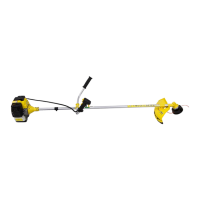
COMBUSTION CUTTER
PM-KS-600T

Questions and Answers

  • J
    Joshua GarciaAug 12, 2025
    What to do if my Powermat PM-KS-600T has problems with switching on?
    • J
      Joseph JohnsonAug 13, 2025
      If your Powermat Cutter is not switching on, several factors could be the cause. Start by checking the fuel tank to ensure it's not empty; if it is, add fuel. Inspect the fuel filter for any blockages and clean it if necessary. Also, the fuel might be dirty, contain water, or have an incorrect mix ratio. In such cases, replace the fuel with a clean mixture. Other potential issues include a dirty spark plug, defective spark plug insulation (replace the spark plug), or an improper spark gap (adjust to 0.6-0.7mm). Also check for loose candle, and tighten it.
  • D
    David BatesAug 16, 2025
    Why Powermat Cutter won't switch on?
    • T
      tonya87Aug 16, 2025
      There are several reasons why your Powermat Cutter might not be switching on. A common cause is an empty fuel tank, so make sure to add fuel. Other potential issues include a blockage in the fuel filter (clean it), dirty or contaminated fuel (replace it with a clean mixture), or an incorrect fuel mix ratio (also replace with a clean mixture). Additionally, inspect the spark plug for oil sediment (clean it), defective insulation (replace the spark plug), or an incorrect spark gap (adjust to 0.6-0.7mm).
  • B
    Barbara MorrisonAug 19, 2025
    How to fix Powermat Cutter that has problems with switching on?
    • J
      Justin HernandezAug 19, 2025
      To troubleshoot a Powermat Cutter that won't switch on, begin by adding fuel to the tank if it's empty. Then, clean the fuel filter if there's a blockage. If the fuel is dirty, contains water, or the mix ratio is too high, replace it with a clean mixture. Also, clean any oil sediment from the spark plug, replace the spark plug if the insulation is defective, or adjust the spark gap to 0.6-0.7mm if it's too large or small. Furthermore, tighten the candle if it is loose.
  • J
    James WalshAug 25, 2025
    What causes Powermat PM-KS-600T Cutter to not switch on?
    • S
      sherrygonzalesAug 25, 2025
      Several issues can prevent your Powermat Cutter from switching on. These include: no fuel in the tank (add fuel), a blocked fuel filter (clean the filter), dirty fuel (replace with a clean mixture), water in the fuel (replace with a clean mixture), or an incorrect fuel mix ratio (replace with a clean mixture). Other possible causes: spark plug is dirty with oil sediment (clean the oil sediment), spark plug insulation is defective (replace the candle), spark gap too large or too small (adjust the pause to 0.6-0.7mm), wire breakage (replace or tighten), backlash in the winding (tighten), piston ring damaged (replace with a new one), the piston ring is cemented (replace).
  • N
    Nicole GilbertAug 27, 2025
    How to troubleshoot Powermat PM-KS-600T Cutter when it won't turn on?
    • L
      Leslie HerreraAug 27, 2025
      If your Powermat Cutter isn't turning on, start by checking the fuel level and adding fuel if necessary. Next, inspect the fuel filter for blockages and clean it. If the fuel is dirty, contains water, or has an incorrect mix ratio, replace it with a clean mixture. Also check for: candle dirty with oil sediment (clean the oil sediment), defective spark plug insulation (replace the candle), spark gap too large or too small (adjust the pause to 0.6-0.7mm), wire breakage (replace or tighten), backlash in the winding (tighten), piston ring damaged (replace with a new one), the piston ring is cemented (replace), candle loose (tighten).
  • T
    Thomas Perkins PhDAug 31, 2025
    What should I check first if my Powermat Cutter won't start?
    • M
      Mark BoydAug 31, 2025
      If your Powermat Cutter won't start, begin by checking the fuel level and adding fuel if the tank is empty. After that, examine the fuel filter for any blockages and clean it. If the fuel appears dirty or seems to have water contamination, replace it with a clean mixture. The same applies if you suspect the fuel mix ratio is off. Also, inspect the spark plug for oil sediment and clean it off. Check for defective spark plug insulation and replace the candle if needed. Make sure that spark gap is in range 0.6-0.7mm.
  • J
    Joan BrownSep 3, 2025
    What to do if cleaning Powermat PM-KS-600T fuel filter doesn't help?
    • G
      Gregory MurraySep 3, 2025
      If cleaning the fuel filter doesn't solve the Powermat Cutter starting problem, consider these possibilities: the fuel may be dirty, contain water, or have an incorrect mix ratio; if so, replace it with a clean mixture. Alternatively, the spark plug might be dirty with oil sediment (clean it), the spark plug insulation could be defective (replace the candle), or the spark gap might be too large or too small (adjust the pause to 0.6-0.7mm). Also, check for wire breakage (replace or tighten), backlash in the winding (tighten), piston ring damaged (replace with a new one), the piston ring is cemented (replace), candle loose (tighten).
  • W
    Wendy TorresSep 8, 2025
    Why does my Powermat PM-KS-600T Cutter only start after several attempts?
    • B
      Brian SmithSep 8, 2025
      Your Powermat Cutter might require multiple attempts to start due to several reasons: there may be no fuel in the tank, a blockage on the fuel filter, the fuel is dirty, there is water in the fuel, mix ratio too high, incorrect proportions, candle dirty with oil sediment, defective spark plug insulation, spark gap too large or too small, wire breakage, backlash in the winding, piston ring damaged, the piston ring is cemented, candle loose, joint between cylinder and shaft surfaces, leakage. To address these issues, add fuel to the tank, clean the fuel filter, replace the fuel with a clean mixture, clean the oil sediment, replace the candle, adjust the pause to 0.6-0.7mm, tighten, replace with a new one, tighten, remove the.

Summary

Graphic Warnings

Warning Symbol Interpretation

Explains the meaning of various graphic warning symbols used in the manual.

Engine Operation Warnings

Specific warnings about turning off the engine, modifications, and exhaust fumes.

Warranty Conditions

Safety Rules and Precautions

Prohibited Activities and Personal Safety

Lists dangerous activities and essential safety measures like protective clothing and equipment checks.

Operational Safety Guidelines (Part 1)

Covers engine operation, adjustments, cleaning, and bystander safety (items 9-24).

Operational Safety Guidelines (Part 3)

Focuses on refueling, movement, maintenance, and working in adverse conditions like rain.

Operational Safety Guidelines (Part 2)

Continues safety guidelines, including device use, clearing areas, and restrictions.

Operational Safety Guidelines (Part 4)

Covers avoiding obstacles, adjustments, storage, inspections, and fire safety (items 36-40).

Cutting Accessories Safety Warning

Warns about the danger of cutting accessories even when the device is stopped.

Installation Instructions

Rules of Safe Work

General Safe Work Practices

Emphasizes understanding operation, wearing protective gear, and protecting the work area.

Personal Protective Equipment (PPE)

Details required PPE like footwear, clothing, and face/head protection.

Hazard Zone and Bystander Safety

Defines hazard zones and precautions for people in the risk zone.

Cutting with a Line Safety

Warnings about debris shielding, line twisting, and protective covers.

Cutting with a Line Safety

Line Cutting Safety and Techniques

Advice on tilting the head to avoid debris and using appropriate line diameter.

Cutting with a Blade

Blade Condition and Obstacle Checks

Warns against using dull/damaged blades and the importance of checking for obstructions.

Warning Against Cutting Trees

Explicit warning against using the scythe for cutting trees.

Mowing Weeds and Brush

Warning on Cutting Large Trees

Specific warning against cutting trees larger than 1/2 to 3/4 inch in diameter.

Fuel and Oil Mixture

Preparation to Work

Pre-Operation Checks and Starting

Starting the Device

Maintenance of Engine During Mowing

Maintenance and Protection

Maintenance and Component Checks

Operational Procedures and Troubleshooting

Troubleshooting Common Problems

Troubleshooting and End-of-Life

Powermat PM-KS-600T Specifications

General IconGeneral
BrandPowermat
ModelPM-KS-600T
CategoryCutter
LanguageEnglish