2231V104-UK 13
4.0
4.1
4.2
4.3
3.0
3.1 3.2
3.3 3.4 3.5
2.0
2.1
2.2 2.3
2.4 2.5
2.1
2.2
1.1
1.2
4.14.0
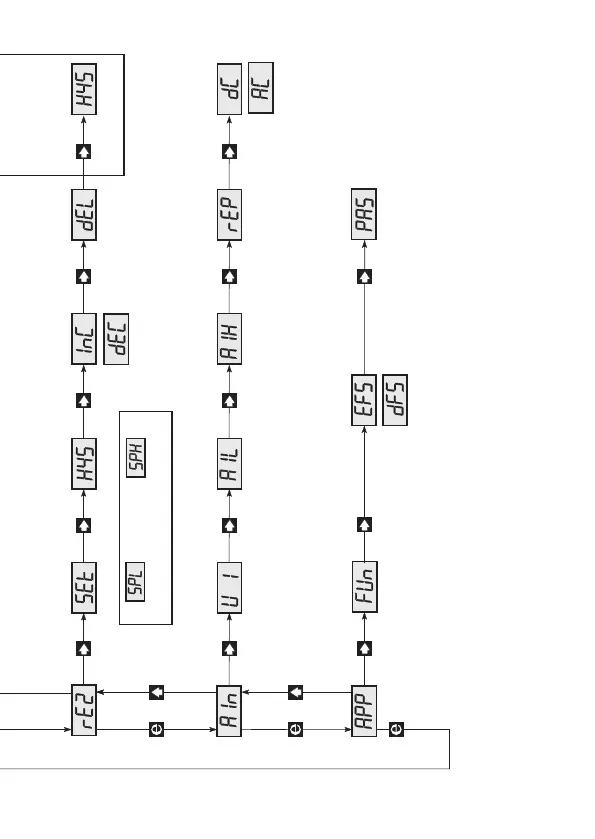
If no buttons are pressed for a period of 2 minutes,
display returns to stage 0.0
Fast Setting
4.2 EFS/dFS - enable / disable fast setting
Upcount setpoint
Store and exit fast setting
Routing diagram
Press or 2 s for automatic counting.
Downcount setpoint
Relay 1
Increasing
Decreasing
0...99.9 s 0…99.9%
Setpoint
Delay
Hysteresis
0...99.9% 0...99.9%
Function 004
setpoint window
Hysteresis
Function 004, setpoint window
001 = Single setpoint
002 = Double setpoint
003 = Pre-setpoint
004 = Setpoint window
- stage 1.5 and 2.5 active
- menutext 1.1, 1.2, 2.1 and 2.2 are different
005 = Hold
Function
Select
application
Program
access
Enable fast setpoint
changing
Analogue
input type
U = Voltage
I = Current
Indication of
JP 1 and JP 4
0.0...20.0 mA
0.0...1.0 A RMS
0.0...250 VDC/VRMS
Analogue
100% input
0.2/0.7…60.0 s
Input
signal
AC or DC
DC/AC
Response time
Password code
Increasing
Decreasing
Hysteresis
0...99.9% 0…99.9%
Relay 2
0...99.9 s 0...99.9%
Function 004, setpoint window
Delay
Hysteresis
0.0...20.0 mA
0.0...1.0 A RMS
0.0...250 VDC/VRMS
Setpoint
Analogue
0% input
040 = enable change in all stages
- - - = disable change
0…999
Memory
Programming
Press and hold , then press
to store changes
Change of parameter
Next digit or point
Go to entry menu / Leave
menu without changes



 To Next Page