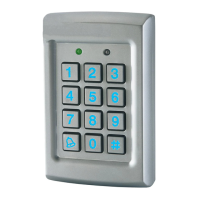
EASYBKA/R SIMPLIFIED PROGRAMMING
ACCESS CONTROL
A) Programming code modification:
• Press the # touch twice: “the left indicator turns off and the right indicator
turns red”.
• Enter the master code: 1 2 3 4: “the right indicator turns green”.
• Press touch 3: “both indicator turns green”.
• Enter the new 4-digit master code: “the keypad beeps 3 times and the right
indicator goes off”.
B) RELAY 1’s code modification:
• Press the # touch twice: “the left indicator turns off and the right indicator
turns red”.
• Enter the master code: “the right indicator turns green”.
• Press touch 1: “the left indicator turns red”.
• Enter the new 4-digit unique user code: “the keypad beeps 3 times, the
left indicator turns green and the right indicator goes off”.
C) RELAY 2’s code modification:
• Press the # touch twice “the left indicator turns off and the right indicator
turns red”.
• Enter the master code “the right indicator turns green”.
• Press touch 2 “the left indicator turns orange”.
• Enter the new 4-digit unique user code: “the keypad beeps 3 times, the left
indicator turns green and the right indicator goes off”.
Return to factory default settings:
- Unplug the power supply.
- Plug simultaneously the green and black wire.
- Re-plug the power supply.
During 15 seconds the programming code is 1234.
- Press the # touch twice , the right indicator turns red.
- Enter the programming code (4 digits), the right indicator turns green.
- Press touch 0 twice, both indicators blinks red.
- Enter the programming code (4 digits): “the keypad beeps 3 times, the left
indicator turns green and the right indicator turns off.
- Unplug the green wire.
ZI Athélia, II
225, impasse du Serpolet
13704 La Ciotat Cedex
Tél. +33 04 42 98 06 06
www.prastel.com


 To Previous Page
 Loading...