www.precision-acoustics.com
Using the Remote functions / Utilisation les fonctions de la télécommandensnections
BT5M
5
.25” Active Bluetooth Speakers
Haut-parleurs amplifié Bluetooth à 133mm
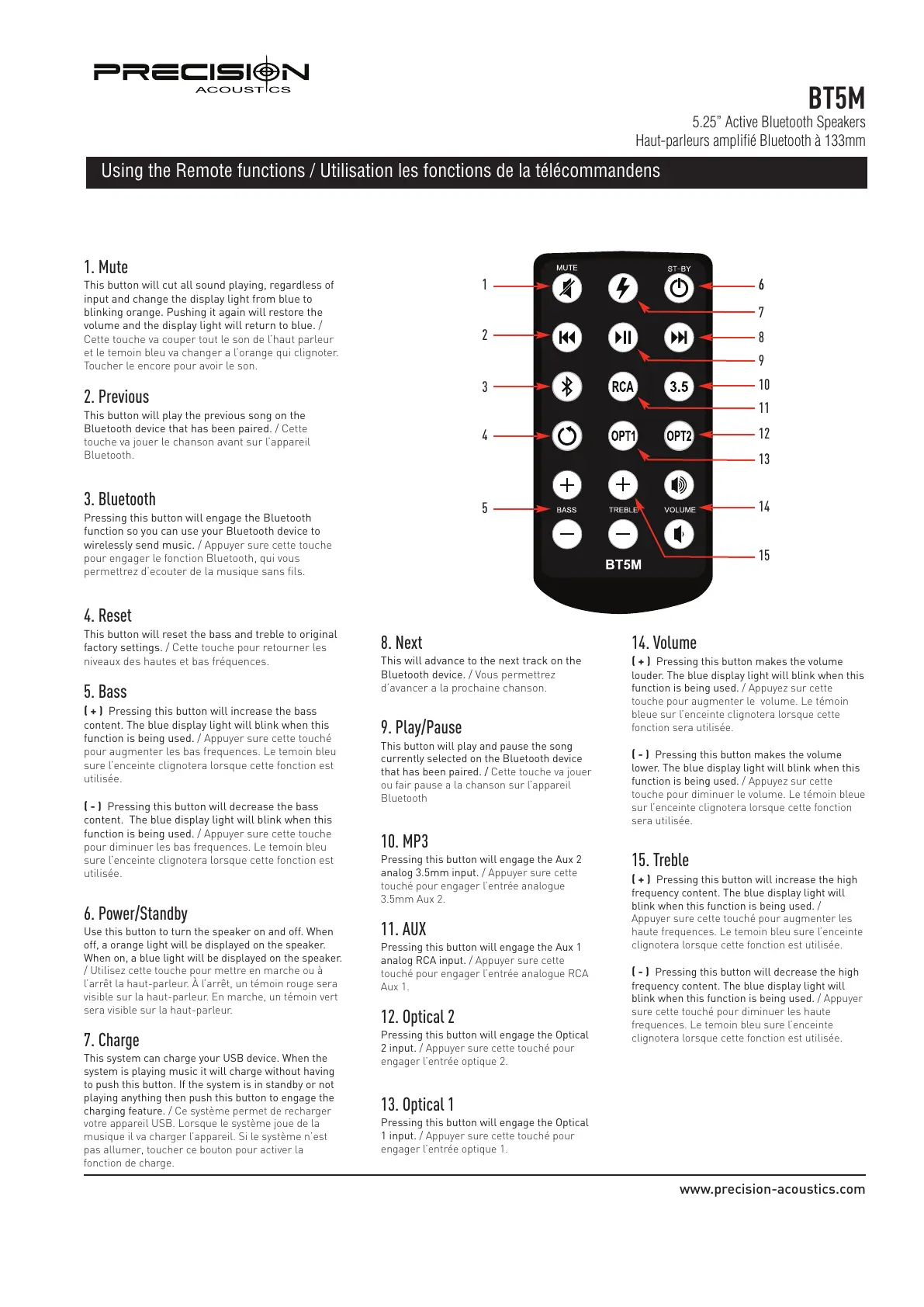
1. Mute
This button will cut all sound playing, regardless of
input and change the display light from blue to
b
linking orange. Pushing it again will restore the
volume and the display light will return to blue. /
Cette touche va couper tout le son de l’haut parleur
et le temoin bleu va changer a l’orange qui clignoter.
Toucher le encore pour avoir le son.
2. Previous
This button will play the previous song on the
B
luetooth device that has been paired. / Cette
touche va jouer le chanson avant sur l’appareil
Bluetooth.
3. Bluetooth
Pressing this button will engage the Bluetooth
function so you can use your Bluetooth device to
wirelessly send music. / Appuyer sure cette touche
pour engager le fonction Bluetooth, qui vous
permettrez d’ecouter de la musique sans fils.
4. Reset
This button will reset the bass and treble to original
factory settings. / Cette touche pour retourner les
niveaux des hautes et bas fréquences.
5. Bass
( + ) Pressing this button will increase the bass
content. The blue display light will blink when this
function is being used. / Appuyer sure cette touché
pour augmenter les bas frequences. Le temoin bleu
sure l’enceinte clignotera lorsque cette fonction est
utilisée.
( - ) Pressing this button will decrease the bass
content. The blue display light will blink when this
function is being used. / Appuyer sure cette touche
pour diminuer les bas frequences. Le temoin bleu
sure l’enceinte clignotera lorsque cette fonction est
utilisée.
6. Power/Standby
Use this button to turn the speaker on and off. When
off, a orange light will be displayed on the speaker.
When on, a blue light will be displayed on the speaker.
/ Utilisez cette touche pour mettre en marche ou à
l’arrêt la haut-parleur. À l’arrêt, un témoin rouge sera
visible sur la haut-parleur. En marche, un témoin vert
sera visible sur la haut-parleur.
7. Charge
This system can charge your USB device. When the
system is playing music it will charge without having
to push this button. If the system is in standby or not
playing anything then push this button to engage the
charging feature. / Ce système permet de recharger
votre appareil USB. Lorsque le système joue de la
musique il va charger l’appareil. Si le système n’est
pas allumer, toucher ce bouton pour activer la
fonction de charge.
1
2
3
5
4
66
7
8
9
10
11
12
13
14
15
8. Next
This will advance to the next track on the
Bluetooth device. / Vous permettrez
d’avancer a la prochaine chanson.
9. Play/Pause
This button will play and pause the song
currently selected on the Bluetooth device
that has been paired. / Cette touche va jouer
ou fair pause a la chanson sur l’appareil
Bluetooth
10. MP3
Pressing this button will engage the Aux 2
analog 3.5mm input. / Appuyer sure cette
touché pour engager l’entrée analogue
3.5mm Aux 2.
11. AUX
Pressing this button will engage the Aux 1
analog RCA input. / Appuyer sure cette
touché pour engager l’entrée analogue RCA
Aux 1.
12. Optical 2
Pressing this button will engage the Optical
2 input. / Appuyer sure cette touché pour
engager l’entrée optique 2.
13. Optical 1
Pressing this button will engage the Optical
1 input. / Appuyer sure cette touché pour
engager l’entrée optique 1.
14. Volume
( + ) Pressing this button makes the volume
louder. The blue display light will blink when this
function is being used. / Appuyez sur cette
touche pour augmenter le volume. Le témoin
bleue sur l’enceinte clignotera lorsque cette
fonction sera utilisée.
( - ) Pressing this button makes the volume
lower. The blue display light will blink when this
function is being used. / Appuyez sur cette
touche pour diminuer le volume. Le témoin bleue
sur l’enceinte clignotera lorsque cette fonction
sera utilisée.
15. Treble
( + ) Pressing this button will increase the high
frequency content. The blue display light will
blink when this function is being used. /
Appuyer sure cette touché pour augmenter les
haute frequences. Le temoin bleu sure l’enceinte
clignotera lorsque cette fonction est utilisée.
( - ) Pressing this button will decrease the high
frequency content. The blue display light will
blink when this function is being used. / Appuyer
sure cette touché pour diminuer les haute
frequences. Le temoin bleu sure l’enceinte
clignotera lorsque cette fonction est utilisée.


 To Next Page
 Loading...