Rev 8/2014
PrecisionTemp, Inc • 11 Sunnybrook Drive • Cincinnati, Ohio, 45237 • 1-800-934-9690 •
fax 513-641-0733 51
SB-11 Fan Relay Test Procedure
Model: PT-200FT and PT-200RC
Software version: All
Tools Required: DC Multimeter
Needle-nose pliers
Process:
1.
Turn heater power switch off and remove front cover. Locate the fan relay.
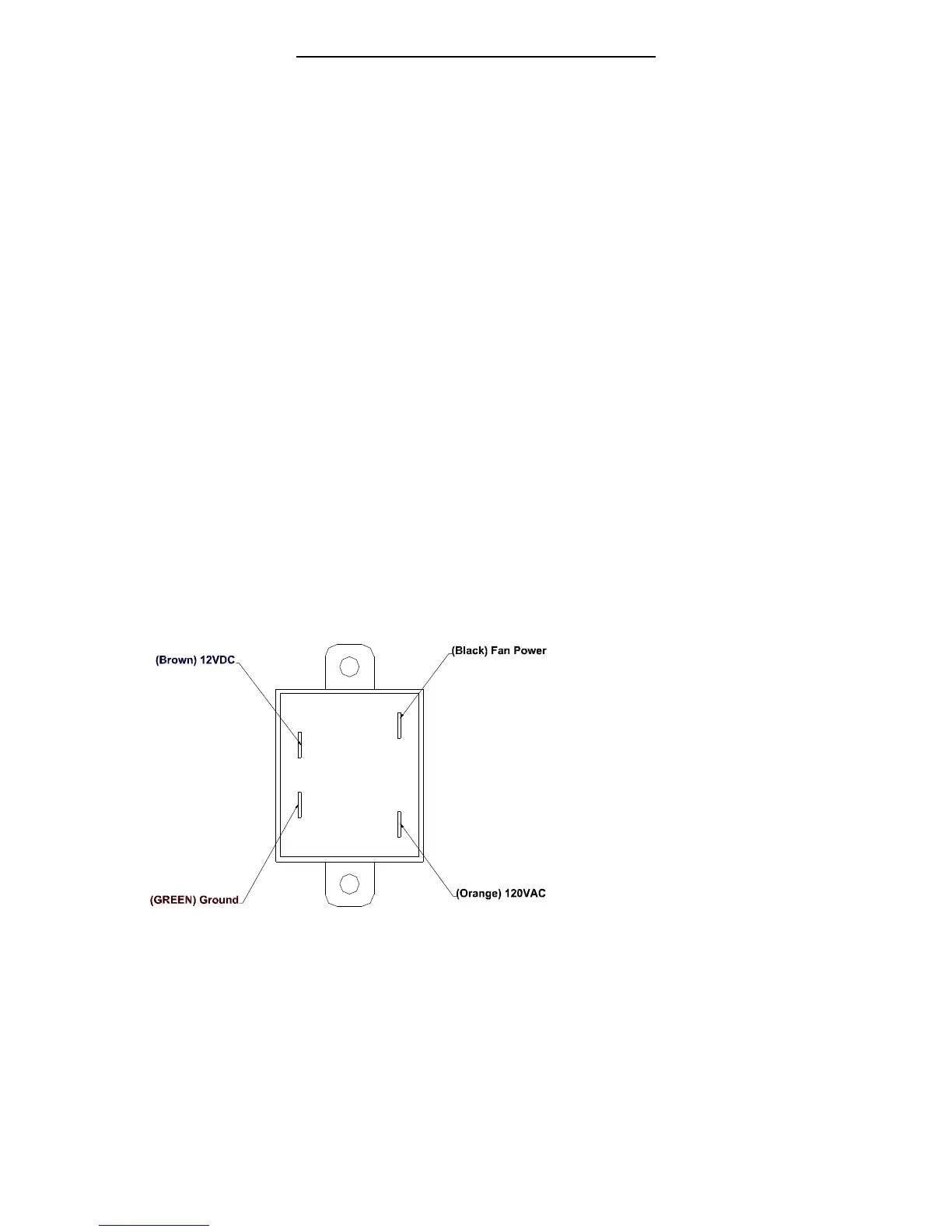
2. Set your multimeter to volts DC. Using the illustration below, connect your meter
to the 12v DC side of the relay.
3. Turn the power on to the booster heater and verify you have 12v
(the relay will only be energized for 8 seconds after power is turned on).
4. If power is present, continue to next step. If not, please refer back to the
troubleshooting guide.
5. Switch your multimeter to 120v AC. Turn the booster heater off.
6. Using the illustration below, connect your meter to the 120v
7. Turn booster heater power switch on and verify you have 120v AC on the relay.
8. If 120v AC is present, turn to booster heater off and connect the orange and
black wire.
9. Turn the power on to the booster heater. If the fan comes on, replace the relay.
If the fan does not come on, replace the blower fan.
Kit Part List:
None
Reference Illustrations:
200-14 Electronic Control Board


 To Next Page
 Loading...