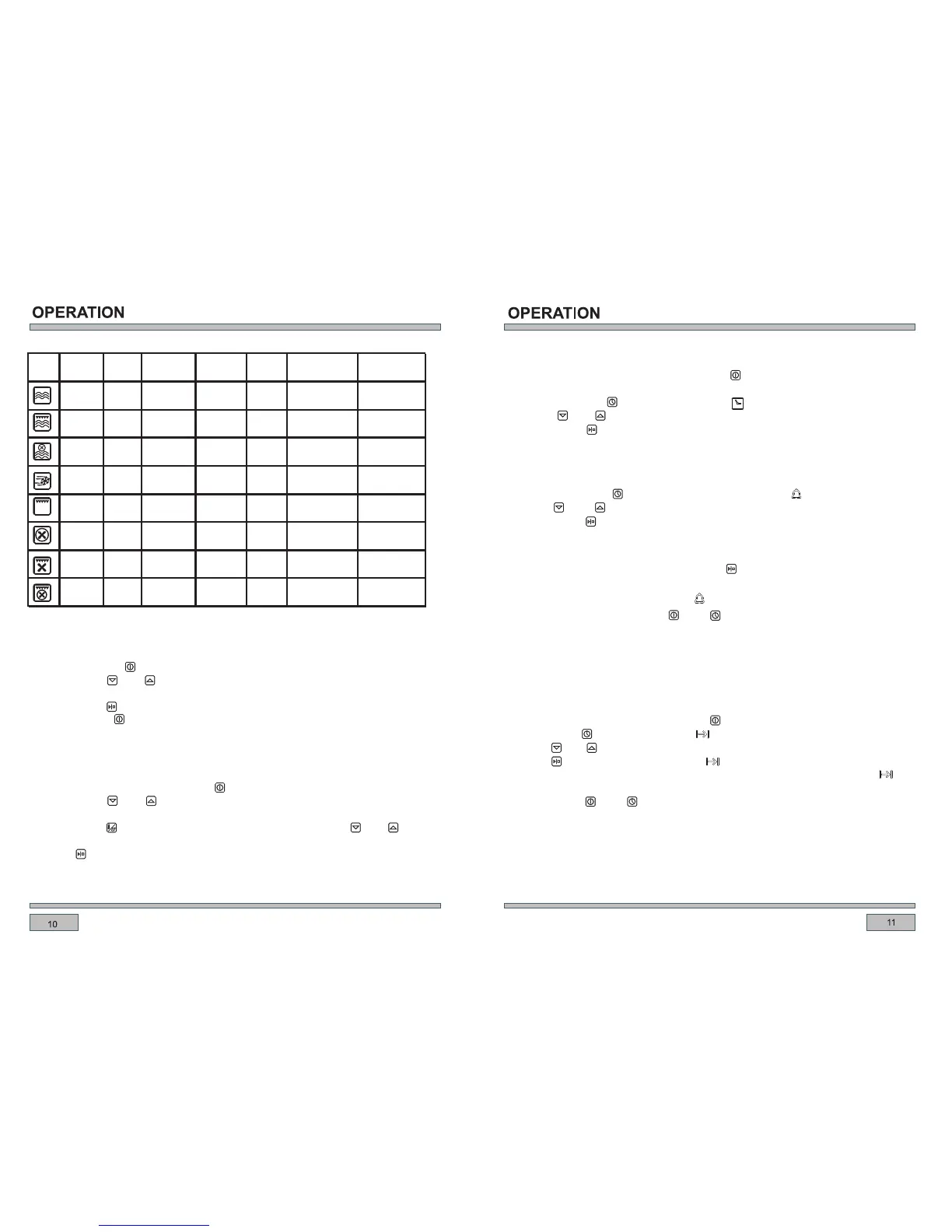
Icon
Function
Preset
( ℃)
Time
(min )
Adjustable
Microwave power
Microwave
1600W /
1
900-100W
Microwave
1750W
180 10
1600W/
1600W / 10
Top grill
1750W 180
Defaut
2850W
1750W
Defrost
2850W
Power
Opened the oven
1.Touch the button “ ” 2s turn on the oven.
2.Touch button or to select function.
3.A suggested temperature will appear on the temperature display.
4.Touch button
5.Touch ON/OFF button to switch off the oven. “ ”
“ ” “ ”
“ ” to confirm.
Function selection / Temperature regulation
1.Touch and hold the ON/OFF button to switch on the oven.
Touch button to set
the temperature.
Touch to confirm the selected temperature.
6.Oven start working.
“ ”
2.Touch button “ ”or “ ” to select function.
3.A suggested temperature will appear on display and blinking when function selected.
4. “ ” enter theTEMPERATURE MODE, Touch button “ ”or “ ”
5. “ ”
Setting the time
The clock can be set when the ON/OFF button in OFF position.
At power on, displayed .
Touch or to set time.
Touch button to confirm, or will auto confirm after 5 seconds.
“ ”
1. “ 0:00 ”
3. “ ” “ ”
4. “ ”
Timer
2. Touch clock button “ ” TWICE , time display “0:00” and “ ” keep flashing.
3. Touch “ ” or “ ” to set time.
4. Touch button “ ” to confirm.
The timer will not be activated without pressing “ and will return to time state. ”
Caution!
The function of alarm can be canceled by setting the time to when the time is
ran out, voice will be activated with the “ ” flashing for reminding the user.
“0:00” ,
Alarm “ ” and “ ”
30 seconds.
can be stopped by pressing , or it will stop automatically after
Semi-automatic operation
This mode to set the oven cooking time, when time run out, oven stop working and alarm
sound to remind customer.
Set the cooking time when ON/OFF button “ ” is on, and the oven is working:
1.Touch button “ ” twice, cooking time “ ” flashing, dispaly shows “ 0:00 ” .
2.Touch “ ” or “ ” to set the cooking time .
3.Touch “ ” to confirm, the cooking time “ ” lights on, time set saved.
4.Set cook time run out, oven stop heating, alarm sounds, the cooking time icon “ ”
and temperature icon both flashing.
5. Touch button “ ” and “ ” ,the alarm signal will go off. or it will be turned off
automatically after 30 seconds.
1. At power on, displayed “ 00.00 ” .
2. Touch clock button “ ”time display “ 0:00”and “ ” keep flashing.
temperature
Preset
and grill
+rear heater
Microwave
( W)
800
400
400
/
power
1600W/
Microwave
+fan
Rear heater
+fan
fan
Top grill+
rear heater
Top grill+
+fan
1100W
Adjustable
temperature range
/
110-180
°C
/
50-250°C
range
200-600W
180 10400
110-180
°C
200-600W
/
/
180
Defaut
/ 50-250°C
/
180
Defaut
/ 50-250°C
/
180
Defaut
/ 50-250°C
/


 To Next Page
 Loading...