Tool Description
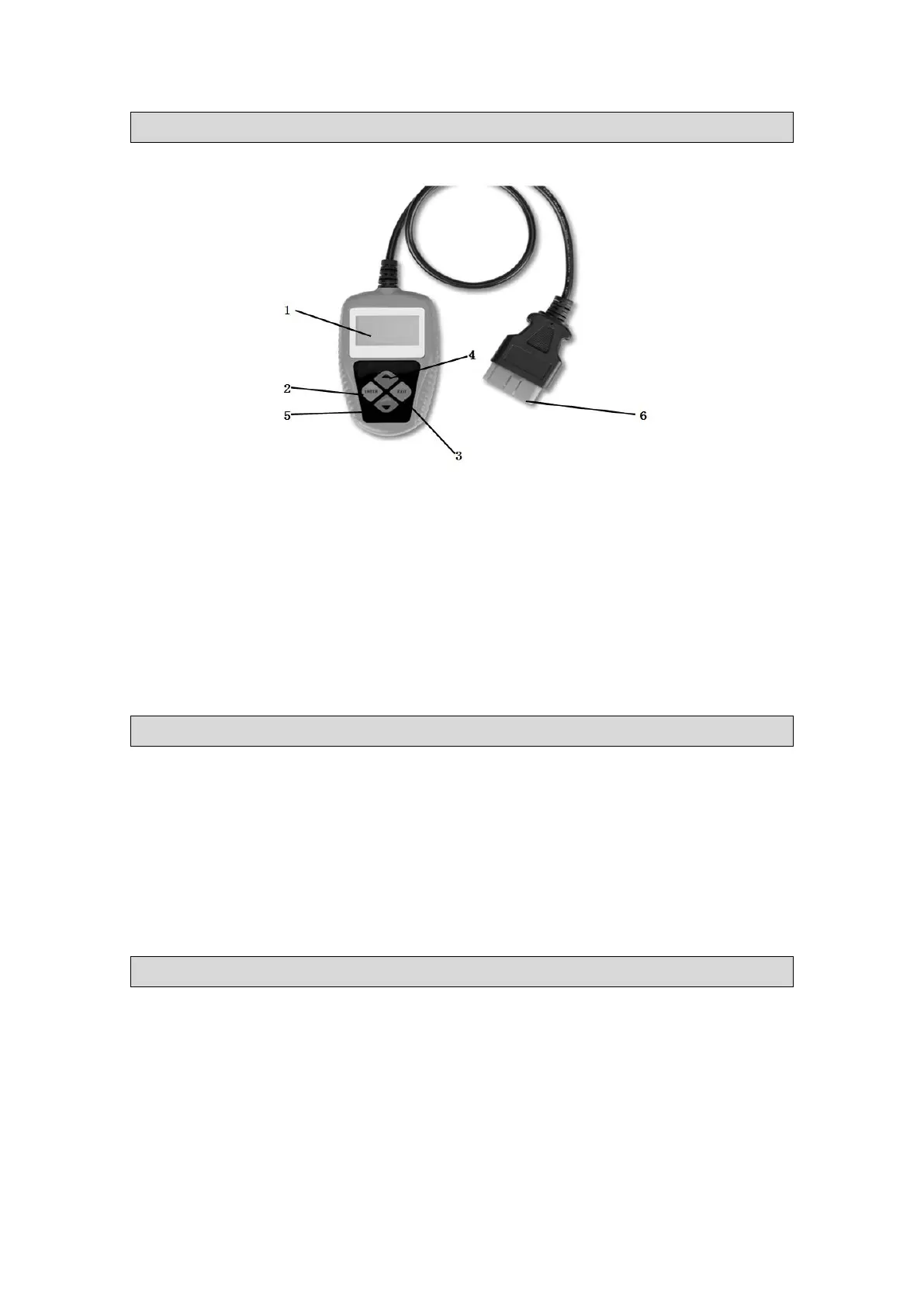
1. LCD DISPLAY Indicates test results. It is a backlit 2-line display with 8 characters on each
line.
2. ENTER BUTTON Confirms a selection (or action) from a menu list, or returns to the main
menu.
3. EXIT BUTTON Scrolls through menu items or cancel an operation
4. & 5. UP & DOWN BUTTON Chooses to up and down items
6. OBD II CONNECTOR Connects the Code Scanner to the vehicle’s Data Link Connector
(DLC).
Instructions
Follow instructions listed below each time the tool is connected to a vehicle providing proper
function.
Turn the ignition off, Key off, Engine off.
Release the park brake and make sure the car is properly blocked with wheel chocks.
Locate the vehicle’s 16-pin Data Link Connector (DLC).
Plug into the OBDII cable to the vehicle’s DLC.
Turn the ignition on Key on, Engine off.
Diagnose EPB On Volkswagen
Reading Codes
1. Use UP/DOWN button to select VOLKSWAGEN from Main Menu and
press ENTER button to confirm.
>1) VOLKSWAGEN
2) AUDI
3) MERCEDES
4) VOLVO
2. Use UP/DOWN button to select Read Codes from Select Function menu and


 To Next Page