DRIVE “JAGUAR REPLACEMENT KIT”
F / 1
WITHOUT OUR CONSENT THE REPRODUCTION OR COMMUNICATION TO THIRD PARTIES IS PROHIBITED BY LAW
ANNEXE “A”
SUBJECT TO CHANGE WITHOUT NOTICE
Drive Parametrization
1-
USER INTERFACE
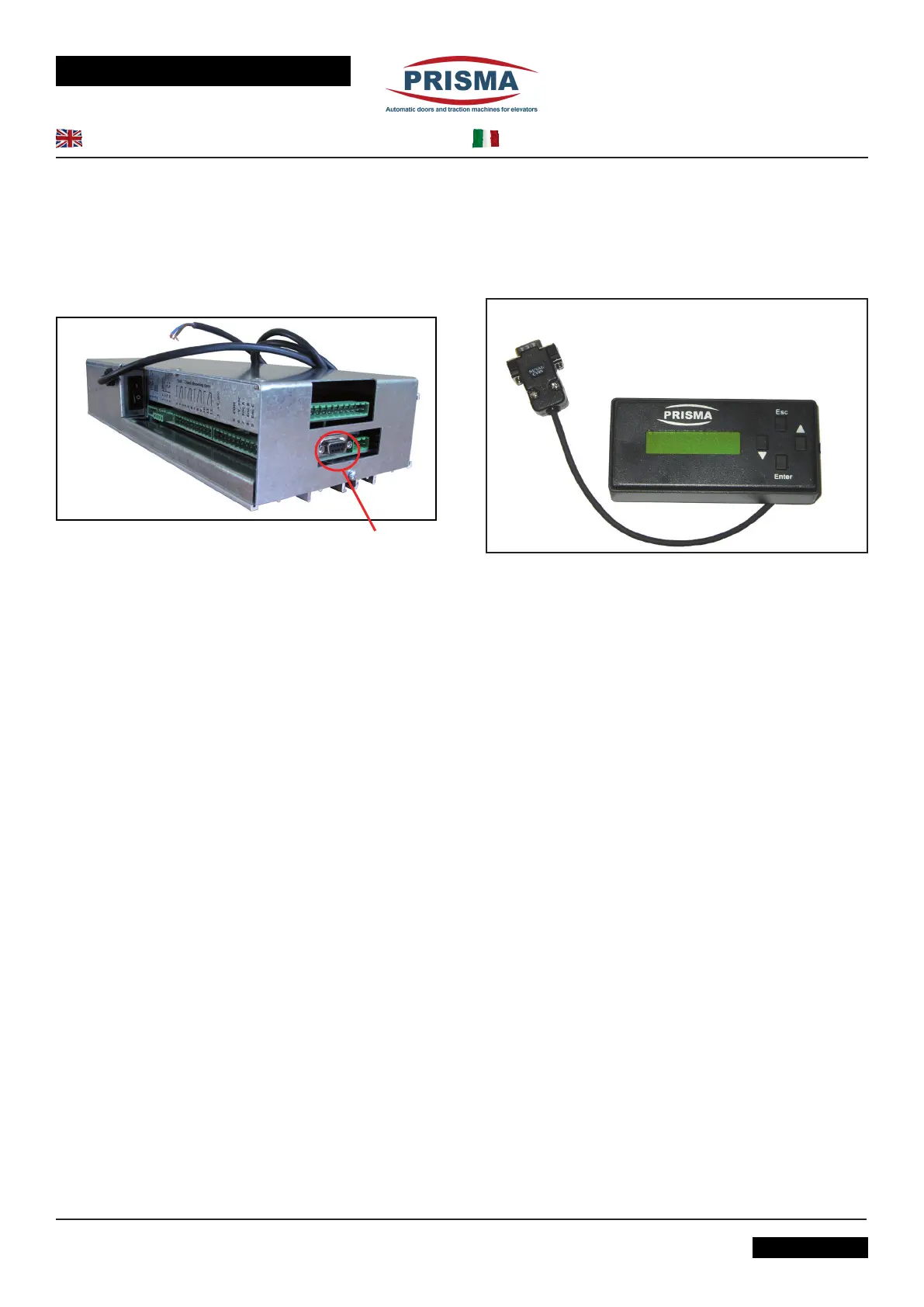
The programming pad (user interface) is made up of a keyboard
with 4 buttons (▼, ▲, Enter, Esc) and an alphanumerical display
(with 16 characters on two lines) and communicates with the drive
via a RS232 serial connection (Connector X6).
X6
Using the ▼ and ▲buttons it is possible to select the commands
to give to the drive and con rm them by pressing the ENTER
button.
When the user interface is connected to the X6 terminal, it recalls
the current drive parameters in use and makes them visible to
the user for checking or changes.
When turned on, PRISMA will appear on the alphanumerical
display on the keyboard. By pressing ENTER the interface menu
is activated.
The interface is structured with 5 main menu levels: Language,
Commands,OpeningProle,ClosingProle,Auxiliaries.
All of the parameter changing operations may be performed with
the door in movement. They must be saved using the SAVE
command and will be applied only at the following actioning.
2-
LANGUAGE
Using the ▼ and ▲ buttons it is possible to choose the desired
language and conrm it using ENTER, thus immediately switching
to the newly selected language; this selection can be saved using
the Save command in the command menu.
3-
COMMANDS
• The commands Open and Close have priority over the
elevator control board commands and open and close the
door immediately.
• The Save command causes all of the datas handled by the
interface to be saved in the permanent memory of the drive.
• In any case the modied datas are permanently saved after
every applied change.
• The Default command replaces all the current data in use with
the original factory settings, except for the security torque,
which remains the last saved one.
A TERMINE DI LEGGE E’ VIETATA LA RIPRODUZIONE O COMUNICAZIONE A TERZI SENZA NOSTR A APPROVAZIONE
ALLEGATO “A”
SOGGETTO A MODIFICHE SENZA PREAVVISO
31_42_01_01REV03
Parametrizzazione del Drive
1-INTERFACCIA UTENTE
L’interfaccia utente (pad di programmazione) consiste in
una tastiera con 4 pulsanti (▼, ▲, Enter, Esc) ed un display
alfanumerico (a 16 caratteri su due linee ) e comunica con il drive
tramite una connessione seriale RS232 (Connettore X6).
Tramite i tasti ▼ e ▲ è possibile selezionare i comandi da impartire
al drive e confermarli con la pressione del tasto ENTER.
All’atto della connessione con X6 l’interfaccia interroga il drive sui
parametri memorizzati e li rende disponibili all’utente per essere
controllati o modicati.
Al momento dell’accensione, sul display alfanumerico dell’interfaccia
utente appare la scritta PRISMA, premendo ENTER si attiva il
menu dell’interfaccia.
L’interfaccia è strutturata su 5 menù principali: Lingua, Comandi,
Profilo Apertura e Profilo Chiusura, Ausiliari.
Tutte le operazioni di modica dei parametri possono essere
effettuate con porta in movimento. La loro memorizzazione
avviene attraverso il comando SAVE ed è applicata al ciclo
successivo.
2-LINGUA
Tramite i tasti ▼ e ▲ è possibile scegliere la lingua desiderata,
la conferma tramite ENTER determina il passaggio immediato alla
lingua selezionata, tale scelta potrà poi essere salvata tramite il
comando Salva nel menu comandi.
3-COMANDI
• I comandi Apri e Chiudi hanno priorità rispetto ai comandi del
quadro di manovra dell’ascensore e fanno aprire o chiudere la
porta immediatamente.
• Il comando Salva fa sì che tutti i dati gestiti dall’interfaccia
siano salvati sulla memoria permanente del drive.
• In ogni caso i dati vengono salvati in modo permamenente
dopo ogni modica.
• Il comando Default sostituisce tutti i dati memorizzati con
quelli originali di fabbrica tranne la corrente di sicurezza che
resterà quella ultima memorizzata.



 To Next Page
 Loading...