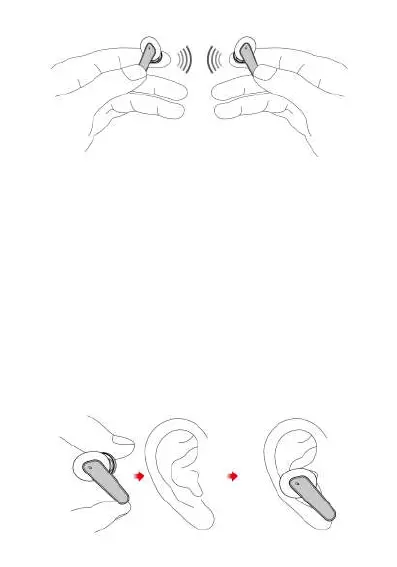
Remove Pairing
Wearing
Put the earbuds into ears lightly with Mic towards to the
front side.
Under the earbuds power off state, touch the multi-function
button of two eabuds at the same time for 12 seconds, until
the earbuds LED lights keeping in blue for 5 seconds with
“dong dong dong dong” prompt, the resetting of earbuds
power off is successful. Put the earbuds into charging case
to activate them and then take out the earbuds, they will
automatically pair, the auxiliary earbud light will power off,
after the the two earbuds paired successful, and the main
earphone will enter into pairing state(the LED light is
flashing blue & red). The mobile phone searches for "TWS158
Prixton" and connect it, the connection between earbuds
and mobile phone is complete.


 To Next Page