Need help?
Do you have a question about the Pro-Elec PEL00410 and is the answer not in the manual?
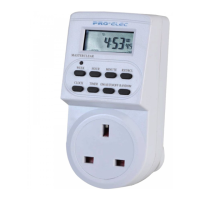
Clear all data in memory including current time and all programs.
Set or cancel random function.
Set current time, 12/24 hr mode, summertime function.
Set programs, select 12/24 hr mode, fast advance.
Select operating modes of timer.
Set week day or block of days.
Set hour combined with CLOCK or TIMER.
Set minute combined with CLOCK or TIMER.
Override or recall overridden programs.
Shows status of power output. ON for power, OFF for no power.
Plug in timer, charge for 14 hours to charge backup battery.
Clear all current information using MASTER CLEAR button.
The Pro-ELEC 24-Hour Digital Plug-in Timer, identified by part number PEL00410, is a versatile device designed to automate the control of electrical appliances by scheduling their power on and off times. This user-friendly timer allows for precise scheduling with a digital display and intuitive button controls, making it suitable for a wide range of household or office applications where automated power management is desired.
At its core, the Pro-ELEC timer serves as a programmable switch that can be plugged into a standard 250V AC, 50Hz power outlet. It enables users to set up to 10 distinct ON/OFF programs, each with a minimum step of one minute, providing granular control over connected devices. The timer features a digital display that shows the current time, including seconds, and indicates the operational status. An output LED indicator clearly shows when power is being supplied to the connected appliance, illuminating when the output is ON and turning off when there is no power output.
One of the key functionalities is the ability to set the current time, which is crucial for the accurate execution of all programmed schedules. This involves simultaneously pressing the CLOCK and WEEK buttons to select the correct day, followed by using the HOUR and MIN buttons to adjust the current hour and minute. The timer supports both 12-hour and 24-hour display modes, which can be toggled by pressing the CLOCK and TIMER buttons concurrently. Additionally, it includes a summertime function, activated by pressing CLOCK and ON/AUTO/OFF simultaneously, which advances the clock by one hour to accommodate daylight saving changes. Reverting to winter time is equally simple, moving the clock back one hour and removing the 'S' indicator from the LCD.
The programming of ON/OFF cycles is straightforward. Users initiate the process by pressing the TIMER button, which brings up the "ON_1" setting for the first program. Here, the WEEK button allows for the selection of specific days or blocks of days, offering 16 different combinations, ranging from individual days (MO, TU, WE, TH, FR, SA, SU) to various groupings (e.g., MO, TU, WE, TH, FR, SA, SU; MO, TU, WE, TH, FR; SA, SU; MO, TU, WE, TH, FR, SA; MO, WE, FR; TU, TH, SA; MO, TU, WE; TH, FR, SA; MO, WE, FR, SU). Once the desired day(s) are selected, the HOUR and MIN buttons are used to set the exact ON time. Pressing TIMER again transitions to the "OFF_1" setting, where the corresponding OFF time is programmed using the same method. This sequence is repeated for each of the 10 available programs. The timer prioritizes OFF programs over ON programs in cases of overlapping schedules, ensuring that a device will turn off if an OFF program coincides with an ON program.
Beyond scheduled operations, the timer offers a "RANDOM" function, which introduces an element of unpredictability to the ON/OFF cycles. When activated, this function randomly advances the programmed settings by 10 to 31 minutes, specifically between 6:00 PM and 6:00 AM. This feature is particularly useful for security purposes, as it can simulate occupancy by making lighting or other appliances turn on and off at slightly varied times, deterring potential intruders. The random function can only be executed in AUTO mode and cannot be set during program settings.
The device also provides flexible operating modes: MANUAL ON, AUTO, and MANUAL OFF. These modes are cycled through by pressing the ON/AUTO/OFF button. In AUTO mode, the timer executes all programmed schedules. In MANUAL ON mode, the power output is continuously ON, overriding all programs. Conversely, in MANUAL OFF mode, the power output is permanently OFF, also ignoring all programmed settings. When transitioning from MANUAL ON to AUTO, the timer maintains the MANUAL ON setting until the next scheduled timer event. The RST/RCL button allows users to override active programs or recall previously overridden programs, offering immediate control when needed.
The MASTER CLEAR button is a critical feature for resetting the device. When pressed with a sharp object, it clears all data from memory, including the current time and all programmed settings, effectively returning the timer to its factory default state. This is particularly useful for starting fresh with new programming or troubleshooting.
Before initial use, the timer requires a charging period of approximately 14 hours by plugging it into a power outlet to charge its internal memory backup battery. This battery ensures that programmed settings and the current time are retained even during power outages, preventing the need for reprogramming after a loss of mains power. After charging, a MASTER CLEAR operation is recommended to ensure all previous data is erased, preparing the device for accurate setup.
The design emphasizes ease of use, with clearly labeled buttons for WEEK, HOUR, MIN, CLOCK, TIMER, ON/AUTO/OFF, RANDOM, and RST/RCL. The ability to hold down the WEEK, HOUR, or MIN buttons for rapid forward counting significantly speeds up the setting process, especially when adjusting times or days over a wide range. The digital display is designed to be clear and easy to read, providing immediate feedback on settings and current status.
The 16 combinations of day or blocks of days offer extensive flexibility for scheduling. For example, a user can program a light to turn on every weekday, or only on weekends, or even on specific non-consecutive days. This adaptability makes the timer suitable for a variety of routines, from automating home lighting and heating to controlling office equipment.
The inclusion of both 12/24 hour modes caters to different user preferences, ensuring that the time display is familiar and comfortable for everyone. The summertime function is a thoughtful addition that simplifies the adjustment for daylight saving, eliminating the need for manual time changes twice a year.
The manual override capabilities (MANUAL ON/AUTO/MANUAL OFF) provide immediate control over connected appliances, allowing users to temporarily deviate from programmed schedules without having to reprogram the device. This is useful for situations where an appliance needs to be turned on or off unexpectedly, such as for a quick task or an extended absence.
The Pro-ELEC timer is designed for minimal maintenance. Its robust construction is intended for long-term reliability. The internal NiMH 1.2V battery provides over 100 hours of backup, ensuring that settings are preserved during power interruptions, reducing the need for frequent reprogramming.
For cleaning, the manual specifies that the timer should be removed from the mains power supply and wiped with a dry cloth. It explicitly warns against immersing the timer in water or any other liquid, which is a standard precaution for electrical devices to prevent damage and ensure user safety. This simple cleaning procedure helps maintain the device's appearance and functionality over time.
The timer is intended for indoor use and should not be subjected to extreme temperatures outside its operating range of -10°C to +40°C. Users are also advised against plugging in appliances that exceed the maximum load of 13 Amps (3200W) to prevent overloading and potential damage to the timer or the electrical system. Furthermore, it is recommended that heaters and similar appliances, which should never be left unattended during operation, not be connected to timers. This safety guideline underscores the importance of responsible usage and highlights the timer's primary role in automating less critical or supervised appliances.
Overall, the Pro-ELEC 24-Hour Digital Plug-in Timer is a practical and reliable solution for automating power control, offering a balance of advanced features, ease of use, and straightforward maintenance.
 General
| Timer Type | Digital |
|---|---|
| Operating Voltage | 230V AC |
| Contact Configuration | SPST |
| Number of Programs | 8 |
| Minimum Switching Time | 1 minute |
| Display Type | LCD |
| Voltage | 230 V |
| Timer Range | 24 hours |
| Number of Sockets | 1 |
| Weight | 150g |
| Pin Configuration | 3-pin |
| Maximum Load | 13A |

 To Next Page