EasyManua.ls Logo

Pro-face GP-3750T - Page 14

Pro-face GP-3750T
29 pages
Print Icon
To Next Page IconTo Next Page
To Previous Page IconTo Previous Page
Loading...
Chapter 3 Replacement Procedure
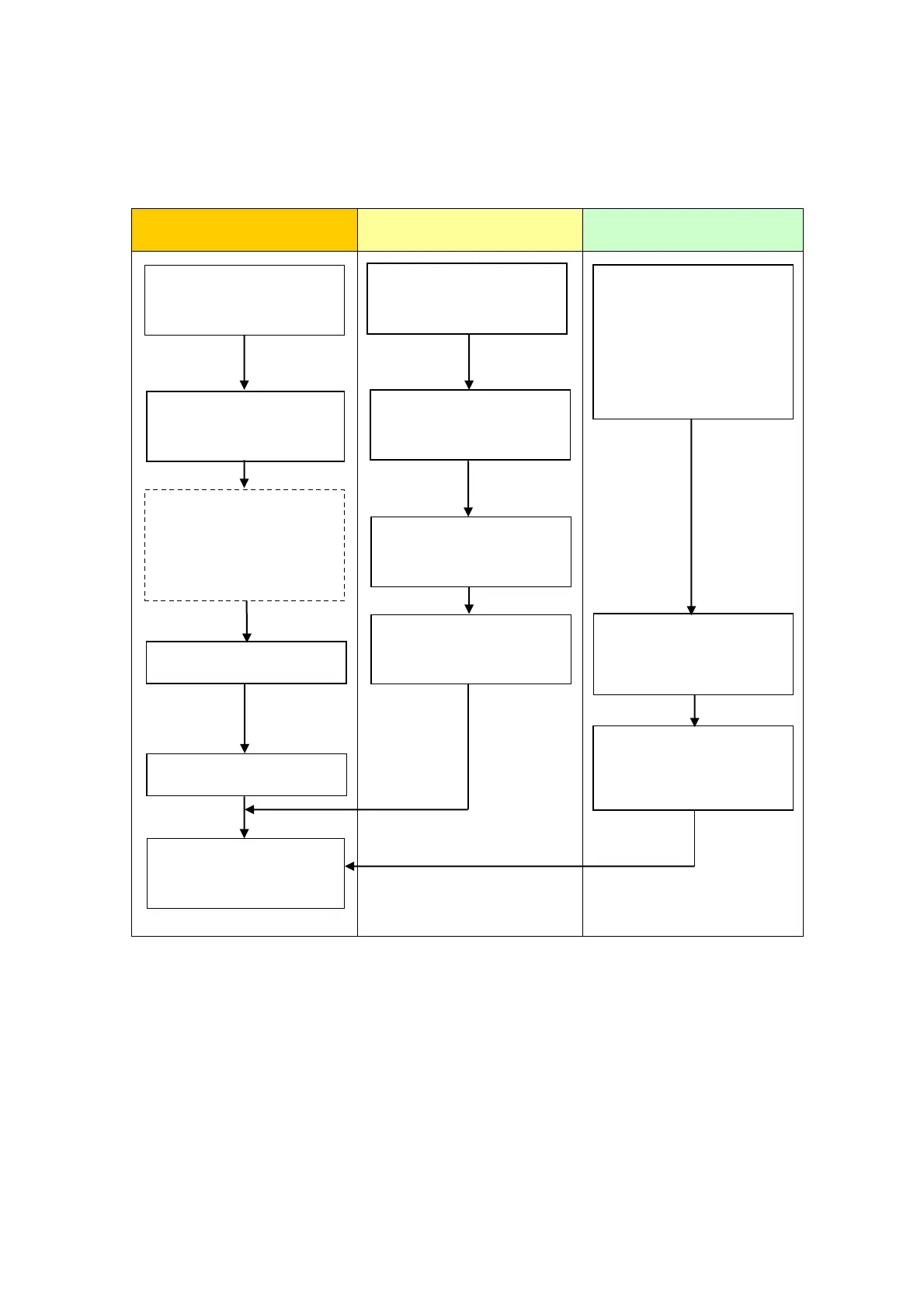
3.1. Work Flow
Installation
Screen
Communication
Check the compatibility of
hardware in Chapter 2.
Receive screen data from
GP3000 Series. *1
Remove GP3000 Series.
Install SP5000 series.
Connect the power cord.
Check the performance
and start operation.
Change the received data
on GP-Pro EX.
Check and modify the
data on GP-Pro EX.
Transfer the screen data
to SP5000 series.
Check the connection
between SP5000 series
and a PLC in the GP-Pro
EX Device/PLC
Connection Manual.
Connect SP5000 series
and PLC with the PLC’s
cable.
Start connection and
check the communi-
cation.
*1: This step is required if screen data is saved only in the GP unit, not in any other device.
When replacing GP3000
series to SP5000 series
process the panel.

Related product manuals