7
IMPORTANT INFORMATION
The detection result will be affected by the size and material of the detected object, as well as
the material and condition of the detected surface and other factors. If the cable is uncharged the
probe depth will be reduced.
Prior to operating this tool, make sure the area marked “SENSOR” in the bottom of the housing is
dry. If required, wipe dry using a dry and clean cloth.
If the tool has been subjected to an extreme temperature change, allow the sensor to adjust to
the ambient temperature before use.
Environmental influences, such as humidity or closeness to electrical devices (such as a
microwave oven), can influence the measurement accuracy. Surface quality and condition of the
walls (e.g., moisture, metallic building materials, conductive wallpaper, insulation materials and
tiles) as well as the amount, type, size and position of the objects can lead to inaccurate
measurements.
Due to uneven density of tile work on cement board (used in kitchens, bath/wash rooms) wall
sensor may generate false indications.
Do not expose product to rain or wet conditions or long term exposure to the sun.
Do not use in harsh environment. Use only in temperature range -10C° - + 40C°.
To increase battery life, turn off the unit after each use.
FOR THE BEST SCANNING RESULTS
Avoid wearing rings or watches when using the detector. Metal may cause inaccurate testing.
Move the tool evenly over the surface without lifting it or changing the applied pressure.
The detector must always be in contact with the surface during scanning.
When holding the tool make sure your fingers or any other body part do not touch the scanned
surface.
Always scan slowly for maximum accuracy and sensitivity.
OPERATION
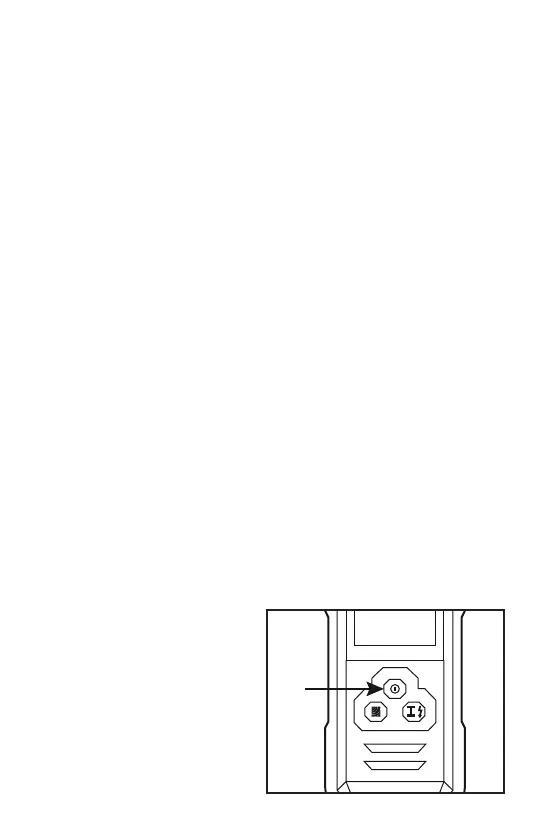
TURNING THE UNIT ON AND OFF
Prior to operating this tool, make sure the area
marked “SENSOR” in the bottom of the
housing is dry. If required, wipe dry using a
dry and clean cloth.
Press and the On/Off button to turn on the
unit. Press the On/Off button again to turn the
unit off.



 To Next Page
 Loading...