3
CAUTION: Only make connections when the S88 is turned off.
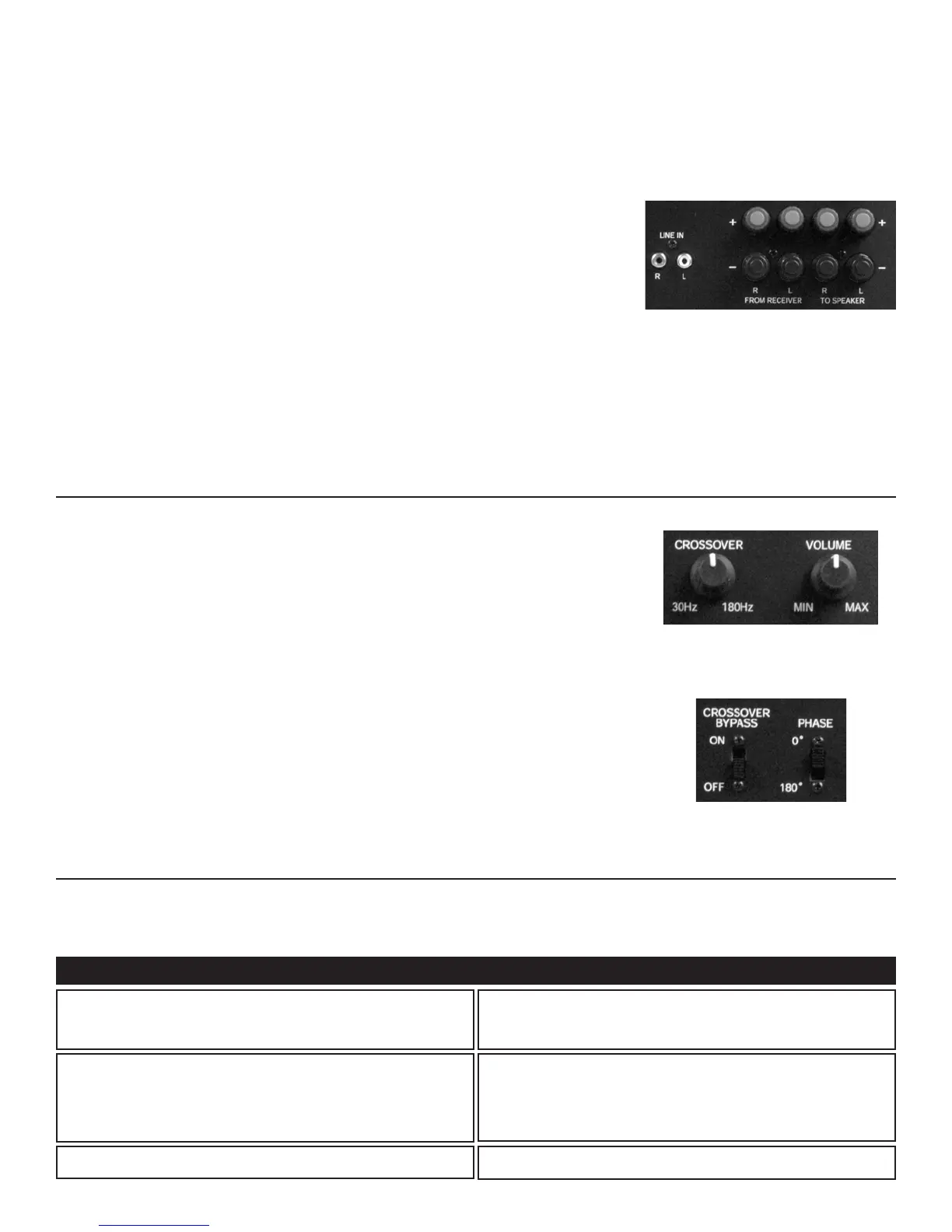
Connecting the Line Level Audio Inputs (See Figure 1)
If your surround sound receiver or amplifier has only one subwoofer output, simply plug it into the Left
Line Input. If your receiver or amplifier has a built-in preamplifier, the left and right pre-outputs can be
connected to the left and right line level inputs.
Connecting the Speaker Wires (See Figure 1)
If you choose to hookup speaker wire instead of RCA line level patch cords, follow these instructions
when using the Speaker Level Outputs of your receiver or amplifier to connect to the S88.
For best results, use speaker wire that is at least 16 gauge. For runs longer than 75 feet, 14 gauge wire
is recommended.
Wire larger than 14 gauge is not recommended because it may not fit into the connector. For best results,
strip all wire insulation no more than ⁄" from the end before inserting into the connector.
1. Strip the speaker wires’ insulation ⁄" from the end.
2. Connect the wires from the speakers to the appropriate location above “To Speakers”. Please observe
proper polarity of the connections (+ to + and – to –).
3. Connect the amplifier’s or receiver's speakar outputs to the appropriate location above “From
Receiver”. Please observe proper polarity of the connections (+ to + and – to –).
CAUTION: If the “To Speakers” and “From Receiver” connections are reversed, a short could result across
the amplifier or receiver output terminals, which may seriously damage your amplifier or receiver. Please
double-check all connections before turning on your amplifier or receiver.
INSTALLATION
The S88 Powered Subwoofer is designed to function trouble-free. Most problems occur due to operating errors. If you have a problem, please check
the troubleshooting list first. If the problem persists, contact your authorized Proficient dealer or Proficient Technical Support at 800.448.0976.
TROUBLESHOOTING
A hum or buzzing sound is heard.
The sound may be caused by a ground loop in the system. Try to eliminate
this by reversing the AC plugs of other components in the system.
Try plugging the receiver into another outlet.
Other causes may include faulty cables.
The S88 will not turn on.
The subwoofer must be plugged into a live AC outlet. The power switch on
the back panel must be on. A signal must be playing into the input jacks.
No sound is heard. Audio cable to the receiver is not connected properly or the cable is bad. Use
another cable that you know is good.
Check all wire connections and plugs.
Problem Possible Causes & Solutions
Figure 1:
Line Level Inputs
Speaker Level Inputs/Outputs
Once the S88 is connected, use the controls described below to make adjustments so that it will blend
seamlessly with the other speakers in your system.
Power Switch
This switch turns the S88 on or off. The Standby light will illuminate green when switched to the “On”
position; when “Off”, the Standby light will illuminate red.
Volume Knob (See Figure 2)
Use this control to match the output of the S88 to that of the main speakers in the system. We
recommend that you play a variety of material before selecting a setting. Start with the control in
the 12 o'clock position for the optimal setting and adjust to your system as necessary.
Crossover Knob (See Figure 2)
Use this control to adjust the upper frequency limit of the S88. The purpose is to control the overlap the
upper frequencies of the sub and the main speakers’ lower frequencies. Start in the 12 o’clock position for
the optimal setting.
Crossover Bypass Switch (See Figure 3)
Bypass the internal crossover on the S88. The default setting is “Off”.
Phase Switch (See Figure 3)
Allows you to toggle between 0° and 180° phase modes. Listen to the system and leave the switch in the
position that has more audible bass. The default setting is “0˚”.
OPERATION
Figure 2:
Volume / Crossover Knobs
Optimal Settings Indicated
Figure 3:
Crossover Bypass / Phase Switches
Default Settings Indicated


 To Next Page
 Loading...