16
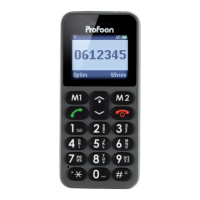
3.2 Touch-buttons
Call button:
To accept incoming calls or call
numbers. In standby mode:
Opens the call log.
Left soft-button / M1 button:
This button performs the function
shown above the button in the dis-
play. In stand-by: dials the number
programmed as M1 (press and
hold)
Power/end button:
To end your current phone con-
versation. In standby mode: Press
and hold for 3 seconds to turn off
the phone, press again for 3 sec-
onds to turn on the phone. When
receiving an incoming call: Refuse
the call.
During SOS: stops the SOS mode
SIZE: 112.5mm * 52.4mm * 13.7mm
PROJECT: G96
ID DESIGN final (black) 德仑
M1 M2
P
1
2
3
4
5
6
7
8
9
0
ABC
DEF
GHI
JKL
MNO
PQRS
TUV
WXYZ
*
#
SIZE: 112.5mm * 52.4mm * 13.7mm
PROJECT: G96
ID DESIGN final (black) 德仑
M1
M2
P
1
2
3
4
5
6
7
8
9
0
ABC
DEF
GHI
JKL
MNO
PQRS
TUV
WXYZ
*
#
SIZE: 112.5mm * 52.4mm * 13.7mm
PROJECT: G96
ID DESIGN final (black) 德仑
M1 M2
P
1
2
3
4
5
6
7
8
9
0
ABC
DEF
GHI
JKL
MNO
PQRS
TUV
WXYZ
*
#


 To Next Page
 Loading...