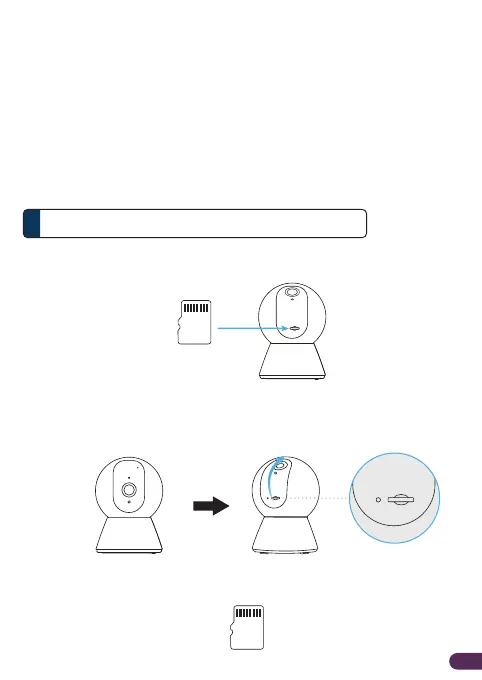
How to insert microSD Card
Step 1. Manually tilt the DS-3101's camera lens upwards until it reaches its
maximum tilt angle.
Insert a microSD Card into the slot to enable recording function.
microSD Card Storage (Optional)5
EN3
Note:
• For physical placement, please do consider the router’s wireless coverage. As a generic
guideline, use another 2.4GHz Wi-Fi Client at the intended location to test the Wi-Fi coverage
and stability prior installing the camera.
• Please ensure that the mobile phone is connected to the Wi-Fi’s 2.4GHz network during the setup.
B. Positioning camera device
i) The camera could be placed on a shelf or any flat surface, alternatively
it can be mounted on the ceiling/wall.
ii) To mount the camera on the ceiling/wall:
• Fasten the mounting bracket with screw provided on the ceiling
• Slot the camera according to the mounting bracket
Step 2. Ensure that the microSD Card contact pin is facing up.
microSD Card


 To Next Page