1
3 4 5
6 7 8 9 10 11
12 13 14 15 16 17
18 19 20 21 22 23
24 25 26 27 28 29
30 31 32 33 34
36 37 38
35
2
123
4
5
6
7
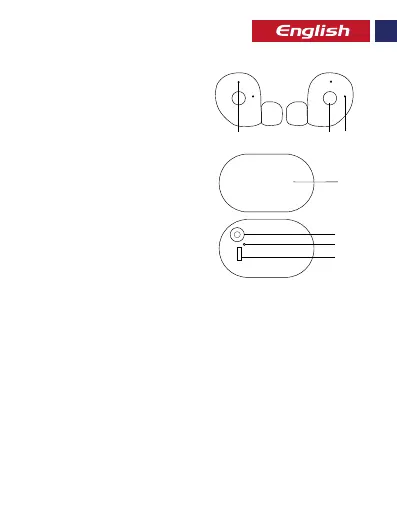
Appearance & Interface Description
1. Led Indicator
2. Multi-function Button
3. Mic
4. Earbuds Charging Indicator
5. Power Button
6. Charging Case Led Indicator
7. Charging Case USB Charging port
Operation Instructions
1. Switching PrimeBud On/Off
• To turn on PrimeBud, press and hold the Multi-function Button on one of the earpieces for about 5
seconds until the Blue LED and red LED starts flashing alternately.
• To turn off PrimeBud manually, press and hold the Multi-function Button on one of the earpieces
for about 4 seconds.
2. Pairing PrimeBud
• Before connecting PrimeBud to your device, make sure that PrimeBud is in pairing mode.
• To enter pairing mode, press and hold the Multi-function Button on one of the earpieces for 5
seconds, until Blue LED and red LED starts flashing alternately.
• Press and hold the Multi-Function button on the other earpiece for 3-4 seconds until the red LED’s
start flashing and the LED on the first earpiece flashes blue and red.
• Turn on the Bluetooth function of the device you wish to connect and search for “PrimeBud”. From
the list of found devices, select “PrimeBud”.
• PrimeBud is now connected to your device.


 To Next Page