1)
2)
3)
1)
2)
3)
4)
TELEFONO 1
10:35 09/06
Menu Rubrica
1)
2)
3)
4)
5)
1)
2)
3)
4)
5)
6)
7)
8)
9)
4 TULIP base unit
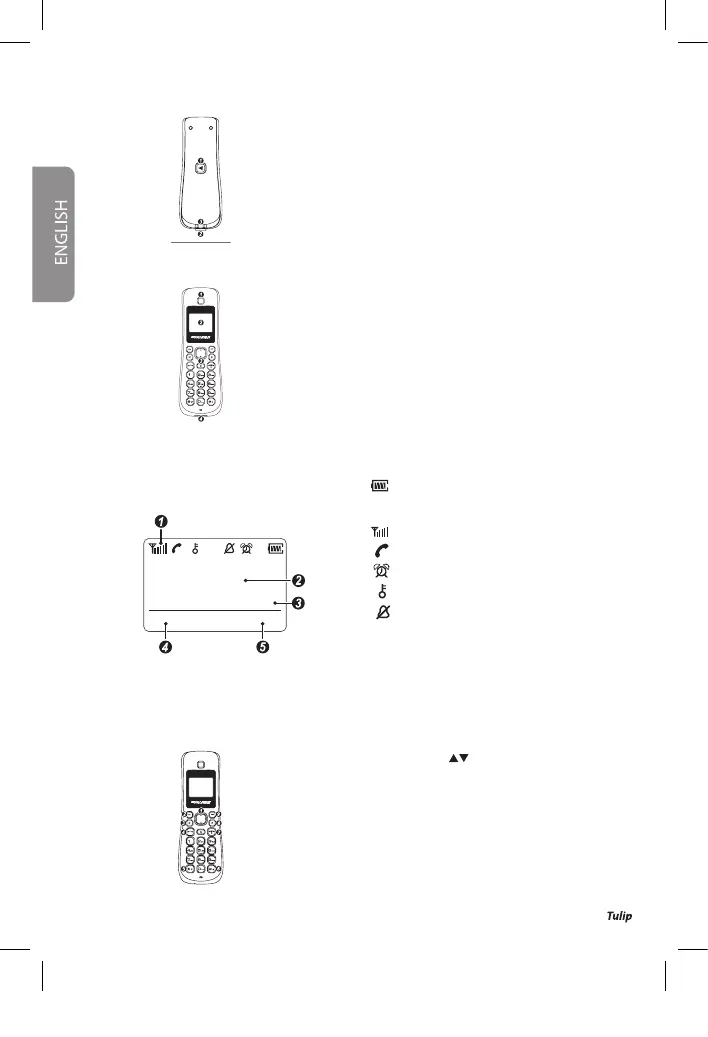
Handset Search / Handset Registration Key
LED Incoming Call / Line Seized / Handset Search
/ Handset Registration
Contacts for recharging the handset battery
5 TULIP Cordless (icons on the display and description of the keys)
Earphones
Dots matrix backlit display
Alpha-numeric keyboard
Microphone
Icons on the display
The Tulip’s dots matrix display is able to show the
following icons and information:
Icons on the display
: Charging status of the battery (the
white coloured bars indicates the
real charge level)
: Signal strength indication
: Line seized
: Alarm enabled
: Keypad lock enabled
: Sounds disabled
Name and number of the handset (predened: Handset 1)
Date and Time
Left Function Key
Right Function Key
Navigation key / with adjustment keys for the listening volume
(in conversation)
Function key left
Handsfree key (activation/deactivation during conversation)
Call answer key/list of the last 10 calls performed/line seizing
(while keeping pressed)
Key * : Activates and deactivates the microphone (while keeping pressed, during conversation )
Key # : Activates and deactivates the key lock (in standby, while keeping pressed)
Call termination key / back to stand-by / switching cordless on/o
Key R (Flash)
Function key right
Keys’ function
The Tulip’s dot matrix display is able to show the following icons and information:
4
User Manual mod.
Libretto_guida_22072011_v.indd 14 25/07/2011 11:12:35


 To Next Page