WALL MOUNT INSTALLATION
INSTALLING REMOVING THE BASE STAND
WARNING
/
:The
LED Display is very fragile and must be protected at all times when removing the b ase
Stand
Be sure that no hard or sharp object or anything that could scratch or damage the LED display comes into
contact with it Do NOT exert pressure on the front of the unit at any time because the screen could crack
,
.
. .
NOTE
Remove the base stand before mounting the unit on the wall.
13
8”
8”
M5
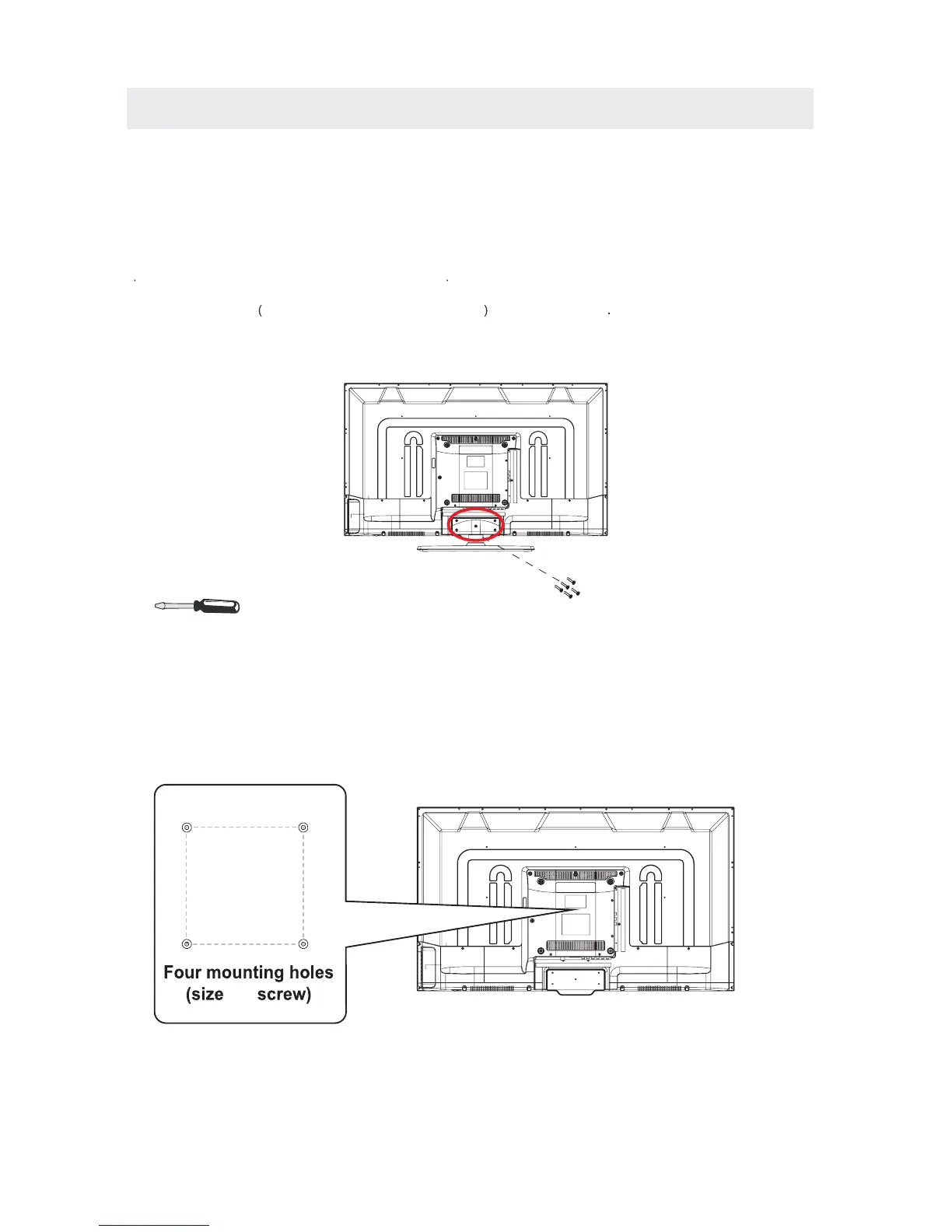
1 Disconnect all cables or cords connected to the unit
2Lay the unit down on a flat surface with the back side facing up Please make sure to place a soft
cushioned material such as a pillow or thick piece of foam beneath t h e s cr e en
3To remove the base stand loosen screws off the holes then pull downwards to release
the base stand
. .
.,
.
MOUNTING ON THE WALL
This unit is VESA-compliant, and is designed to be wall-mounted with a VESA-compliant
(200mm x 200mm) mounting kit designed for flat-panel TV's (not supplied). Mount this unit according to
the instructions included in the mounting kit.
Length of screw should not exceed 6 mm.
8”x
8”













 To Next Page