Using Your TV and Remote
With Remote Buttons
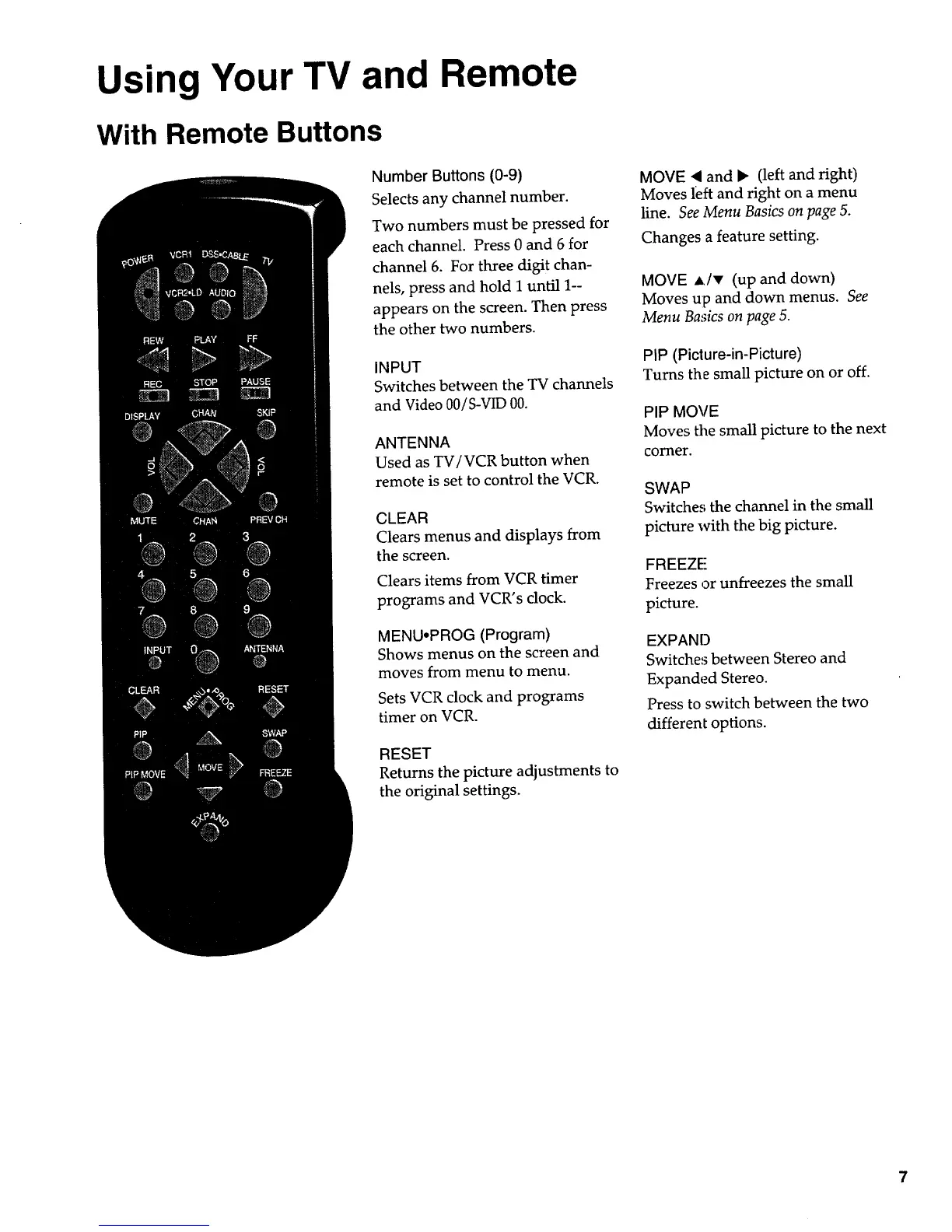
Number Buttons (0-9)
Selects any channel number.
Two numbers must be pressed for
each channel. Press 0 and 6 for
channel 6. For three digit chan-
nels, press and hold I until 1--
appears on the screen. Then press
the other two numbers.
INPUT
Switches between the TV channels
and Video 00/S-VID 00.
ANTENNA
Used as TV/VCR button when
remote is set to control the VCR.
CLEAR
Clears menus and displays from
the screen.
Clears items from VCR timer
programs and VCR's dock.
MENUoPROG (Program)
Shows menus on the screen and
moves from menu to menu.
Sets VCR clock and programs
timer on VCR.
RESET
Returns the picture adjustments to
the original settings.
MOVE 4 and I_ (left and right)
Moves left and right on a menu
line. See Menu Basics on page 5.
Changes a feature setting.
MOVE A/, (up and down)
Moves up and down menus. See
Menu Basics on page 5.
PIP (Picture-in-Picture)
Turns the small picture on or off.
PIP MOVE
Moves the small picture to the next
corner.
SWAP
Switche,_ the channel in the small
picture with the big picture.
FREEZE
Freezes or unfreezes the small
picture.
EXPAND
Switches between Stereo and
Expanded Stereo.
Press to switch between the two
different options.


 To Next Page
 Loading...