Quick Guide to Your TV
Startup
Follow the steps below to get your TV connected and ready for watching.
lo
Set up your TV
CAUTION: If you choose not to
use the stand recommended for
your TV, take precautions that the
stand or other furniture the TV is
placed on is properly located and
of adequate size and strength to
prevent the TV from accidentally
being tipped over or pulled off.
This could cause damage to the TV
and/or personal injury.
Matching stands were designed to be used with the TV models included
in this book. The recommended stands are provided with hardware to
secure the TV to the stand so that it cannot be easily pulled off or tipped
over.
Stands are not available by mail order. To locate your nearest RCA dealer
call this toll-free number: 1-800-336-1900.
TV Model Matching Stands
PS27108 RB2710
PS31108 RB3106
2. Hook up your TV
Hook up any antennas, cables or other equipment to your TV before you
follow the steps below. Details are in the Connections Guide.
3. Plug in the TV
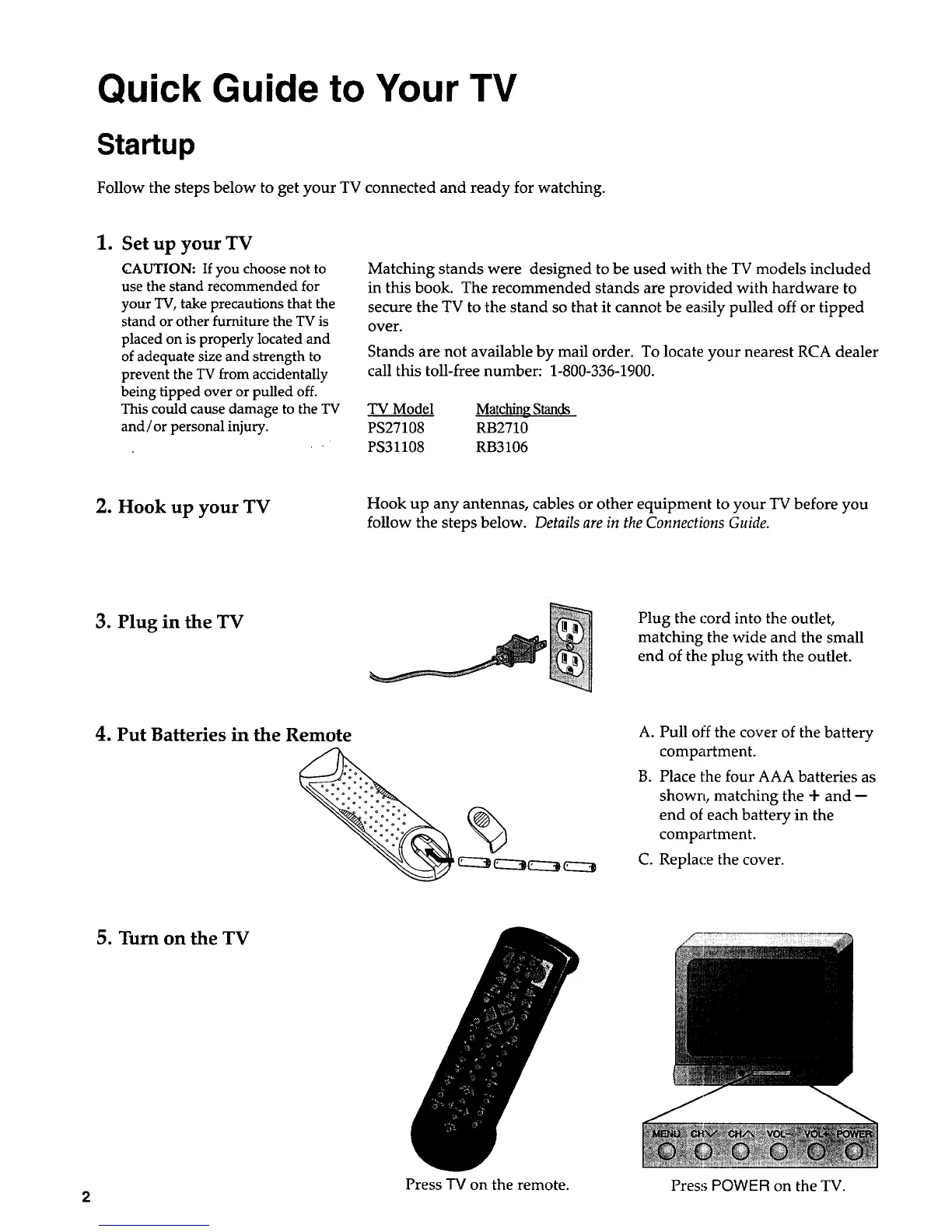
Plug the cord into the outlet,
matching the wide and the small
end of the plug with the outlet.
4. Put Batteries in the Remote A. Pull off the cover of the battery
compartment.
B. Place the four AAA batteries as
shown, matching the + and --
end of each battery in the
compartment.
C. Replace the cover.
5. Turn on the TV
Press -IV on the remote. Press POWER on the TV.
2


 To Next Page
 Loading...