EasyManua.ls Logo

Prospec Electronics INFINITY PRV250 - User Manual

Prospec Electronics INFINITY PRV250
7 pages
Print Icon
To Next Page IconTo Next Page
Loading...
INFINITY PRV250 Troubleshooting Guide
Prospec Electronics
Note: Please click on highlighted words for links in this guide and links to our website
1 Wiring
2 Compatible Accessories
3 List of common issues
3.1. No power
3.2. Intermittent Power
3.3. Buttons/controls not responding
3.4. USB issues
3.5. Poor reception or no reception
3.6. No audio, speaker audio is unevenly distributed or some speakers not working
3.7. Low audio
3.8. Fluctuating Audio
3.9 Audio Shoots up when Bluetooth is on
3.10 Moisture in Display
3.11 Erratic Controls
3.12 Bluetooth Won’t Work
4 Reset Procedure
5 External Amplifier Issues
Question and Answer IconNeed help?

Do you have a question about the Prospec Electronics INFINITY PRV250 and is the answer not in the manual?

Summary

1.0 Wiring

2.0 Compatible Accessories

3.0 List of common issues

3.1 No Power

Troubleshooting steps for devices that do not power on.

3.2 Intermittent Power

Diagnosing and resolving issues with the device powering on and off.

3.3 Buttons;controls not responding

Steps to address unresponsive buttons or control functions.

3.4 USB issues

Resolving problems related to USB connectivity and device playback.

3.5 Poor or no Reception

Steps to improve or fix radio signal reception quality.

3.6 No audio, speaker audio is unevenly distributed or some speakers not working

Addressing issues with audio output, uneven sound distribution, or non-functional speakers.

3.7 Low Audio

Troubleshooting steps to increase or fix low audio volume output.

3.8 Fluctuating audio or FM signal

Identifying causes for audio level variations, especially when the engine is running.

3.9 Audio shoots up when Bluetooth is on

Resolving unexpected audio volume increases when using Bluetooth.

3.10 Moisture in Display

Addressing display fogging, water ingress, and condensation issues.

3.11 Erratic Controls

Troubleshooting unpredictable behavior of buttons or remote controls.

3.12 Bluetooth Wont Work

Steps to resolve Bluetooth pairing, connectivity, and functionality problems.

4 Reset Procedure

5 External Amplifier Issues

5.1 Strong hiss

Techniques to reduce or eliminate audio hiss from an external amplifier.

5.2 Amplifier volume fluctuates or amplifier turns off and on

Troubleshooting inconsistent amplifier operation or power cycling.

5.3 Audio is extremely low

Adjusting amplifier gain settings to ensure adequate audio output.

Overview

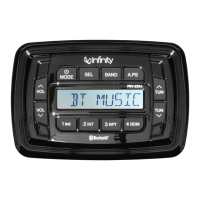
The INFINITY PRV250 is an audio unit designed for marine and other vehicle applications, offering a range of features for entertainment and connectivity. This troubleshooting guide provides comprehensive information on its operation, common issues, and maintenance, ensuring users can effectively manage and resolve problems.

Function Description

The INFINITY PRV250 serves as a central audio hub, capable of playing music from various sources. It includes support for USB devices, AM/FM radio, and Bluetooth connectivity, allowing users to stream audio wirelessly from their smartphones or other compatible devices. The unit is designed to integrate with external amplifiers and speakers, providing a customizable audio experience. It also features an auxiliary input for connecting devices via a headphone jack. The unit's design focuses on durability and performance in challenging environments, typical of marine use.

Usage Features

  • Power and Control: The unit is powered by a 12V+ source, with both red ACC (accessory) and yellow battery wires needing connection for operation. The red ACC wire acts as a trigger to turn the radio on, and it's recommended to connect it to an on/off switch to conserve battery power when the radio is not in use. The unit features a control pad with buttons for various functions. Each button is designed to produce a faint click when pressed, indicating mechanical operation.
  • Audio Source Selection: Users can select between different audio sources, including USB, AM/FM radio, Bluetooth, and AUX input.
  • USB Connectivity: The USB port supports MP3 and Windows Media files, provided they are formatted to FAT or FAT2. It's important to note that iPod/iPhone devices are not supported for charging or playing via USB; they should be connected via the AUX input. Similarly, not all MP3 players will play via USB, depending on their software. The unit supports flash drives, but proprietary software on some drives may prevent them from being read. Music files should not exceed a bit rate of 128 Kbps for optimal performance.
  • Bluetooth Connectivity: The INFINITY PRV250 allows for wireless audio streaming via Bluetooth. To pair a device, users need to ensure their Bluetooth device is turned on and set to scan, and the PRV250 is set to BT MUSIC. The pairing code for the unit is 1234. It's important to turn off other Bluetooth devices nearby to avoid confusion during pairing. The unit supports Bluetooth streaming in (from a phone to the radio) but not out (to Bluetooth headphones).
  • Radio Reception: The unit includes AM/FM radio functionality. For optimal reception, an antenna must be installed, and its wire should not be coiled or wound up. The proximity of the radio, speakers, and antenna to other electronic equipment like gages, GPS, depth finders, and LED lighting can affect reception and audio quality due to Radio Frequency Interference (RFI) and Electronic Magnetic Interference (EMI).
  • Audio Adjustments: The unit offers various audio adjustments, including Balance settings for left/right distribution, sound enhancements, and a LOUD feature to boost audio. These settings are accessed and adjusted using the SEL button and volume controls.
  • External Amplifier Integration: The unit can be connected to external amplifiers for enhanced audio output. It provides "Line Out" connections for this purpose.
  • Remote Control Compatibility: The INFINITY PRV250 is compatible with various add-on accessories, including remote controls and remote extensions, which can provide additional control options.

Maintenance Features

  • Wiring Inspection: Regular inspection of all wiring connections is crucial for maintaining proper operation. This includes checking the red ACC, yellow battery, and black ground wires for secure connections and absence of corrosion. Speaker wires should be installed to individual terminals, and combining them is strictly prohibited as it can damage the radio's output IC. Unused speaker wires should be taped off to prevent accidental shorting.
  • Fuse Check: The unit includes a fuse holder, and the fuse should be checked periodically. While a bad fuse can often be visually identified, using a multi-meter or test light is the most reliable method.
  • Power Supply Verification: Ensure the battery or power supply consistently provides at least 12V (and at least 11V under load) for normal operation. Fluctuations or drops in voltage can lead to intermittent power issues.
  • Corrosion and Looseness Checks: All connections, including the radio's harness, battery terminals, bus terminals, and fuse panel, should be regularly checked for corrosion, looseness, or any other condition that could lead to a bad ground. Corrosion is a primary cause of grounding issues and can result in excessive heat, potentially melting wires or terminals.
  • Button Functionality: Periodically check each button on the control pad to ensure it clicks properly, indicating mechanical operation. Stuck buttons may require a warranty claim.
  • USB Port Inspection: Inspect the USB outlet for any signs of corrosion or rust, which can affect connectivity.
  • Antenna Integrity: Ensure the antenna wires are not torn and are properly connected.
  • Moisture Management: The unit is not designed to withstand pressurized streams of water. When cleaning around the radio, a very low-pressure spray is recommended. Slight fogging in the display in colder weather is normal and usually dissipates after 1-2 hours of operation. However, heavy condensation or persistent moisture should be monitored, as it may indicate internal damage.
  • Reset Procedure: The unit can be reset using two methods:
    1. Holding down the power/mode button and the "1" button simultaneously until the screen turns blank (resets presets).
    2. Disconnecting the 12-pin connector plug from power and ground for 10 seconds. This can help resolve erratic controls or Bluetooth issues.
  • External Amplifier Troubleshooting: If an external amplifier is used, its input gain should be adjusted to reduce hiss while maintaining performance. An RCA filter can be installed between the radio's "Line Out" and the amplifier to remove feedback. Amplifier grounds should be checked for corrosion, and the amplifier's chassis should be grounded to the stereo's chassis. The amplifier's gain setting should also be checked if audio is extremely low.
  • Bluetooth Volume Adjustment: If audio shoots up when Bluetooth is on, check the Bluetooth volume (BTVOL) setting, which can be accessed by holding down the SEL button until I-VOL appears, then pressing SEL again until BTVOL appears. This setting may be higher than the stock radio I-volume.

Prospec Electronics INFINITY PRV250 Specifications

General IconGeneral
BluetoothYes
USB PortYes
Aux InputYes
Water ResistantYes
TunerAM/FM
Preamp OutputsYes
Frequency Response20 Hz - 20 kHz
Speaker Impedance4 Ohms
Power Output50W x 4
TypeStereo Receiver
Signal-to-Noise Ratio70dB

Related product manuals