LET’S GET STARTED!
GETTING STARTED
The App
Download the Prynt app for your iOS device to start printing.
Charge your device
The Prynt Pocket will typically print 20 photos on one charge. We recommend giving the device a
full three-hour charge before use.
Taking your first Prynt Photo: The Prynt Pocket is automatically turned on and off when your
phone is connected/disconnected.
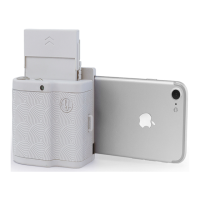
1. Connect your phone: Prynt Pocket is compatible with iPhone 7 Plus, iPhone 7, iPhone SE,
iPhone 6s Plus, iPhone 6s, iPhone 6 Plus, iPhone 6, iPhone 5s, iPhone 5 and will be
compatible with Androids later this year. To connect your phone, press and slide th
e
adjustment button to open the clamps. Then, simply attach your phone to the lightning
co
nnector until your phone is nice and snug.
2. Download the Prynt app: (If you haven’t already)
3. Load paper: Remember the days of messy ink cartridges? Well, those are over. The Prynt
Pocket uses magic inkless ZINK Paper. Each sheet of paper is also a sticker.
a. Load Paper Cartridge: Get your paper and paper cartridge ready. Remove cap from
the cartridge and open cartridge door. We’ve included images to help you with this
on the next few pages. Place the 10-pack of paper inside the cartridge with t
he
barcode of the bluesheet showing, followed by paper glossy side facing the metal
spring.
b. In
sert Paper Cartridge: Insert the cartridge slowly into the top of the device, lining
up with the arrows. Hear a click? You’re set! See helpful graphics on the following
pages.
** Why is there a blue sheet in my pack of paper?
** This sheet calibrates the device and cleans the paper head, giving you the best
possible photo quality.


 To Next Page
 Loading...