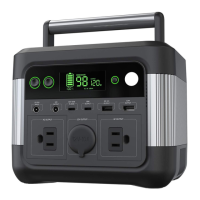
BUTTON
Buttons for AC output, LCD on/off, DC output
Press the AC button at least for 2 seconds to turn on/ turn off the AC output
Press the DC button at least for 2 seconds to turn on/ turn off the DC( 5521 DC port
and car charger port) output
Button for LCD three modes :
light (Press the LCD button at least for 2 seconds)/
50% bright (click on the LCD button) /
SOS (click on the LCD button), Long(at least for 2 seconds) press button to turn off the LCD
Under the AC outlet mode,Press the DC and AC button at the same time at least
for 2 seconds to shift the frequency (60Hz/50Hz)
Maximum output power
Maximum output power DC+AC is limited to 300W, Peak power output 500W for
1 second.
The fan will turn on when the internal temperature rises up to 45°C (charging mode),
the fan will turn off if the internal temperature down to 40°C (Discharging mode) .
the fan noise should be controlled under 60db in 10 cm distance.
BL: BATTERY LEVEL
· LCD Display for battery level and protection.
· Display battery level from 0 to 100 as 0%-100% when input.
· Display battery level from 0 to 100 as 0%-100% when output.
BP: INPUT DISPLAY
· Input Display: INPUT XXX W
· Output Display: OUTPUT XXX W
· When input OTP (Over Temperature Protection): ''INPUT Err" flashes
· When output OTP (Over Temperature Protection): ''OUTPUT Err" flashes
AI: AC INDICATOR
· LCD Display ''AC, Hz for AC output power status
DI: DC INDICATOR
· LCD Display、'DC" for DC output power status.
UAI: USB-A INDICATOR USB-A
· LCD Display" USB-A" for USB-A output status.
UCI: USB-C INDICATOR USB-C
· LCD Display" USB-C" for USB-C output status.
LC: LOW CURRENT
· Low loading current for USB output: lower than 80mA for 12 hours.
LP: LOW POWER
· Low AC output power for AC output: battery output power lower than 7W for 12 hours .
OPERATION DESCRIPTION
ABBREVIATION NOTE
SLEEP MODE
ALL OFF.
· USB-C input plug-in or Adapter input plug-in, INPUT Mode.
· Press AC button/DC button for 2 seconds to turn on the AC outlet / DC outlet, Type-C
and USB- A outlet automatically. Enter sleep mode on automatically.
CHARGE MODE
BATTERY RECHARGE, BP AND BL ON, CHARGE TIME ON.
· USB-C input plug-in, battery is charging.
· DC adapter input plug-in, battery is charging.
· Both USB-C and DC adapter input plug-in, battery is charging.
· BATTERY LEVEL=100% and the battery is full, stop recharging and LCD turn off.
·
USB-C input and adapter input unplug, No any loading in after 30 seconds, SLEEP MODE on.
8 9


 To Next Page
 Loading...