a How to reset SMC?
This applies to MacBook Pro models introduced in mid-2009 to 2017,
MacBook Air models introduced in 2017 or earlier, and all MacBook
models, except the MacBook (13-inch, Mid 2009).
1.Shut down your Mac.
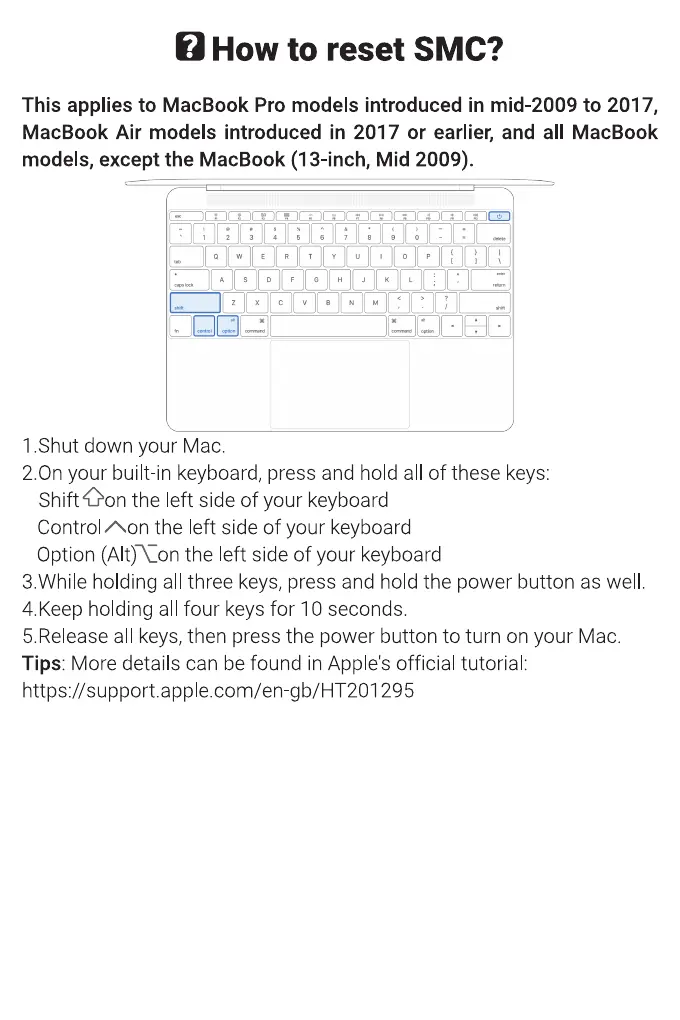
2.0n your built in keyboard, press and hold all of these keys:
ShiftOon the left side of your keyboard
Control Aon the left side of your keyboard
Option the left side of your keyboard
3 While holding all three keys, press and hold the power button as well
4.Keep holding all four keys for 10 seconds.
5.Release all keys, then press the power button to turn on your Mac.
Tips: More details can be found in Apple's official tutorial:
https //support.apple.com/en gb/HT201295


 To Next Page
 Loading...