Connect with SWITCH
* Enter homepage of SWITCH, select Setting -+ Controllers and Sensors -+ select
Pro Controller Wired Connection. Please make sure that the option state is ON.
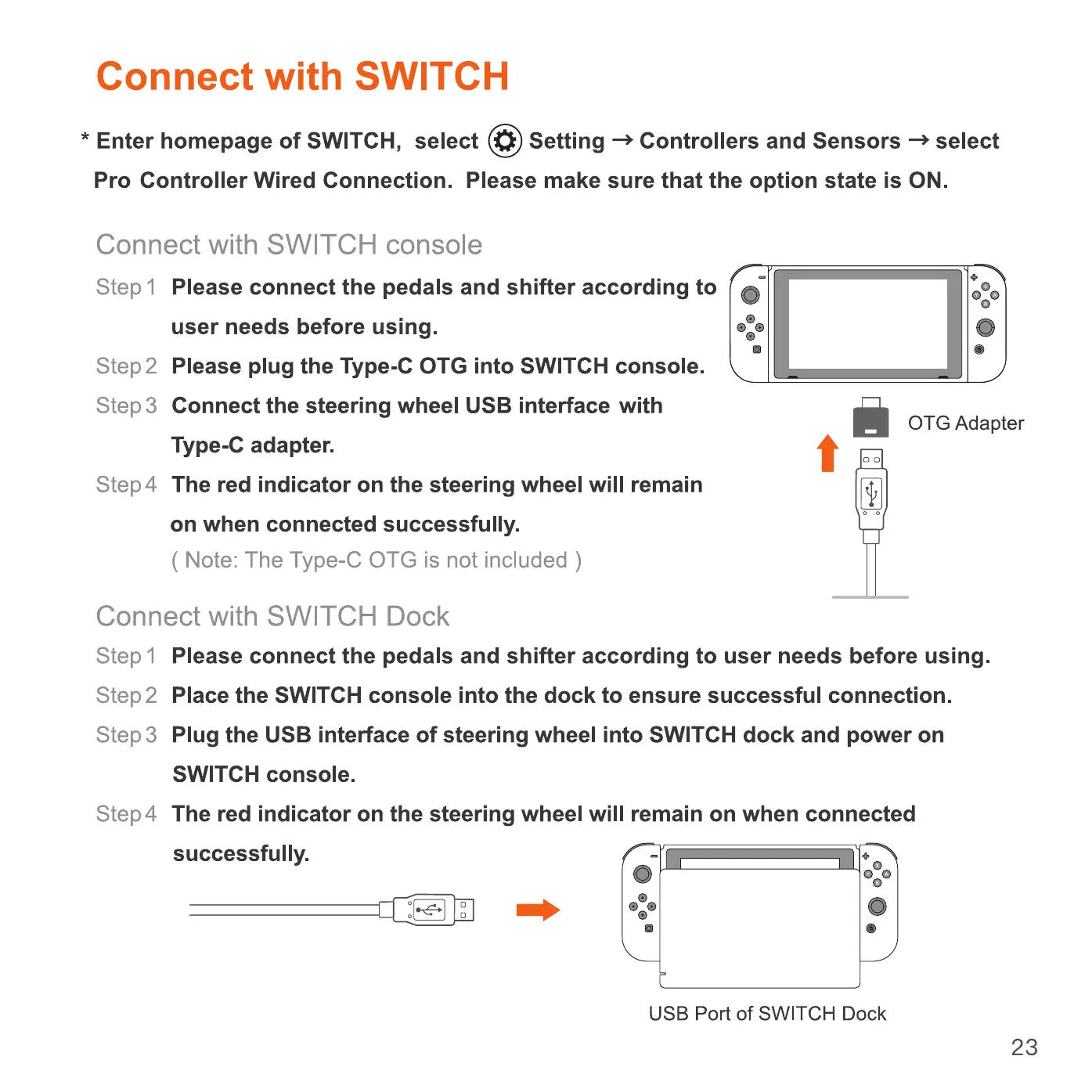
Connect with SWITCH console
Step I Please connect the pedals and shifter according to
user needs before using.
Please plug the Type-C OTG into SWITCH console.
step2
Step 3 Connect the steering wheel USB interface with
Type-C adapter.
Step 4 The red indicator on the steering wheel will remain
on when connected successfully.
( Note: The Type-C OTG is not included )
Connect with SWITCH Dock
o
OTG Adapter
t
Step 1
Please connect the pedals and shifter according to user needs before using.
step 2
Place the SWITCH console into the dock to ensure successful connection.
Step 3 Plug the USB interface of steering wheel into SWITCH dock and power on
SWITCH console.
Step 4 The red indicator on the steering wheel will remain on when connected
successfully.
o
0
o
USB Port of SWITCH Dock
23


 To Next Page
 Loading...